Desert Online General Trading LLC
Dubai, United Arab Emirates
Desert Online General Trading LLC
Dubai, United Arab Emirates


💻 Upgrade your MacBook Pro’s heartbeat with MMOBIEL’s all-in-one HDD cable kit!
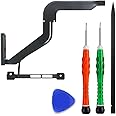
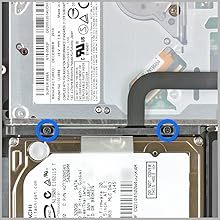
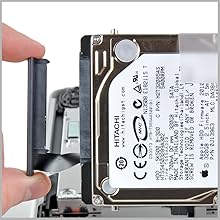
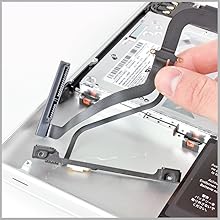
The MMOBIEL Replacement HDD Hard Drive IR Sensor Sleep Detector Cable with bracket is a precision-engineered repair kit designed exclusively for the MacBook Pro 13” A1278 Mid 2012. It includes a brand-new HDD cable with integrated IR sensor, pre-installed adhesive for easy installation, and a full set of professional tools (P5 & T6 screwdrivers, nylon spudger) to empower users to restore their device’s hard drive connection and sleep detection functionality efficiently and reliably.






| Brand | MMOBIEL |
| Package Dimensions | 25.5 x 17.7 x 1.2 cm; 40 g |
| Item model number | Macbook Pro 13” A1278 Mid 2012 |
| Manufacturer | MMOBIEL |
| Series | Macbook Pro 13” A1278 Mid 2012 |
| Colour | A1278 Mid 2012 |
| Form Factor | all in one |
| Standing screen display size | 13 Inches |
| Hard Disk Description | Mechanical Hard Disk |
| Hardware Platform | mac |
| Are Batteries Included | No |
| Item Weight | 40 g |
| Guaranteed software updates until | unknown |
G**.
Works great and easy to install
My laptop suddenly wouldn't boot up (however managed to run a live linux distro off of a usb drive which showed the hard drive nowhere to be seen). Having tested the hard drive in an external enclosure which was working, I came to the conclusion the SATA cable in my macbook pro 8,1 finally gave up the ghost. Having watched an instructional video on youtube, i installed this cable in under 5 minutes and back to using my Mac. As the bracket with the IR sensor is included with this cable, there is no faffing about with fiddly ribbon cables. The screwdrivers that are included are also of good quality
L**M
This cable works perfectly
I had bought a large capacity SSD drive which I configured as an external drive, everything was fine until I put it inside the Macbook. It would power up then crash. I discovered that the SATA cables in the 2012 models, as shipped, were known to be an issue. They worked fine on old, slow, data transfer drives but not on the newer SSD drives.I fitted this replacement SATA cable using the tools supplied and within 7 minutes the Macbook was up and running, working beautifully and super fast. I thoroughly recommend both this cable and this seller for a superb product.
M**N
Perfect fix for MacBook that will boot from HDD but doesn't recognise SSD
I bought a secondhand MacBook Pro 2012 13" to replace my recently dead 2011. It was good deal but needed an SSD and a RAM upgrade to bring it up to speed. RAM installed I set about trying to install a new SSD. The SSD would format fine in an external caddy but every time installed it into my new MacBook and I tried to install Mac OS via a bootable USB stick, the MacBook would either not recognise the SSD or if I did manage to get it to be recognised , the install either failed or the one time I did get it to install, it wouldn't start and instead gave 'flashing folder' (is not found) errors.The weird thing was that every time I put the original mechanical HDD back in, the MacBook would start fine.After much confusion, frustration and googling, I fould that a lot of other people had similar problems with 2012 MacBooks. Seems the SATA cable that connects the drive to the logic board can fail over time or even if it works with a HDD, is unable to deal with the increased throughput from a faster SSD.So with nothing to loose, I bought this kit.After a 10 minute install, I was up and running, SSD recognised and was installing Mac OS.Install successful and new MacBook living up to its fully potential. Man it's amazing how slow a mechanical drive is once you're used to SSD!! So glad to get this sorted. Great life saving, reasonably priced bit of kit!
C**I
It's working!
My SSD had stopped working. Before purchasing a new one, I thought I would try replacing the cable in order to eliminate that as the possible problem. The old part was quite easy to remove and the new part as easy to install. The SSD is working again, so I was happy that it was the old cable that was faulty as the replacement was much cheaper than a new SSD! The only thing that wasn't quite right with the new cable was that a section of it seemed to be slightly too long and did not sit flush but it doesn't seem to causing any issues so far.
P**P
Trusted product. It works really well in my 2012 macbook.
Why did you choose this product over others?:lots of good reviews i red about the supplier. And it works really well in my computer.
A**Y
Good product
This hdd cable was the perfect thing I was looking for after I accidentally broke the factory one as I was replacing with ssd ,Over all I am happy with my purchase and it has been working well since buyingDo I recommend???? Yes I do
C**N
Too easy!
Bought this following a failure of my 2012 Macbook Pro following an upgrade to an SSD and extensive research on line. Initially, my Mac was faster following the SSD but failed catastrophically after a week. Like previous reviewers I tried various reboots and resets with little improvement. Found a video on Youtube showing how to replace the SATA cable and bought this for £12 not expecting much but it seemed a small price to pay if I could save myself £1000 on a new machine. What a revelation, easy to fit with all the tools included and now a Mac which is faster than when I first bought it. I would highly recommend this piece of kit and I hope it works for you.
J**B
saved a macbook pro!
saved a macbook pro i had my hands on, the hard drive wasn't recognized (even in the disk utils in recovery mode - the hardware test saying everything was fine on the computer) because this part certainly broke after the computer fell. the hard drive was still working when put in an external enclosure. once this part replaced (search for the ifixit tutorial on google on how to change this part) everything went fine. replaced the hard drive by a ssd at the same time and installed the (natively unsupported) macOS catalina, the mac just got a second life! :-)just a little precision, the original cable is folded to fit between the superdrive and hard drive shapes, with two tiny screws in this area. personally i didn't take te risk to fold it, i just put the screws in their holes so they are here if i needed one day and then let the cable pass from the top part of the superdrive to the bottom of the hdd/sdd, i feel like it's less risky for it to get damaged again...if needed: macbook pro 8,1 (late 2011) 13" model A1278.the tools provided are of good enough quality even though i used another set of screwdrivers. i preferred this kit as the one without the LED/IR receptor part so i was sure not to break anything if i had to combine the stock/new part here but i guess that if you are more experienced you can go for the kit with no tools and that IR/LED part...
Trustpilot
Hace 3 días
Hace 2 semanas