We remain fully operational. Our teams are working around the clock to ensure your deliveries continue safely.

Descargar la aplicación


Servicios al cliente
Sobre nosotros
Copyright © 2025 Desertcart Holdings Limited
Descargar la aplicación

⌨️ Elevate your typing game—comfort, style, and power in one sleek split keyboard!
The NocFree Wireless Ergonomic Split Mechanical Keyboard combines a compact 60% layout with a unique split design and walnut palm rest to promote neutral posture and reduce strain. Featuring hot-swappable linear switches, it offers a premium typing experience customizable without tools. Dual connectivity via 2.5GHz wireless or wired mode ensures flawless performance for both gaming and professional use. Compatible with Mac, Windows, and Linux, it supports programmable layers through the Vial web interface. Lightweight and portable, its 3600mAh battery lasts 3-7 months per charge, making it perfect for modern hybrid work environments.


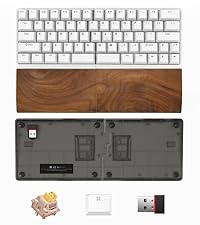
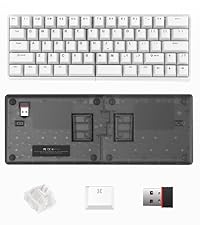
| ASIN | B0D6MT8TYQ |
| Batteries | 2 Lithium Polymer batteries required. (included) |
| Best Sellers Rank | #822 in Computer Keyboards |
| Customer Reviews | 3.9 3.9 out of 5 stars (43) |
| Date First Available | June 24, 2024 |
| Item Weight | 2.33 pounds |
| Item model number | NocFree Lite |
| Manufacturer | Shenzhen Knockfree Technology Co., Ltd. |
| Product Dimensions | 11.84 x 4.42 x 1.59 inches |
J**N
Impressive Ergonomic Keyboard
I’ve only had the NocFree Wireless Ergonomic Split Mechanical Keyboard for about a week, but I’m already loving it. The split ergonomic layout feels natural and has noticeably improved my typing posture. Even after long sessions, my wrists feel much more comfortable than with a traditional keyboard. The linear switches are smooth and satisfying to type on, and the fact that it’s hot-swappable is a big plus—I like knowing I can customize it even more down the line. The compact 60% layout is perfect for saving desk space while still giving me all the essential keys. It paired easily with both my Mac and Windows devices, and the wireless connection has been reliable so far. The PBT keycaps also feel solid and high-quality, with a nice texture that doesn’t pick up fingerprints. So far, this keyboard has exceeded my expectations. Looking forward to using it more, but based on this first week, I’d definitely recommend it!
S**Y
Wireless Mechanical Marvel for Comfort & Customization.
This split wireless keyboard redefines ergonomic typing! The compact 60% layout saves desk space while remaining fully functional with programmable layers for both Mac and Windows. Linear switches deliver buttery-smooth keystrokes, and the hot-swap design lets enthusiasts customize effortlessly. PBT keycaps feel premium and resist shine. Wireless stability is flawless, perfect for multi-device users. Though adjusting to split typing takes a day, reduced wrist strain makes it worthwhile. A versatile upgrade for coders, writers, and anyone valuing comfort!
R**O
Input lag and keys get stuck
Don't recommend this keyboard. All the reviews on key stability are accurate. The keys get stuck so easily, and it's super annoying to type. Keep in mind that the first month of usage was not that bad, but later on it gets way worse. So now I can't even return this keyboard. The keyboard looks good, and it does not feel cheap. However, the fact that it does not work properly is sufficient to rate it with one star.
G**A
Excelente aunque las luces no funcionaron correctamente ya q no prenden todas las teclas.
Z**G
Game changer
I’ve been using a split mechanical keyboard lately, and honestly, it’s super comfortable. Since it’s in two parts, I can position my hands however I want, and it feels way better on my wrists and shoulders. Typing feels really nice—clicky and smooth. It did take a bit to get used to the layout, but once I got the hang of it, it was great. Not the best for carrying around, but perfect for desk setups. If you type a lot and want something more ergonomic, I’d definitely recommend this one.
T**R
BEST SPLIT KEYBOARD EVER!
I am giving this keyboard five stars because I love it. It has everything I am looking for - split, RGB, linear touch and the palm rests are awesome. Finally someone who took it upon themselves to design a good looking, functional split keyboard. Added bonus? They have great customer service if you have an issue please feel free to reach out to them and trust in their ability to resolve your issue. This is my fave keyboard ever. Thank you!
E**.
Most comfortable mechanical keyboard I've used so far
Most comfortable mechanical keyboard I've used so far. The split design and raised center feet are much better for my wrists. Like the plug and play functionality, no weird pairing, even with the split wireless design. Only wish there was a latch or something to hold both halves together when you do want to use them as a single keyboard. The halves fit together snugly, but with nothing holding them together securely, the halves can come apart if you move them
J**N
Great design, poor quality
I really like the design of this, and features such as extra switches and keycaps and the open-source configuration software. But the thing was not built to last. The plastic flip-up part that lets you tilt broke on one half on the first day. I had frequent problems with it losing connectivity, which could only be fixed by unplugging and re-plugging in the usb dongle. Often I would have to do this several times before it would reconnect. Eventually it became so bad that it wireless mode was completely unusable. It is very disappointing that this seems to be the only truly split (no cable connecting the two halves) offering out there, because that is something I really love, but I just can't get it to consistently work. I do see other people reporting the same problems the connectivity, but then plenty of people who are quite happy with it, so maybe there are just a certain percentage of them that are duds.
F**Y
The customisation of this keyboard is unparalleled. You can have up to four layers, you can move keys around. You can even use the mouse with the keyboard bindings. I changed right-space and the Fn key to make mouse updownright left be jkl; keys - but eventually got frustrated at using the keyboard-as-a-mouse. They key caps are soft textured, they feel soft, but are rigid plastic. The provided cap removal tool works fine, i swapped the Winkey and FN key around. Each keydown is decisive and does not get jammed on the way down or up. The spare key-modules are inside the box with the usb cables -don't throw them out like I did :( The wireless, i didnt get to try. The cabled-ness it provides usb-c cables, or you can probably use your own. If you use the website key configuration website, then you cannot save or load the profile. If you download the windows app from get.vial.today, then you can. The wireless and wired profiles are separate and you need to configure in one, save, and then load into the other profile when you connect with the other method. You can really feel the linear feel of the keys here. Personally, turns out i'm not a fan of linear. Finally, if you bought this thinking, dang, you should have gotten the one with the palm rests - do not despair for the other palm rest models are basically two pieces that do not even attach to the keyboard, they kinda just float next to it. So, buy a normal palm rest and cut it up to do the same. update: there is a problem with this keyboard..if you are a FAST touch typer then under wireless mode sometimes you WILL get mixed up keys. it's as if the receiver doesnt know which half a key came from first and does it the wrong way around. i havent tried under wired under the same conditions yet..lose 1 star for making me backspace often
E**E
The keyboard was great to use. I have used it on and off for about a month before returning it. Battery life kinda sucks. It seems to drain pretty quickly after a full charge. This would happen after using it on and off and I didn't even get the one with RGB lights.
Trustpilot
Hace 1 mes
Hace 2 meses