We remain fully operational. Our teams are working around the clock to ensure your deliveries continue safely.

Descargar la aplicación


Servicios al cliente
Sobre nosotros
Copyright © 2025 Desertcart Holdings Limited
Descargar la aplicación


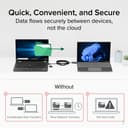

⚡ Upgrade your data game — transfer like a pro, no cloud required!
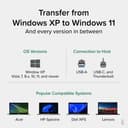
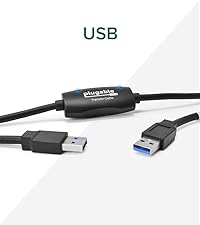
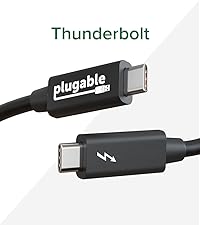
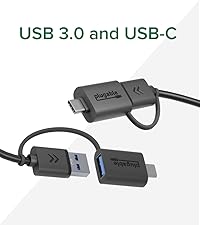
The Plugable USB Data Transfer Cable (6.6ft) offers ultra-fast 5Gbps file transfers between Windows PCs using a hybrid USB-C and USB 3.0 connection. Bundled with Bravura's Easy Computer Sync software, it enables secure, direct PC-to-PC data migration without relying on cloud or external drives. Compatible with a wide range of Windows versions and USB standards, this cable ensures a smooth, private, and hassle-free transition to your new computer.


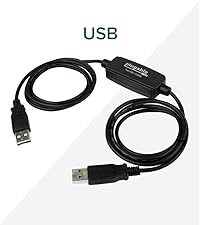
| ASIN | B0D79Q4PDL |
| Best Sellers Rank | #658 in USB Cables |
| Brand Name | Plugable |
| Cable Type | USB |
| Color | Black |
| Compatible Devices | Windows, Windows XP, Vista, 7, 8.x, 10, 11 |
| Compatible Phone Models | Compatible with smartphones, specific models not listed |
| Connector Gender | Male-to-Male |
| Connector Type | Usb, Usb 3.0 |
| Customer Reviews | 4.3 4.3 out of 5 stars (194) |
| Data Transfer Rate | 5 Megabits Per Second |
| Global Trade Identification Number | 00819927013440 |
| Included Components | 1x 6ft (2m) USB 3.0 Transfer Cable, 1x USB-C Keychain Adapter, 1x 16 character alphanumeric Product Key, 1x Quick Start Guide |
| Indoor Outdoor Usage | Indoor |
| Item Shape | Dot |
| Item Weight | 0.42 Pounds |
| Manufacturer | Plugable |
| Model | USBC-TRAN |
| Number of Items | 1 |
| Number of Pins | 9 |
| Other Special Features of the Product | Data Transfer |
| Recommended Uses For Product | Ideal for seamlessly transferring large amounts of files between older and newer Windows PCs without the need for cloud storage or external drives |
| Specification Met | USB-IF |
| UPC | 819927013440 |
| Unit Count | 1.0 Count |
| Warranty Description | 2 Year Limited Parts and Labor |
D**H
Reliable Data Transfer Cable That Does Exactly What It Promises.
We recently purchased a new laptop and needed an easy way to transfer all of our files and data from the old one. After researching different transfer options, I decided on the Plugable Data Transfer Cable—and I’m so glad I did. I ordered it on Amazon and it arrived the very next morning. Installation was simple. I followed the easy instructions to download the software on both laptops, then connected them using the cable. The cable includes both USB-A and USB-C ends, which made it fully compatible with both devices—no adapters needed, so it fit perfect! Once connected, the software opened a clear, user-friendly window where I could select exactly which files, photos, and data I wanted to transfer. It even gave me the option to set up the new laptop just like my old one, which I selected. The entire process took about 20 minutes, and when it finished, my new laptop looked and functioned just like the old one—everything transferred perfectly. The cable itself feels sturdy, well-made, and high quality. Overall, this was an incredibly smooth, fast, and stress-free experience. I highly recommend the Plugable Data Transfer Cable to anyone needing a reliable and easy way to move data to a new computer.
R**D
Just great!
As an IT guy who has multiple laptops and is often upgrading, this cable was invaluable. I don't know why this approach isn't more spoken of or used, but I've always wanted to pursue this method of file transfer, and this cable was pure perfection. It requires a quick download and installation of software from the company's website (onto each laptop), then allows you to plug and chug. The cable comes with USBA/C adapters on both sides, and will handle USB 2 or 3. You can mix and match these between laptops too. The software interface allows you to "drive" on one laptop, telling it if you're transferring to or from that laptop, then offers sync or direct file copy options. I don't have hard MBPS numbers (probably depends on your laptops' tech), but this was much faster than using an external hard drive. At the end of a transfer, it gives you a helpful transfer log. As an example, I did a transfer of 72.5 gig of data in 36 minutes. And the process carries on in the background while you continue other work on either computer. If you're looking for such a capability, this cable is highly recommended.
G**Y
Data Transfer made easy!
The Plugable USB Data Transfer Cable PC to PC works exactly as described. I was able to connect the PCs together, download and install the software and begin transfer of my data in about 10 minutes. My situation just required transferring data, so I wasn't trying to move configuration and settings as the layout of the new PC was radically different than the old PC. Copying GB of files was smooth and effortless as I continued to work, installing the tools I needed. Preparation is key to get a new PC up and running and this cable was well worth the cost, in my opinion.
S**E
Absolutely Awesome Product of which I think it's usefulness in completely misunderstood.
Not sure why it shows on Amazon as a frequently returned item. It does much more than just transferring files from one PC to another. It also allows remote control of the connected PC. That should be included in the product description. Setup was a total breeze, and this thing just works, and it works very well. The software is very intuitive, a small and quick download with zero license requirements as long as the owner is the one using it. It also does not tie up either PC. You can work on other things while any transfer is in progress. With the fast remote connection, I see multiple ways this will come in very handy. Need to transfer files from one PC to another or remote control a connected PC? This is it, so just buy it.
C**A
HARD TO USE AND NOT RELIABLE
Difficult to get started with this product. Instead of including everything in the package - you have to go to a website and download the software to it, which is no intuitive. The link is buried in a product brochure page with various options. This is especially a problem if your "old' computer is having issues and takes a long time to boot up. I finally got the two computers connected and followed the installation (which has to be done on BOTH computers separately), and 2 minutes into this ordeal, the computers lost contact with each other. No cable were moved, nothing was touched. I found this very frustrating, seeing that I chose a product that would be connected by cable one to the other, not by wifi, so there wouldn't be any connections issues. Going back with rebooting both computers, reinstalling the software, the computers never again connected. Going to the "help" page of the product website is not helpful at all. I even tried using ChatGPT to talk me through possible fixes, and some of these included updating firmware and long lists of "fixes" to try. This product is just too time consuming, and especially maddening when you have the "old" computer having problems, which is why you got a new one in the first place. I'm past my date to return the product, so now I'm stuck with it. Ack.
C**H
Great Product
The cable was easy to use and the app was equally easy to use. It makes copying files much easier.
K**N
Not worth it.
You can only transfer basic file folders. Wanted to transfer programs also but this is not for that. Opened and used it after the 30 days, so couldn't return it.
G**L
Good but needed more
Easy to use but it didn’t transfer my programs and only some data files
N**9
The file transfer program is very basic and is the only one that can be used, which is unfortunate as I have several other file transfer programs and backup / synchronization that have I'd prefer to use as they are much more sophisticated. Too many clicks are required on both computers to get the program running - it would be nice to have the option to 'not show window again' rather than be reminded to purchase the software and to open up to the folders previously used, rather than having to find and re-select each folder each time. But worst of all, the file transfer keeps dropping out. I'm back to using the flash drive for transfer. I really can't recommend this cable & software system. For me to start again I'd like to see more reliability in the transfers, (as well as less clicks and the ability to use my software). The real question is after almost 30 years of Windows, is after near 30 years of Windows (since Win95) why doesn't Microsoft have direct PC-to-PC file transfer sorted with just a simple USB cable that 'Plug-and-Plays', so I don't need a third party cable with additional electronics and basic software to have to do it.
M**H
I helped a friend set up their new PC laptop. With the help of this data transfer cable and the accompanying software, it was simply a breeze to transfer all the personal files over to the new machine. Both laptops had a USB-C connection. It's worth the money.
E**.
Sent back, wouldn’t work for my needs.
T**H
Best deal going - transferred all my data (C Drive) over to my new computer. Instructions are a little difficult to follow, but worth the trouble.
A**X
No product key emailed or attached was purchased from Plugable store. Request it and they will email you
Trustpilot
Hace 2 meses
Hace 1 mes