We remain fully operational. Our teams are working around the clock to ensure your deliveries continue safely.

Descargar la aplicación


Servicios al cliente
Sobre nosotros
Copyright © 2025 Desertcart Holdings Limited
Descargar la aplicación


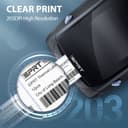



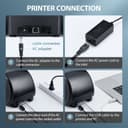
🏷️ Print Smart, Label Fast, Stay Ahead!
The iDPRT SP310 Thermal Label Printer is a high-speed, monochrome thermal printer designed for home, office, and small business use. It supports label widths from 1" to 3.15", delivers up to 102 pages per minute at 203x203 DPI resolution, and features a quick-release thermal printhead for easy maintenance. Compatible with Windows and Mac via USB, it’s ideal for barcode, address, and inventory labeling tasks.


| ASIN | B0CB7NHDY5 |
| Additional Printer Functions | Print Only |
| B&W Pages per Minute | 102.00 |
| Brand | iDPRT |
| Built-In Media | 1 x CD; 1 x Cables Fasterner, 1 x Power Cord; 1 x Power Adapter, 1 x Printer, 1 x USB to Type-C Converter(only for mac), 1 x User Guide, 1 x Paper Roll |
| Color | Black |
| Color Depth | 1 bpp |
| Compatible Devices | Laptops |
| Control Method | App |
| Controller Type | iOS |
| Customer Reviews | 3.7 3.7 out of 5 stars (69) |
| Display Type | LED |
| Dual-sided printing | No |
| Duplex | Simplex |
| Global Trade Identification Number | 06972220384410 |
| Hardware Interface | USB |
| Ink Color | Black |
| Item Dimensions D x W x H | 18.8D x 13.4W x 15H centimeters |
| Item Type Name | Thermal Printer |
| Item Weight | 1.52 Kilograms |
| Manufacturer | Xiamen Hanin Electronic Technology Co., Ltd. |
| Maximum Copies Per Run | 100 |
| Maximum Copy Resolution Black and White | 203 |
| Maximum Copy Resolution Color | 203 |
| Maximum Copy Speed Black and White | 100 ppm |
| Maximum Media Size | 3 x 5 inch |
| Maximum Print Resolution Black and White | 203 |
| Maximum Sheet Capacity | 1 |
| Maximum print Resolution Color | 203 |
| Model Name | SP310 |
| Model Number | SP310 |
| Model Series | SP310 |
| Number of Drivers | 1 |
| Number of Trays | 1 |
| Other Special Features of the Product | Wired |
| Paper Size | 1-3.15 inches width |
| Print media | Labels |
| Printer Connectivity Type | USB |
| Printer Output Type | Monochrome |
| Printer Type | Thermal |
| Processor Count | 1 |
| Resolution | 203 x 203 DPI |
| Series Number | 310 |
| Specific Uses For Product | Inventory management, shipping and packaging, storage organization |
| Total Usb Ports | 1 |
C**.
I got this printer for a computer we have in the house. It would be nice to be able to print labels there and not just in the office at our shop. The printer works fine and does its self-print, but I am having a issue with software compatibility, as we are using an older version of QuickBooks and things are not quite right. The printer is fine, and works great, it's a me thing or at least an older software issue that is keeping the printer from printing what the software request. Works fine doing other task for other software.
D**L
I recently purchased the IDprt thermal label printer, drawn by its promise of compatibility with various labels, as I already had a stockpile and did not want to buy proprietary labels. However, my experience with this printer was far from satisfactory. Initial Setup and First Impressions Upon receiving the printer, I followed the setup instructions meticulously. Despite this, the printer refused to print. I double-checked connections, drivers, and settings multiple times to no avail. Customer Support Nightmare Realizing I needed assistance, I tried reaching out to the customer support number provided. To my dismay, I was met with a busy signal – something quite unexpected in this day and age. After some investigation, I discovered that the only contact number was based in China. Given potential language barriers and the inconvenience of international calling; I decided against this option. Online and Email Support Frustrations I then turned to the internet for solutions, but every website I found led to a dead end. In a desperate attempt to resolve the issue, I reached out to Amazon's customer support. Unfortunately, this was also outsourced, and after an exceedingly long hold time, my call was disconnected. I also sent multiple emails to IDprt’s support email address but received no response. After two days of fruitless efforts, I had no choice but to return the printer to Amazon. In conclusion, the IDprt thermal label printer not only failed to function as expected, but the lack of accessible and effective customer support compounded my frustration. Given the combination of technical issues and abysmal support, I cannot recommend this printer. If you are considering a thermal label printer, I suggest looking at other brands with more reliable customer service and support infrastructure.
D**R
This has printer is great for churning out a high volume of simple labels. It takes a bit of experimentation to understand the software, but that isn't a surprise for an inexpensive printer. We have been careful to use labels that are not too cheap out of concern for unreliable adhesive and fading (if they come in a sealed bag, that helps). FYI: Fading of the label image can be an issue with this type of printing system. We left samples in direct sunlight for a month and the fading was minimal with this unit and the labels we are using. We are very happy with this little unit!
S**D
I was tired of prining addresses on paper, cutting them out, then taping them to packages. This little printer does an excellent job of printing mailing labels, up to five lines long. The label software that "comes with it" had to be located on line, which took some effort. The software is also pretty clunky, but once you figure it out you can easily print single labels for your packages. Great printer, but a tad expensive.
C**1
Application for this device is not functional on my computer.
Trustpilot
Hace 2 semanas
Hace 1 mes