We remain fully operational. Our teams are working around the clock to ensure your deliveries continue safely.

Descargar la aplicación


Servicios al cliente
Sobre nosotros
Copyright © 2025 Desertcart Holdings Limited
Descargar la aplicación

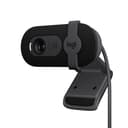
🎥 Elevate your video presence—because your image deserves the spotlight!
The Brio 101 is a sleek, Full HD 1080p webcam designed for professionals and streamers seeking crystal-clear video and effortless compatibility. Featuring Logitech’s RightLight technology for 50% brighter visuals, a built-in microphone, and a privacy shutter, it ensures you look and sound your best while maintaining control over your privacy. Compatible with major platforms including Zoom, Microsoft Teams, and Nintendo Switch 2’s GameChat mode, it’s a plug-and-play powerhouse made with 77% recycled plastic for an eco-conscious edge.


| ASIN | B0BXGFFSL1 |
| Antenna Location | video conferencing, streaming, and remote work |
| Are Batteries Included | No |
| Best Sellers Rank | #1 in Webcams |
| Brand | Logitech |
| Built-In Media | Privacy Cover |
| Camcorder Type | Webcam |
| Color | Black |
| Compatible Devices | Windows 7 and up, macOS 10.10 and up, Chrome OS |
| Connectivity Technology | USB-A |
| Customer Reviews | 4.4 4.4 out of 5 stars (5,352) |
| Display Resolution Maximum | 1080p Full HD |
| Effective Still Resolution | 0.9 MP |
| Effective Video Resolution | 1080 Pixels |
| Exposure Control Type | Automatic |
| Features | Low Light |
| File Format | MP4 |
| Flash Memory Speed Class | C10 |
| Flash Memory Type | Micro SD |
| Flash Memory UHS Speed Class | 3 |
| Flash Memory Video Speed Class | V60 |
| Focus Type | Fixed Focus |
| Form Factor | Rectangular |
| Global Trade Identification Number | 00097855188915 |
| Has Image Stabilization | No |
| Image Aspect Ratio | 16:9 |
| Image stabilization | false |
| Item Dimensions D x W x H | 1.26"D x 2.87"W x 2.62"H |
| Lens Type | Zoom |
| Manufacturer | Logitech |
| Maximum Aperture | 2 f |
| Maximum Focal Length | 4 Millimeters |
| Model Name | BRIO 100 |
| Model Number | 960-001589 |
| Operating System | Windows 7 and up, macOS 10.10 and up, Chrome OS |
| Optical Zoom | 5 x |
| Screen Size | 0.01 |
| Sensor Type | Fluid crystal |
| Shooting Modes | Low Light |
| Style Name | 1080p |
| Supported Audio Format | Mono |
| Supported Image Format | JPEG |
| UPC | 097855188915 |
| Video Capture Format | H.264 |
| Video Resolution | 1080p |
| Viewing Angle | 60 Degrees |
| Warranty Description | 1 Year Limited Hardware Warranty |
| Water Resistance Level | Not Water Resistant |
| White Balance Settings | Auto |
| Zoom | Digital |
M**L
Practical, good quality webcam without the heavy pricetag
This Logitech camera is good! It works perfectly with the new Logitech software and is a fraction of the price that I bought my previous Logitech for. The image quality is good and it is perfect for use with Teams/ Zoom meetings. It has Autofocus, plug and play, the colour quality is good, as is the low light feature. All in all, a really good camera for the price!
D**.
Easy to use great quality
I love Logitech. This cam works great for lightweight tasks at a great price and excels in dark environments with small amounts of light.
M**K
Great very basic camera
Nice camera for the price, great quality picture and sound and easy to set up. My only issue is that you cannot adjust the camera to zoom in/out, but again, it’s cheap and very basic. I’d go up a bit in quality/price if I were to do it again just for that feature. Otherwise, great for basic zoom calls etc.
D**Y
Value priced Webcam for video calls at 1080p
Inexpensive but completely adequate webcam for Zoom calls at 1080p. Like the fact that it has a privacy shutter and a built-in microphone. Super easy to install - just plug it into a USB-A port for plug-n-play installation. Hinged clip on the back allows it to "clamp" on to the top of your monitor.
S**E
Vast improvement over laptop webcam
I usually use the built-in webcam on my 15 inch laptop for video calls, but when I am in meetings where I have lots of files open on the screen, I would prefer to use the 27 inch monitor on my desktop so I got the Logitech Brio 101 webcam. It is vast improvement over the laptop webcam. The image and sound quality is much better. Installation was simple plug and play with Windows 11. For those who have complained about the Brio webcam being too zoomed in, it is that most laptop webcams have a wide angle lens that is zoomed out.
N**I
Small field of view
Exactly what I wanted. I wanted a camera with a small field of view where I would take up most of the picture for video conferencing.
B**Y
An excellent basic webcam that installs easily on a Mac mini M4
The Logitech Brio 101 is a basic but very functional webcam. I own a new Mac mini M4 and use it with a monitor that has no built-in webcam. It installed easily using Logi +, the Logitech software, and was ready to use in two minutes. I do have two very minor complaints. First, I like the privacy shield on the camera, but the lower tab on the cover extends slightly below the monitor's bezel, which is a distraction. Second, the camera connects via USB-A, not USB-C, which means I have to use an adapter to connect it directly to the Mac mini or to a USB hub that accommodates the larger plug. I don't use the camera all that often, so I tilt it back and slightly up so the bottom tab on the privacy shield is out of the way. It would also be easy to simply remove it, lay it on your desk, and then put it back on the monitor when needed. All in all, if you're looking for a basic webcam to use with Zoom et al., this webcam should be on your short list.
D**H
Works well but a little annoying. Blocks screen, can't aim.
Camera and microphone both works well. No software needed and simple to set up. I like the physical camera block for privacy. There is no physical mute though. Nitpicky stuff: I wish you could adjust the zoom as it shows a little too much of my background than I prefer. My desk is in my bedroom and the camera angle shows my bed which is annoying. You can't always rely on the meeting software to blur or cover the background. Doesn't sit nicely on my monitor. I've had a couple of monitors, and it varies based on how the monitor is made. My Alienware had a triangular shape when looking from above and it never sat well. It always wanted to aim the wrong direction. My current monitor is rectangular shaped so the camera sits better, but you can't aim the camera, it only points forward. My monitor is on an arm so I can angle it, but then I'm looking at my monitor from a weird angle when I'm in meetings to avoid showing my bed in the background. The camera also blocks a portion of the screen. It's just annoying to have to duck to see under it or move it to read a browser tab. Finally, what's with the price? I don't understand why webcams (this one is $40) cost nearly 3 times as much as a 2k security camera with microphone, zoom, Wi-Fi, Bluetooth, SD card reader, and a smart software suite that works on web and mobile ($16).
H**R
The Logitech Brio 101 is a very good webcam with clear Full HD 1080p video quality. I use it for meetings and streaming, and it works perfectly with Zoom and Microsoft Teams. The built-in microphone is clear, and the privacy shutter is a great feature. The best part is that I don’t need to open my laptop anymore—I can keep my laptop closed and still get great video quality using my external monitor setup. It’s easy to plug in, works instantly via USB-A, and feels well built. Overall, a reliable and high-quality webcam that does exactly what I need.
R**L
I’ve been using this webcam for a while, and it works really well for everyday calls and meetings. The image quality is sharp, and it handles lighting nicely even when the room isn’t very bright. Setup was quick and easy — just plug and go. The only downside is that it’s not the best fit for frameless monitors since it covers a small part of the screen. Other than that, it’s a solid, reliable webcam for the price.
M**E
Easy to install, great video quality, universal support fits on any screen!
S**E
Very satisfied with camera, easy to install, long enough cable. Reasonable price. Would recommend.
S**E
The camera worked well, good picture quality, easy set up, good voice quality. Sadly I purchase this in Jan. 2025 and it has already stopped working (Aug 2025).
Trustpilot
Hace 2 meses
Hace 2 semanas