
Descargar la aplicación


Servicios al cliente
Sobre nosotros
Copyright © 2025 Desertcart Holdings Limited
Descargar la aplicación




🎨 Elevate your art with precision and color that commands attention!
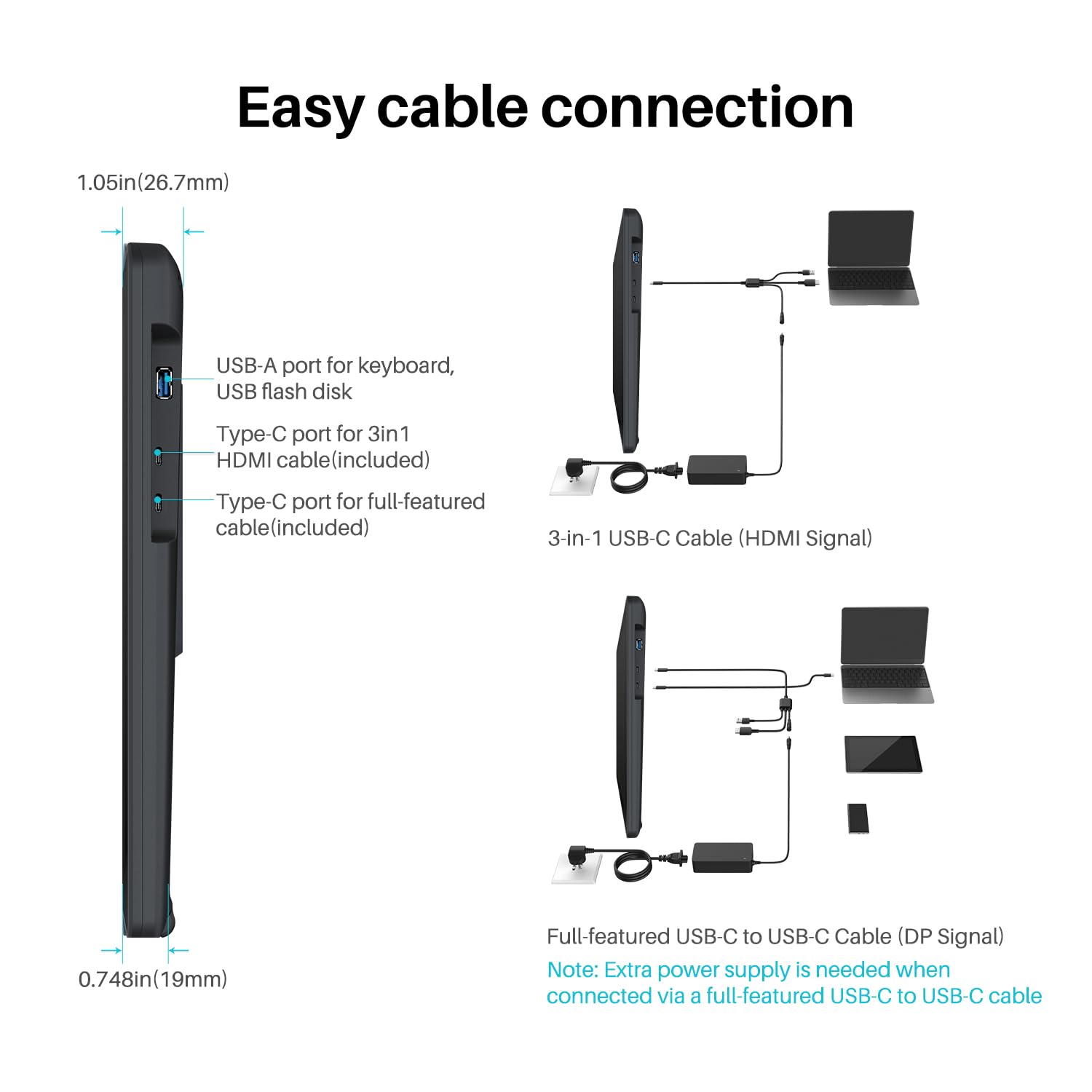
The HUION Kamvas 22 Plus is a 21.5-inch QLED drawing tablet featuring a stunning 140% sRGB Quantum Dot display with full lamination and anti-glare etched glass for enhanced color accuracy and natural pen feel. Equipped with PenTech 3.0 and tilt recognition, it offers 8192 pressure levels and lag-free precision. Dual USB-C ports provide versatile connectivity across Mac, Windows, Linux, and Android platforms. Its adjustable stand ensures ergonomic comfort, making it a top-tier choice for professional artists and designers seeking vibrant visuals and seamless workflow integration.










| ASIN | B08BZ897B4 |
| Best Sellers Rank | #90,880 in Computers ( See Top 100 in Computers ) #275 in Graphic Tablets |
| Item model number | GS2202-US |
| Manufacturer | Shenzhen Huion Animation Technology LTD. |
| Product Dimensions | 54.61 x 32.26 x 1.91 cm; 3.4 kg |
A**O
Es sumamente cómodo trabajar en una pantalla de este tamaño, si bien es cierto que al dibujar con el soporte instalado (puntos a favor que venia incluido) la pantalla se puede deslizar un poco con el peso del brazo al principio, despues te acostumbras y aprendes a no necesitar recargarte tanto al punto de que la pantalla ya no se recorra hacia atras. -El tamaño de esta pantalla hace que no sea importante el que no incluya botones de shortcuts, ya que puedes acceder facilmente a las herramientas con tu mano. Sin embargo si recomiendo el uso de un teclado externo de macros para simplificar el uso de comandos como CtrlZ, CtrlY, etc. -La presicion de la plumilla no es perfecta (en ninguna tablet lo es) pero es bastante precisa, tanto que te acostumbras a la brevedad. El tacto que tiene no es identico pero es bastante similar a dibujar en papel, ya que la pantalla viene con cristal de proteccion contra rayones en vez del protector plastico que incluyen otros modelos (puntos a favor por que en otros modelos con mica plastica se notan muy rapido los rayones del uso) -El soporte puede posicionarse en diferentes angulos de inclinacion y una vez ajustado queda bastante fijo, por lo cual no tendras mucho problema con acomodarlo a la inclinacion que mas te convenga. -Viene con los cables necesarios ya sea para que lo puedas conectar a una computadora o a un celular (en ambos casos requiere conectarse a la toma de 110v).
S**I
Really glad to have bought this. Its good quality and has improved my workflow. Definitely one of the best tablets out there at this cost.
P**R
I wanted to wait a few months before posting a review so that I could really be fair on this Tablet. As a professional illustrator, I use my drawing tablet every day and I really do put it through its paces. I'm going to attempt to put this into point form so that I don't waste your time. The GOOD You cannot ignore the price of this tablet compared to Wacoms selection. Well priced. Pen The pen is pretty much on par with the Wacom pen, has great pen pressure and it's comfortable. Screen The colours on the screen are pretty great actually. I had a Wacom 13 and its colour range was absolute rubbish. The resolution is Great, not super amazing. For super amazing you may want to look into the 2k or 4 k model. That said I am immensely happy with the resolution I get on this badboy. Driver The driver is surprisingly good for this tablet, I dare say it's better than the WACOM. If you are a Wacom owner you have no doubt at some point encountered the irritation of a Wacom driver doing something annoying. Build quality The included stand is of great quality, it is solid and works pretty well. Yes, this Tablet supports VESA Mounts. Long cables The screen is non-reflective and has a nice tooth to it. The tablet overall feels pretty tough and is built to withstand daily art-making rituals. You are not giving your money to Wacom who have repeatedly proven that they don't care about its users by pricing its tablets out of the hands of Aspiring beginner artists. The negatives On the very extreme edges of the screen, you may notice some very slight artefacts or pixel breaks. These are only noticed if you move your mouse there. I'm pretty sure most people wouldn't even notice it was there because pretty much every drawing software out there has UI elements that populate that space. The colour options on this monitor are amazing, they are also vast and technical which may be a bit intimidating to a new user. That said, pick a basic setting and youtube how to calibrate your drawing tablet monitor and you should be good. My only real irritations with this tablet There are no built-in hotkeys, you will have to get yourself a tour box or even HUION's very own key dial thing. The cable inputs are only on the right of the tablet. this is fine if your Computer is on your right. I also fear for the life of my cables and cable connection points on the tablet. The pen build is not as solid as Wacoms premier Art pen, it is however pretty close. The pen is also a quarter the price. The pen also has no eraser on the back a feature I do miss from Wacom. Some nib options would've been nice, thankfully you do get plenty of replacement nibs. As of writing this, I am still on my first one.
Y**I
I had connectivity issue with Macbook Air M1. It was showing no signal most of the time. Issue is with Macbook. We need to connect Macbook to charger all the time or have high battery (higher than 85-87%) . It doesn't have enough power to transfer the pixels or what, I don't know. But connecting with charger seems to solve the issue. Video is attached as well.
E**H
buen producto; funciona a la perfecto el lápiz; los ajustes de la pantalla son bastante difícil de ajustar ese es su punto malo; aun traduciendo cuenta mucho trabajo y aun con apoyo de PDF cuesta. por lo demás todos es perfecto, el lápiz, la configuración la pantalla el lector de usb todo.
Trustpilot
Hace 1 día
Hace 4 días