Some deliveries may take a little longer than usual due to regional shipping conditions.

Descargar la aplicación


Servicios al cliente
Sobre nosotros
Copyright © 2025 Desertcart Holdings Limited
Descargar la aplicación


💡 Light up smarter, not harder — the future of home control is here!
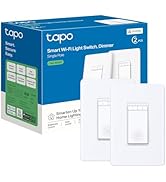
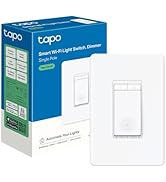
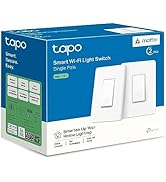
The TP-Link Tapo S505 is a UL-certified, Matter-enabled smart light switch designed for single-pole setups with neutral wiring. It supports 15A current and 120V operation, offering seamless compatibility across major smart home ecosystems like Apple Home, Alexa, Google Home, and SmartThings. Featuring voice control, app-guided installation, and local LAN control for uninterrupted performance, it empowers users to monitor, schedule, and automate lighting from anywhere with ease and reliability.








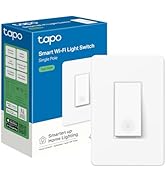
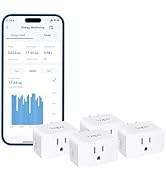
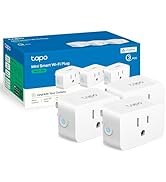
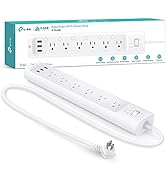
| ASIN | B0C2B6RSDX |
| Actuator Type | Push Button |
| Best Sellers Rank | #2,338 in Tools & Home Improvement ( See Top 100 in Tools & Home Improvement ) #25 in Electrical Light Switches |
| Brand | Tapo |
| Circuit Type | 1-way |
| Color | White |
| Compatible Devices | Apple Home, Alexa, Google Assistant, Samsung SmartThings |
| Connectivity Protocol | Matter, Wi-Fi |
| Connector Type | Screw |
| Contact Material | Copper |
| Contact Type | Normally Closed |
| Control Method | App, Touch, Voice |
| Control Type | Remote (Voice, App), Local (Touch) |
| Controller Type | Amazon Alexa, Android, Google Assistant, iOS |
| Current Rating | 15 Amps |
| Date First Available | April 25, 2023 |
| International Protection Rating | IP00 |
| Item Weight | 5.3 ounces |
| Item dimensions L x W x H | 5.04 x 3.33 x 1.41 inches |
| Item model number | Tapo S505 |
| Lower Temperature Rating | 32 Degrees Fahrenheit |
| Manufacturer | TP-Link |
| Number of Items | 1 |
| Number of Positions | 1 |
| Operating Voltage | 120 Volts |
| Operation Mode | Off,Smart Switch |
| Product Dimensions | 5.04 x 3.33 x 1.41 inches |
| Smart Home Compatibility | Smart Home Compatible |
| Terminal | Screw |
| UPC | 840030708190 |
| Unit Count | 1.0 Count |
| Upper Temperature Rating | 104 Degrees Fahrenheit |
| Wattage | 600 watts |
K**W
Smart upgrade for home lighting!
I installed this 2‑pack of Tapo S505 smart light switches around my house and I’m really happy with how well they work. These switches let me control lights remotely via the Tapo app, or with voice commands using Alexa, Google Assistant, or Siri, which is super convenient when my hands are full. The Matter compatibility means they integrate smoothly with other smart home systems and work reliably even when the internet is down — local control is responsive and fast. The schedule and timer features are great for automating my lights, and setup with the app was straightforward (just make sure you have a neutral wire in the switch box). Overall these switches are a great value for making regular lights “smart”, and the 2‑pack gives you flexibility for multiple rooms. Perfect for anyone upgrading to a more connected home!
S**V
Works Great with Matter Connectivity, Easy to Install
This smart light switch works great and has been very reliable so far. Installation was straightforward with clear guidance. The Matter connectivity works as expected, and setting up schedules is easy. One thing to note is that the physical position of the switch does not change when turning the light on or off—the small indicator light on the switch is the only way to tell its current state. Overall, a solid smart switch and I would recommend it.
M**F
Easy Installation, Accurate Calibration, and Thoughtful Design
I’ve installed multiple smart switches, and this TP-Link Tapo Matter Smart Dimmer was one of the easiest. Before shutting off the breaker, I removed the wall plate and used a multimeter to identify line and load. After cutting power, I labeled the wires using the included stickers, removed the old switch, and disconnected the pigtail ground from the existing ground bundle. The Tapo dimmer uses a long ground wire instead of a ground screw, which made installation straightforward. Everything fit back into the box cleanly. Setup in the Tapo app was quick and intuitive. Tap the plus icon, add a new device, and follow the prompts. One important tip: don’t skip calibration. I did initially, and the dimming levels weren’t correct. Running calibration afterward fixed it immediately and made the dimming smooth and accurate. You can also set custom brightness percentages if you want precise control. Build quality feels solid, and the design is clean. A standout feature is the subtle glowing ring when the light is off—it’s surprisingly useful in a dark room. If you don’t like it, the ring can be disabled in the device settings. The only downside is cosmetic: if you’re replacing a switch that uses a double faceplate, you’ll need to reuse your existing plate or buy a matching double to avoid mismatched covers. Bottom line: easy installation, reliable performance, and thoughtful features. Highly recommended.
D**B
Slim, Smart, and Simple
I recently installed the TP-Link Tapo S505 smart switches in my home, replacing an older 3-gang setup, and I’ve been really happy with how smoothly everything went. One of the first things I noticed is how much slimmer these switches are compared to older smart switches I’ve used. That might not sound like a big deal, but when you’re cramming three switches into one box with a bunch of wires, every millimeter counts. The reduced thickness gives you way more room in the back for wire management, which made the install way less stressful. And since they’re UL certified, I felt confident they’re safe to use without cutting corners. Wiring was surprisingly simple—especially the fact that either black terminal can be used for line or load. That’s a small but huge win because it means you don’t have to stress about matching the exact wire to the exact terminal. For someone who’s done a few DIY electrical jobs, that flexibility saves time and guesswork. The app setup was fast and intuitive, and within minutes, the switches were online and responding. I already use a bunch of TP-Link devices, so I’m familiar with their app, but even if you’re new, I think you’d find it straightforward. Bonus: once they were in the Tapo app, they showed up instantly in Home Assistant, which I use to control everything. No weird delays or pairing issues. The only thing to remember is that these need a neutral wire, so they won’t work in older setups that don’t have one. But if you’ve got the neutral, these switches are a solid choice—especially at this price. They’re reliable, responsive, and blend well into my smart home setup. I also like using the scheduling and timer features to turn lights on/off automatically.
J**O
Increíbles, elegantes de buen materiales y al ser matter funciona en Apple o cualquier otro asistente
A**R
Ce lot de deux interrupteurs intelligents Tapo Matter m’a vraiment impressionné par sa simplicité d’installation et sa compatibilité parfaite avec mon écosystème SmartThings. La configuration s’est faite en quelques minutes seulement, sans aucune complication. Depuis, ils fonctionnent sans faille : la réactivité est excellente et la connexion stable. Un produit fiable, bien conçu et idéal pour moderniser facilement son installation électrique. Je recommande à 100 %.
J**N
Tp link adding matter support is great!
B**N
So far so good! This product was extremely simple to install, and even easier to set up using the Tapo App. The dimmer buttons are very tactical and offer a solid click when pushed. The on/off button has a good spring-like action when pushed. The App also offers tons of automations and customizations. For example, between the hours or 11PM and 6AM, I limited the brightness to 25% so if I need to turn on the light in the middle of the night, I'm not blinded!
L**C
Muy bueno para un ventilador. Los únicos inconvenientes en mi caso, para el uso mencionado, son: -Los 7 niveles de los BOTONES FÍSICOS del dimmer para un ventilador de este tipo, no se pueden usar todos, solo son útiles los tres niveles más altos, en este orden: séptimo mñaxima velocidad, sexto media velocidad, quinto velocidad muy suave, pero agradable ...y de ahí hacia abajo, para un ventilador, los niveles de los botones físicos ya no son utilizables. -En la aplicación, se pueden personalizar 5 niveles, y en el caso de mi ventilador, programando tales niveles a 72%, 80%, 85%, 90%, 100% obtengo todo el rango de velocidades de mi ventilador, desde muy suave y silencioso, hasta viento violento, lo cual con los controles manuales del ventilador no es posible. -Desafortunadamente los niveles de los botones físicos, no se pueden personalizar como sí es posible mediante la app; aún así, como lo indiqué en el primer punto, esos tres niveles son muy prácticos. Si bien, este dimmer/atenuador está diseñado para luces y no para ventiladores, estoy bastante contento con los resultados con mi ventilador tipo industrial. ACTUALIZACIÓN DICIEMBRE 2025: Actualmente el dimmer YA SE PUEDE CALIBRAR desde la aplicación, en "calibración de atenuación". Con esto, la atenuación mínima y máxima, se ajusta por única vez; y con ello ya son 100% útiles cada uno de los 7 niveles de los botones físicos. En resumen, la desventaja inicial ya es cosa del pasado, ya funciona perfecto con mi ventilador, ya sea mediante los botones físicos, o mediante la app. Lo único que desearía, es que la escala de intensidad quedara encendida todo el tiempo en que está encendido el dispositivo (ya que esta se apaga en unos cuantos segundos), en fin, es un pequeño detalle, pero a más de un año de mi compra inicial estoy muy contento
Trustpilot
Hace 2 días
Hace 1 semana