We remain fully operational. Our teams are working around the clock to ensure your deliveries continue safely.

Descargar la aplicación


Servicios al cliente
Sobre nosotros
Copyright © 2025 Desertcart Holdings Limited
Descargar la aplicación
Buy anything from 5,000+ international stores. One checkout price. No surprise fees. Join 2M+ shoppers on Desertcart.
Desertcart purchases this item on your behalf and handles shipping, customs, and support to Nicaragua.
🚀 Elevate your display game—connect, power, and conquer in 4K clarity!
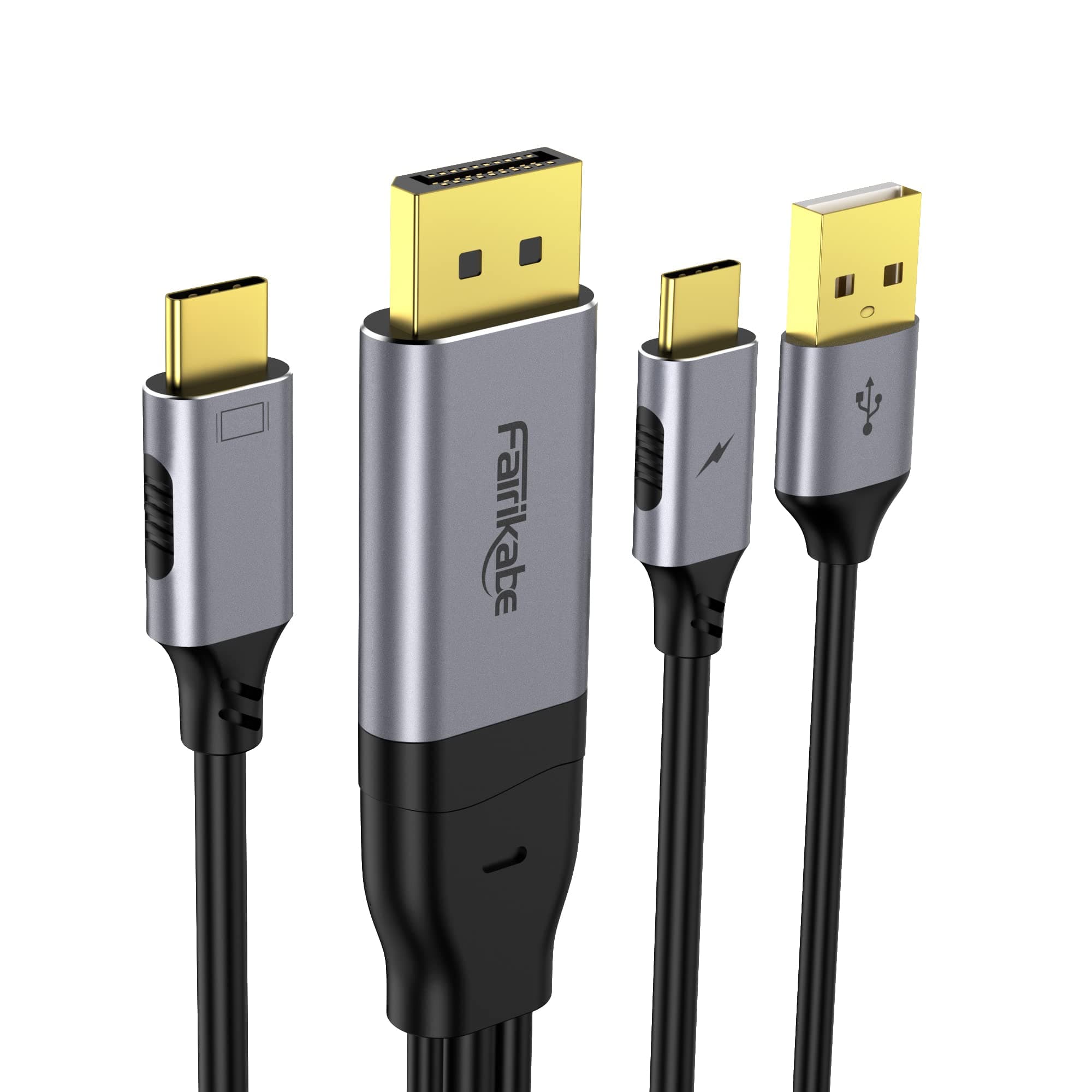
The fairikabe DisplayPort to USB-C Cable is a 6.6ft unidirectional cable designed to extend DisplayPort sources to USB-C monitors, projectors, and AR glasses. Supporting up to 4K resolution at 60Hz with HDR, Gsync, and FreeSync, it also delivers 60W power pass-through and touch functionality for portable displays. Compatible with Windows and macOS, it’s ideal for professionals seeking seamless multi-device connectivity and high-fidelity visuals.


| ASIN | B0BW8QKFHK |
| Best Sellers Rank | #57,713 in Computers ( See Top 100 in Computers ) #175 in Computer DisplayPort Cables |
| Brand Name | fairikabe |
| Cable Type | Display Port |
| Color | Black |
| Compatible Devices | Monitor, Projector, Television |
| Compatible Phone Models | Huawei |
| Connectivity Technology | DisplayPort |
| Connector Gender | Male-to-Male |
| Connector Type | USB |
| Customer Package Type | generic shipping box |
| Customer Reviews | 4.1 4.1 out of 5 stars (100) |
| Data Transfer Rate | 6.6 Gigabits Per Second |
| Frequency | 60 Hz |
| Included Components | DisplayPort Source to USB-C Display Cable 6.6ft |
| Indoor Outdoor Usage | Indoor |
| Item Shape | Round |
| Item Weight | 0.14 Kilograms |
| Manufacturer | fairikabe |
| Model | MY-DPMTC184 |
| Model Name | fairikabe DPMTC184 |
| Number of Items | 1 |
| Number of Pins | 24 |
| Other Special Features of the Product | High Speed |
| Outer Material | Aluminum, Gold |
| Recommended Uses For Product | Connecting devices for video output, such as to USB-C monitors, projectors, HDTVs, and VR glasses |
| Specification Met | RoHS |
K**.
Für alle die ewig danach gesucht haben, wie sie ihr, beispielsweise, Wacom Movink 13 verbinden mit einem normalen PC. Dies ist genau euer Produkt bzw Kabel, ich habe locker 1 bis 1.5 Stunden nach genau solch einem Kabel bzw. Verbindungsmöglichkeit gesucht und hier ist es, super easy an die Grafikkarte anstecken und USB einfach in ein übrigen Anschluss stecken, USB-C auf der Seite vom DP-Port an eine Steckdose oder Steckdosen-Adapter und schon kannst du das übrige gebüdelte USB-C in dein Grafiktablett stecken. Perfekt wirklich.
も**も
液タブ接続用途 内臓GPUなしデスクトップパソコンで一応グラボにHDMIポートがあるので使えないことはないがHDMIポートが一つしかないのでDisplayPortで使いたくて購入 私の使用環境では電力供給をマザーボードの背面のタイプCに繋いでもちゃんと液タブを使うことができました。 高価格帯のグラボにしか付いていないC付のグラボを買い替えようかと悩んでいたので、安価でDisplayPortでも使えるようになって大変満足しています。
A**R
I recently connected my VITURE Pro XR/AR Glasses to the DisplayPort of my Gigabyte GeForce RTX 4060 WINDFORCE OC 8G Graphics Card as a third display, and the combination works seamlessly. The glasses deliver an impressive Full HD display, providing an immersive visual experience. When connecting the VITURE Pro XR/AR Glasses, ensure the USB-C connector is oriented correctly. If the glasses do not function as expected, try reversing the USB-C connector by turning it upside down. This simple adjustment can resolve connectivity issues. Overall, pairing the VITURE Pro XR/AR Glasses with the Gigabyte GeForce RTX 4060 WINDFORCE OC 8G Graphics Card enhances the visual experience, making it a great combination for both gaming and professional applications.
E**T
I bought this specifically because I wanted to use an RTX 30 or 40 Series card with a USB-C monitor, which also has a USB hub, but the trouble is that only the RTX 20 Series (or laptops) have USB-C outputs that support this particular feature. (Yes, I could just run two separate cables, but I don't want to.) Well, this works flawlessly, with one tiny exception: this is only just over six feet long. Not a deal breaker for me, as I have several give-or-take ten/fifteen-feet USB-C cables, and using a C-to-C coupler, that seems to work fine. Presently, I have around twenty-one feet of cable, including a coupler, running 2560x1600@144hz with HDR, and with full USB 2.0 capabilities, over DisplayPort>USB-C, with both extra heads plugged into respective sockets. The main issue is that this requires a pretty hefty USB-C power supply, so I'm using one that can go up to 12v, not the motherboard's USB-C (which I think this particular Motherboard predates USB-C). A pass-through device I have plugged in directly to said monitor says its running at around 10.3v, 1.12a, for around 11w, and that's only going to go up, as I demand more from it. Given that this is plugged into the DisplayPort, I'm not worried at all about the voltage possibly damaging my video card, computer, or monitor. USB power over DP or HDMI should be completely safe, due to the necessity that those standards require a strict signaling voltage, without the option to backfeed voltage. (as I understand it, DP is 3.3v, HDMI is 5v; USB-C, using DP-Alt Mode is likely also 3.3v). I did once blow out a PS3's USB ports, but only the power part, as long as I use a hub that requires external power, it still works; but I don't want to make that mistake again. I'm nothing if not spoiled for choice, but something appeals to me about being able to stretch a single USB-C cable around a room and still get high resolution and framerate, with the option for using my existing USB devices, and not having to resort to wireless. I understand that wireless is "more convenient" or "better now than in years prior", but I like a simple solution to a specific problem. This cable solves my specific problem. At present, though, this is just an experiment for me, and won't get to be implemented until much later.
E**Z
Using this for my XReal One Pro display glasses. Works great.
Trustpilot
Hace 1 mes
Hace 3 semanas