We remain fully operational. Our teams are working around the clock to ensure your deliveries continue safely.

Descargar la aplicación


Servicios al cliente
Sobre nosotros
Copyright © 2025 Desertcart Holdings Limited
Descargar la aplicación


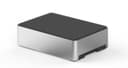


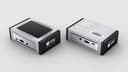
🖤 Cool, sleek, and built to perform — your Pi’s new power suit.
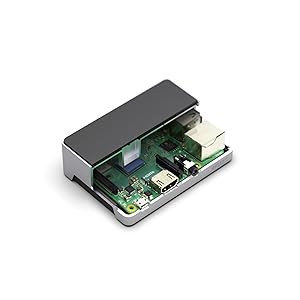
The Flirc Raspberry Pi 3 Case is a premium aluminum enclosure designed for Raspberry Pi 3 B+, 3, 2, and B+ models, featuring a built-in heat sink with thermal pad and screws for enhanced cooling. Its precision manufacturing guarantees perfect port alignment and easy access to all connectors, making it the ultimate blend of style, durability, and thermal efficiency for professional-grade Pi projects.


| ASIN | B07349HT26 |
| Antenna Location | Business |
| Best Sellers Rank | #581 in Computer Cases |
| Brand | Flirc |
| Case Type | Raspberry Pi |
| Color | Silver |
| Compatible Devices | Raspberry Pi 3 |
| Cooling Method | Air |
| Customer Reviews | 4.6 out of 5 stars 1,745 Reviews |
| Enclosure Material | Metal |
| Fan Size | 80 Millimeters |
| Global Trade Identification Number | 00090281102647 |
| Hard Disk Form Factor | 2.5 Inches |
| Item Weight | 0.25 Pounds |
| Light Color | Enhanced |
| Manufacturer | Flirc |
| Material | Metal |
| Model Name | Flirc Raspberry Pi 3B Case |
| Motherboard Compatability | Raspberry Pi Model 3 |
| Number of Fans | 2 |
| Other Special Features of the Product | Heat Dispersing Case, High Efficiency Thermal Pad |
| Power Supply Mounting Type | Bottom Mount |
| Recommended Uses For Product | Business |
| Supported Motherboard | Raspberry Pi Model 3 |
| Total Usb Ports | 4 |
| UPC | 090281102647 |
| Warranty Description | 1 year manufacturer warranty |
D**L
Beautiful, Solid, Functional.
PROs: (Basically everything...) 1. Excellent build quality and materials selection. No visible defects whatsoever. No sprue remnants, no split lines, nothing. Flawless. 2. Every bit as attractive IRL as in the published images - possibly more so. It's really the finest looking gadget-related accessory I've purchased in recent memory. 3. Very tight (in the sense of exact) dimensional tolerances. All port openings line-up perfectly with the ports on my test device. 4. Functionally, the case cools the CPU as advertised. One could only hope for additional heat-sinking of the other IC's, but it's not clear that it matters in my application. CONs: (Hard to cite any...) 1. Instructions concerning the installation of the heat-transfer pad were lacking. Not a big deal. There seems to be some confusion about whether or not to remove both the paper adhesive-patch cover AND the clear, thin adhesive-patch cover on the other side of the pad. FWIW, I removed both. I do not get the sense that it matters which side contacts the CPU and which side contacts the aluminum heat-sink. In fact, it may be acceptable only to remove the paper backing from one side of the conductive foam and to leave the very thin plastic on the other side, if future disassembly and access to the Pi are expected to be necessary. 2. Instructions on exactly how to pivot the Pi into place would have been helpful, given the precision fit. In my experience, it worked best to assemble the unit by (1) removing the SD card so that it does not protrude, (2) removing the backing from one side of the heat-conductive foam and adhering it to the CPU, followed by removal of the backing from the other side of the foam for mating with the top shell heat sink protrusion, (3) holding the metal case upside-down with USB port cut-outs to the right, lowering the farthest (connectorized) edge of the board into place, permitting the power, HDMI and audio connections to mate with the cut-outs in the aluminum case, (4) pivoting the board into its final position lowering the nearest edge gently onto the screw mounts, (5) placing the bottom plastic cover into place, (6) screwing the bottom shell, Pi and top shell together with the four included screws and finally (7) re-inserting the SD card. For me, attempting to insert the Pi3 by other strategy resulted in it binding into an incorrect position and almost refusing to yield for re-positioning. Alternative to my method might be the attachment of the conductive foam to the interior protrusion from the top aluminum cover, if preferred. I haven't tried it. Pleased with the thermal performance, ruggedness and aesthetics, I have purchased two of these cases so far, and I plan to purchase several more of them for use in my application.
D**O
Great case, works great with the RasPi 3 and the Libre Computer AML-S905X-CC Le Potato
UPDATE: Recently got into using Libre Computer's AML-S905X-CC Le Potato board, which is a more power efficient and slightly more powerful board compared to the RasPi 3 models. The Potato was designed to fit the same form factor, and I'm pleased that the case works just fine with it. My solution was to cut the thermal pad and put one piece of the pad on each chip that the case's "heat sink pilla" fits right over. The only problem you'd have is if you plan to use the IR sensor on the Potato, in which case you might need to drill a hole or seek a different case. Just got mine today and did some testing with it. It's definitely solid and a bit more weighty than the average Pi case. The materials seem to be very good quality, especially the aluminum. I'd have to say that this is my favorite case so far. It definitely performs well as a heat-sink, and comes with two different cuts of thermal transfer pads to match the different CPU shapes between Pi models. Aesthetically, it looks sleek in a very stylishly simple sort of way. I like it. The aluminum has a matte finish and isn't too shiny (not a mirror finish). Likewise, the plastic has a "soft" matte finish, and is textured in such a way that it feels and looks soft to the touch. My only negative comment - and a very minor one at that - is that the plastic seems to like to absorb skin oils, and that finger prints and smudges show up on the top especially in certain lighting. It can be wiped away without too much effort, however, so it's really not a big deal. All in all, 10/10. I hope the manufacturer will continue to make these for future versions of the Raspberry Pi - please do!
A**R
Great for a desktop computer, less so for tinkering
The overall construction quality of this case is just as good as the listing describes. It keeps the Pi very well-protected and holds it firmly using all four of its mounting holes. The openings on the sides of the case line up with the board's connectors perfectly, which is very satisfying. Having the whole case act as a heatsink probably makes this one of the best heatsinks around for the Pi, which is great, although it only provides a surface for the main SoC and not the USB hub/ethernet chip, so if your use involves very large continuous USB and ethernet throughput, it might not be ideal. There are also no mounting holes in the load-bearing parts of the case that would allow the whole assembly to be attached to a surface, which will be a problem for some projects. My primary gripe is that the case makes accessing the GPIO header pins rather frustrating; while there is a slot which is apparently intended to accommodate a ribbon cable, it is on the bottom, which seems like it will make the whole thing very cumbersome with such a cable installed. This setup also precludes the use of HAT boards or other modules intended to plug straight into the top of the Pi. I think this is a great case for those who want to use their Raspberry Pi as a desktop box, home entertainment system, or server, but not great for those who intend to use it to play with hardware a lot. While it provides very good protection for the board and looks and feels great, accessing the GPIO is much more of a hassle than with other cases. I give it top marks for being as-described in the listing and of good build quality, but you'll want to look elsewhere if you're looking for a case that leaves the GPIO header accessible.
J**.
Good quality, nice finish but not for user friendly at your "lab"...
I have been using Raspberry Pis with 21.5 inch touchscreens that are mounted on the wall so they can be used as kiosks. Up to now, I was using the "Official" box ( Official Raspberry Pi 3 Case, Red/White ) but the colors of the box stand out and give a cheap look to the whole installation. So I decided I will spend the extra money to get an aluminum box that will look more like a computer component than a toy. This box is beautifully put together with a plastic cover that has a matte finish and gives the box a professional component look. Since I mount mine behind the touchscreen, I needed to put a reset switch so users can just reset it with the push of a button when needed. I attached a video showing how I did it. Note that I used a 5mm Normally Open momentary switch. Here is a couple of things you may want to know: 1) The box dimensions are: H 1.12 inches, W 3.87 inches, D 2.8 inches 2) When the RPi is installed, the clearance between the 40 pin contacts is 0.31 inches which means that the total height of your ribbon cable connector cannot be more than 0.54 inches and this will prove to be short for most ribbon cable connectors. 3) The built in heat sink is a little too short in my view and they supply a thick foamy sticker that goes between the processor and the heat sink so I am not very confident on the heat sink abilities of the box but time will tell and I will update this review if I get an overheating message from the RPi. 4) Once the Raspberry Pi is inside and the box is put together, there is no rattling noises and it has some weight on it that gives the feeling of quality. If you are going to display your Raspberry Pi or you are going to permanently install it somewhere, you should give this box a try because it just may be the thing that makes your device look like it is a serious piece of equipment. I find that when I put together equipment to be used by multiple people, the users are more inclined to work with that equipment if it looks to be of high quality and this box gives that impression. If you are just looking for a simple box to put your Raspberry Pi in so you can use it at your lab, there is no need to spend the extra money and you should get the colorful box that costs less and is easier to work with.
B**N
The best case for Raspberry Pi!
I started with a NES type case for my RetroPi setup. It was cute, but the fan was noisy. I was in search of another case that would work well. Enter the Flirc case. This thing is downright beautiful, functional, and small (compact). It is much smaller than the NES type cases and more akin to a silver MacBook or Apple product. I liked it so much a bought a couple more for my other Pis. Even without a noisy fan, the built in heatsink takes care of cooling the processor. All the ports are easily accessible, and it comes apart easily if you need to get into it. While this case may seem a bit more expensive than the other plastic cases, you won't regret it one bit. It is perfect for being next to your TV, or thrown in a bag with your other stuff. Quiet, beautiful...just a well though out case. I suppose the only challenge is if you are using your pi and accessing the GPIO pins a lot you may want something that has a bit easier access to those pins. No problem for a few connections one time, but if you are constantly getting in there you may want a GPIO extension cable.
R**T
SOOO much better than the stock heat sinks, but not *quite* perfect
I was running Octoprint on my Pi 3B+ for my 3D printer and was getting little thermal warnings when I was using the stock heat sink. After upgrading to this sleek case, those warnings went away. It's a beautiful case. My only gripe is that the case doesn't seem designed with running wires and cables from the pins inside in mind. I've heard that it is very, very tricky to run a ribbon cable from the GPIO pins due to how tight the screw posts are to the ends of the GPIO pins (there isn't room for the ribbon cable's end clips without some surgery to the cable clip). My own experience is that, if you want to run a DSI cable from the end of the Pi, you need to snip the little crossbar of the black plastic bottom above the opening through which the SD card slides in order to make room. You could also route the cable through the slot intended for the GPIO ribbon cable, but that becomes very tricky to do if you are also using the slot for other wires/cables. Plus, it's pretty typical for graphics displays to have their DSI ports oriented to allow for the cable to come straight out the end and up to the display. Certainly the cables they supply won't stretch much further than this. So, bottom line, if you're just going to plug things into the ports on the outside, this case is perfect. If you're going to connect to the pins inside, it's pretty good.
A**W
replace thermal pad for non + models
Out of the box thermal throttles with temps over 81 C on Pi 3b (non +). The 3b does not have the metal heat spreader on chip like the 3b+ does. I suspected the included thermal pad was not making contact with the processor. I changed the thermal pad to a 1.5mm pad. Thermal temps stay under 49c with the thicker pad installed. I did not test with my 3b+ that has the metal heat spreader on chip; however, I suspect the included thermal pad would be sufficient for it. Not a major issue unless you do not have any thermal pad material handy, and do not learn before you buy. Marketing states it is made for the 3b+ and works with the 3, 2, and b+ models. For the cost; it would be nice if they could include a second thermal pad for the other Pi models. Case has a nice design, look, and feel. Very clean and well made. It shows the product manufacturing has been well refined and feels like care went into making the product. A little functionality to get at the GPIO pins; but, that is not the real purpose for a case like this. It functions and works as designed beautifully. Properly installed, it will give most active fan cooled cases a run on performance. This is one of the best SBC/Pi cases currently available for it's intended purpose.
1**A
Amazing Case!! Thermal Results Below!!!
I loved the Gen 1 Flirc Case (made for rpi2) and had to get this upgrade when I saw it! I love the new finished product! Here are the improvements over the Gen1 Case: * It is slightly shorter * Better access to the SD card * Bigger (and properly placed) heatsink * Better ventilation at the bottom (holes rather than slits) * Defined cutouts for the USB ports and Ethernet * Solid feel in the hand I replaced the thermal pad that came with the case with a Fujipoly Ultra Extreme XR-m Thermal Pad (17.0 W/mK) for better thermal conductivity from the CPU to the case/heatsink. I used the 1.5 size and it fits really snug which I like. Below are stress tests that I ran with CPU Burn (the most stressful test for a CPU) at the normal 1.2GHz clockspeed. Case + Fujipoly CPU Burn Stress Test * Starts at 34.3C * Finished 15mins at 63.4C Case + Fujipoly + Fan (Pushing Air Into Case) CPU Burn Stress Test * Starts at 34.3C * Finished 15mins at 59.1C Case + Fujipoly + Fan (Pulling Air Out) CPU Burn Stress Test * Starts at 33.6C * Finished 15mins at 56.9 All in all, I can say that I am extremely pleased with this case! No cons for me at all! I would recommended this to everyone wanting to run retro gaming, media, etc. for long periods of time. Overclocking is also possible with this case.
Trustpilot
Hace 2 meses
Hace 1 semana