🎯 Master precision and comfort—your desk’s new MVP!
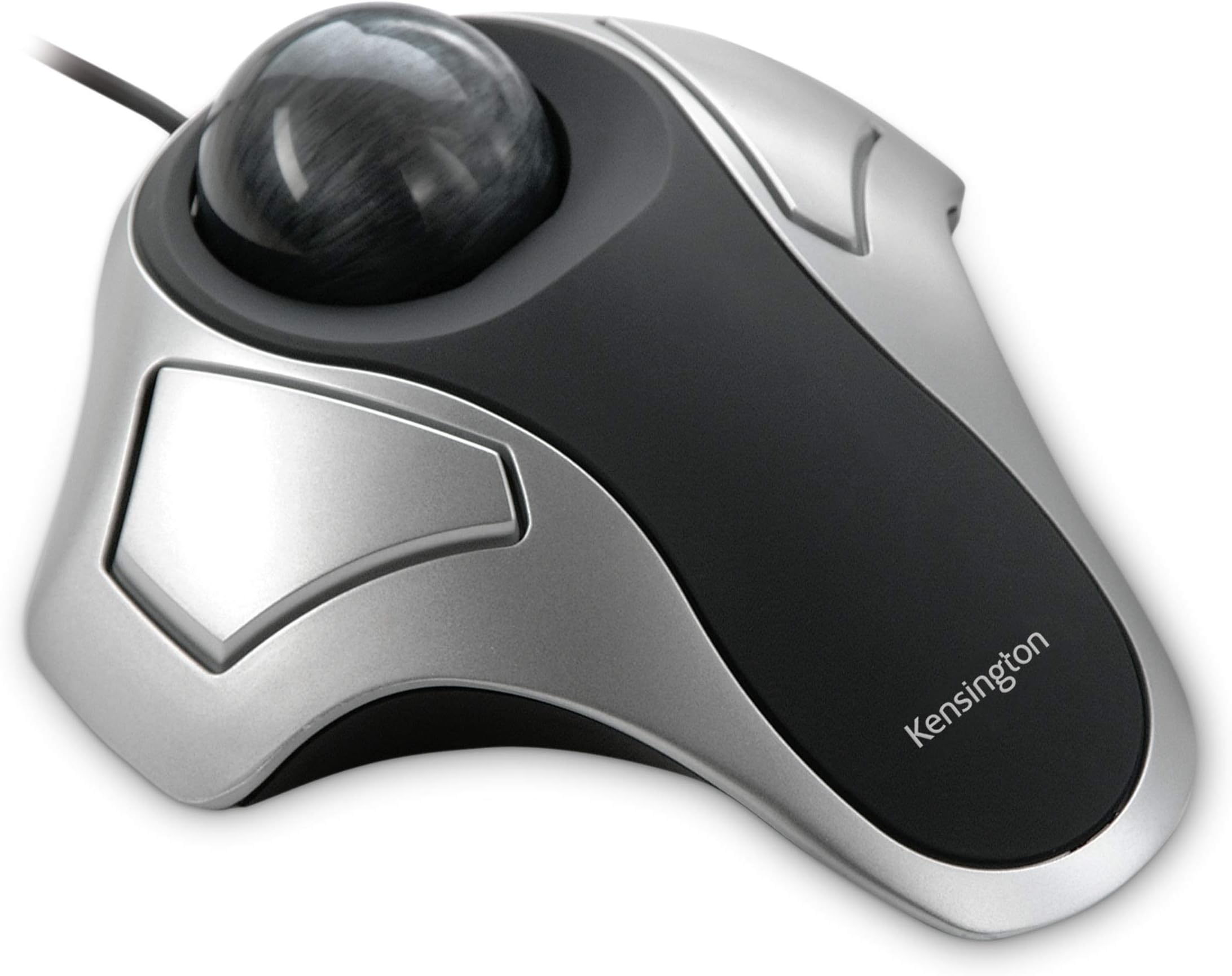
The Kensington Orbit Trackball Mouse (K64327F) combines Diamond Eye optical technology with an ergonomic, low-movement design to deliver precise cursor control while saving desk space. Its dust-resistant trackball reduces maintenance, and USB plug-and-play compatibility ensures smooth operation across Windows and Linux platforms. Compact and comfortable, it’s ideal for professionals seeking efficiency and style in a sleek silver/black finish.


| ASIN | B000HEW0KW |
| Brand | Kensington |
| Color | Silver/Black |
| Computer Memory Type | DDR3 SDRAM |
| Customer Reviews | 4.2 4.2 out of 5 stars (4,817) |
| Date First Available | June 29, 2004 |
| Department | trackball mice |
| Hardware Platform | PC |
| Is Discontinued By Manufacturer | No |
| Item Dimensions LxWxH | 7.9 x 6 x 1.7 inches |
| Item Weight | 9.5 ounces |
| Item model number | K64327EU |
| Language | English, French, Spanish |
| Manufacturer | Kensington |
| Number of Processors | 1 |
| Operating System | Windows Vista, Windows XP |
| Power Source | Corded Electric |
| Product Dimensions | 7.9 x 6 x 1.7 inches |
| Series | K64327F |
A**S
Better than the rest and works with Linux
Having used the Logitech trackball for years, but when it was time to replace Logitech's prices went too high. So, recently tried the Kensington with the Ring and found it to be too wide for most hands here...to the point of being uncomfortable and clumsy. Decided to take a chance on this one without the "ring" and what a difference! The width is just right and the ball moves ever so smoothly and quickly and stops easy too! It is being used on a Linux O/S and absolutely no problems. Highly recommend this mouse. For those who need to know the size width: The narrowest part where your hand lies across the top (to click either left or right side of mouse) is approx. 2.25 inches. Compared to the same brand with "the ring" which is approx. 3 full inches. Also the highest height of the ball on the "ring" model is 2.50 inches and on THIS model it is a half inch lower. SO you can see by these measurements this model is much more suitable for smaller hands, or hurting/stiff hands. Additionally, other reviewers stated that the trackball is loose and falls out...I too noticed that my trackball was not seated all the way in. I took it out and examined it and saw that there is a clear piece of plastic that was stuck on the ball and had rolled to the under side of the ball. It was hard to see because it was clear and had black writing on it and the ball is a very dark gray. I think this piece of plastic had some warning on it -- maybe to remove before use...but it was difficult to see. Now that that is removed the only way I can remove the ball from its place is to turn the mouse over and it gently falls out so that you clean/dust it off. It never just falls out or pops out...unless something is in the way. Its a great little mouse...thinking about getting another one!
J**S
I love this trackball!
The first thing that impressed me was the thick cardboard packaging. Super protective. Opened it up, was surprised that the ball was so loose. I had been used to ones that held the ball in, even if dropped. Plugged it in to my 2004 Lenovo computer, heard that sound, you know what I mean, acknowledging it. Put my hand on it, rolled the ball around, and nothing happened on the screen. No matter what I did it just didn't work at all. I was disappointed. In the evening I took it to the bedroom, plugged it in my 2014 Acer laptop on the off chance it might work, and whaddaya know?! It worked perfectly! I'm very, very happy with it! It will live with the laptop and my other trackball will stay with the computer. Other than the looseness of the ball, which I can live with, I love this trackball!
S**J
Easy to use, relieves strain
I’ve been using trackballs since the Mac Plus was released in the 1980s, so I have plenty of experience with them. I find them easier to use than mice, and though I use a trackpad on my MacBook, I get cramps in my thumb and the trackball is a good alternative. I use it full-time on my iMac. I prefer wired because I don’t want to worry about batteries running out of power when I need to use my computer, and, anyway, I keep the trackball close to the laptop or desktop so the cable is not an inconvenience—it makes it easy to connect. I’ve basically stuck to two major brands over the years: Kensington (this one) and the Logitech Trackman, which has been my preference. However, the latter is about six times the cost of this Kensington Orbit, and they are somewhat equivalent. As I haven’t seen the high-end competitor’s lately, I don’t know if they’ve changed it, but this version of the Orbit definitely feels lighter and perhaps flimsier than earlier versions. The ball kind of clicks; it is not 100% smooth. It also seems very sensitive, which can be good or bad. But the ergonomics of the unit fits my hand just fine, and it makes scrolling and pointing intuitive and easy. The OSes on my two Macs are very outdated and they allow me to use old apps, so I haven’t upgraded them. This trackball is completely plug and play with both, without needing to download Kensington’s utility/app. I use the mouse setting of system preferences to configure speed and buttons on this. Kensington has been around for many years and, overall, they make good-quality peripherals. Perhaps the price point on this accounts for what I perceive as the lightweight feel, and the question is, then, how long this will last. But, for now, it works well for me.
A**M
Fits the hand well. Easy to set up. I have been using a well known marble mouse for years, but it appears to be obsolete now. Any on the secondary market are horrendously overpriced, so finding this as a replacement is great.
M**E
WOW now i have an issue !! ?? brought this trackball, because with my degenerative desease I was at times not able to use my mouse. I was surprised at just how far they have moved forwards, the last trackball I brought was in the 90s, So I was very surprised at its senticy of movement, which I am now trying to get used to. I now have this trakball & my mouse plugged in and switch to what ever I can use the easiest. Deffo recomend, but it is NOT a quick fix, it will take time n patience to get the trackball adjusted to your needs. Stick with it and you wont be dissappointed. I opted `for the usb version of this track ball, just becase the items i use already my battery charger is struggling to cope.
R**U
Ótima qualidade e precisão. Para usar a rolagem (simulando a roda do meio do mouse) precisa do software, que vc deve configurar o click dos dois botões laterais como simulando o click do botão do meio do mouse convencional.
Y**P
Objet permet à des personnes qui sont atteints du tremblement essentiel de pouvoir cliquer sur un ordinateur sans utiliser une souris trop compliqué
K**2
I've always wanted a trackball mouse, after using my aunt's awesome Logitech one I've always wanted my own, late last year I finally got one. The Kensington Orbit is a comfortable and easy to use trackball mouse. Compared to some other trackball mice it's design is pretty simple featuring the Trackball and the right and left click buttons. Its a minimalist design that serves the product well. It's pretty light and not as chunky as some other mice. My only gripe with this is the fact that it dosent have a scroll wheel, so if I want to go down I have to track back to the scroll bar and manually scroll down. That being said there is more good than bad here. This is a great little mouse and I'm happy with my purchase.
Trustpilot
Hace 2 días
Hace 2 semanas