

⌨️ Elevate your desk game with smart, sleek, and sustainable typing power!
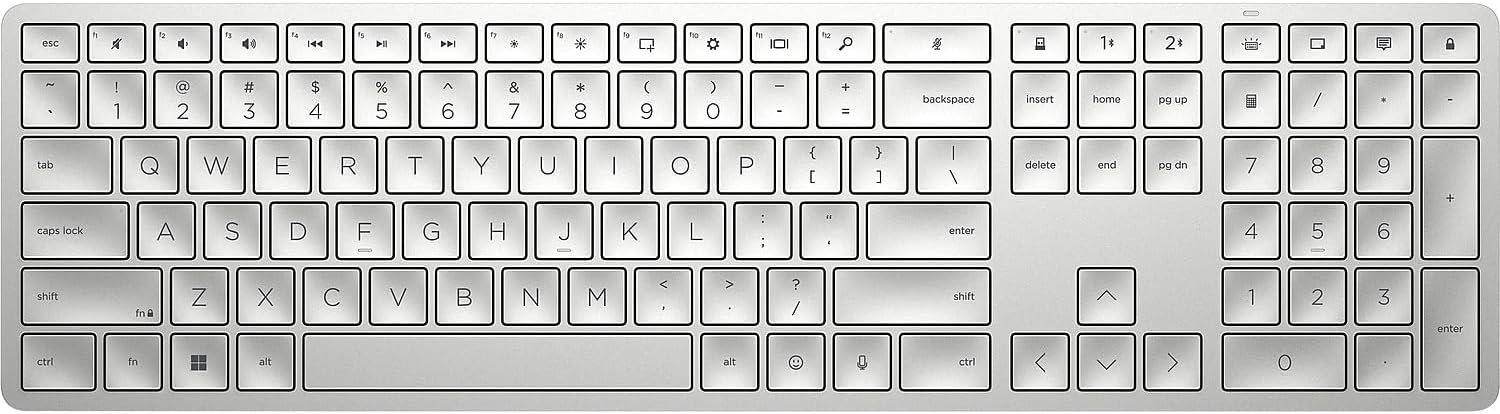
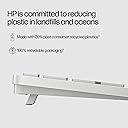
The HP 970 Programmable Wireless Keyboard combines premium ergonomic comfort with advanced multi-device wireless connectivity (Bluetooth 5.0 + 2.4 GHz USB receiver). Featuring 24 programmable keys, adaptive backlighting, and a long-lasting rechargeable USB-C battery that delivers over 6 months of use, it’s designed for seamless switching between Windows and macOS. Made with 20% recycled plastics, it’s a stylish, sustainable choice for the modern professional.







| ASIN | B09W7CSFPB |
| Additional Features | Ergonomic, Long lasting rechargeable battery, Multiple connectivity options, Programmable, Wireless Keyboard |
| Antenna Location | Office |
| Best Sellers Rank | #750 in Computer Keyboards |
| Brand | HP |
| Built-In Media | Keyboard; Dongle; USB Type-C® cable (1.2m); Warranty card; Quick Set Up guide |
| Button Quantity | 104 |
| Color | Natural Silver |
| Compatible Devices | Laptop, Mac, PC |
| Connectivity Technology | wireless |
| Customer Reviews | 4.0 out of 5 stars 162 Reviews |
| Enclosure Material | Information Not Available |
| Hand Orientation | Ambidextrous |
| Item Dimensions L x W x H | 18"L x 6"W x 2"H |
| Item Type Name | Wireless Keyboard |
| Item Weight | 1.5 Pounds |
| Keyboard Backlighting Color Support | Single Color |
| Keyboard Description | Multi Functional |
| Keyboard Layout | QWERTY |
| Manufacturer | HP INC. |
| Model Name | HP 970 Programmable Wireless Keyboard |
| Model Number | 3Z729AA#ABA |
| Number of Batteries Required | 1 |
| Number of Keys | 104 |
| Number of Sections | 6 |
| Power Source | Battery Powered |
| Recommended Uses For Product | Office |
| Series Number | 970 |
| Style Name | Programmable Keyboard |
| Switch Type | Tactile |
| Theme | Game of Thrones |
| UPC | 195908664611 |
| Warranty Description | Peace-of-mind coverage: Rest easy with an HP standard one-year limited warranty |
| Water Resistance Level | Not Water Resistant |
A**O
Fantastic keyboard
Excellent quality. Fast bluetooth connection. Instant switch with my Dell Latitude 7430, Microsoft Surface pro 7 and samsung tab 7+. The back lit keyboard is great. the battery lasts around a month. very responsive. the keys and number pad are perfectly spaced. high recommend this keyboard for your home office. at the time, great price compared to the retail stores.
A**R
Fran
Love my new keyboard!! Easy to use, more features keys than others. I love that it’s wireless. I just love it!! Different to what I’m accustom to.
J**S
Great keyboard, battery completely died after few months.
I absolutely loved this keyboard. The keys are great. The USB-C charging port is perfect. I liked the heaviness. It was perfect for me. however, the battery started dying very quickly about 3 months into using it. As anyone with a wireless keyboard will tell you, you can get months of life out of 2 AA batteries. This keyboard started dying in 2 days and would have to recharge. Now, about 5 months after buying it, the keyboard no longer functions even while plugged in. Is it possible I got a lemon? Yes. Do I want to risk another $50? Probably not.
D**B
It’s great
A great keyboard
T**T
Very nice keyboard, couple of critical faults
So much good here. Keyboard is super slim and light. Very sleek looking. Quite and comfortable keys (I'm coming from mechanical w/brown switches that were far too loud with kids sleeping in next room over), programmable features are fantastic and ability to connect to 3 devices with quick switching is also super convenient. That said, I have two big problems: Battery life. It is dismal compared to most others. Two weeks, maybe 3, is what I get out of a charge. If you're using heavily more than an 8 hour workday, expect even less. Changing all the settings to maximize battery life doesn't help much because there's a firmware issue: the "Smart Sensor" feature never actually turns off...you can turn it off but it turns itself right back on which means the keyboard backlight tends to switch on and off regularly even when nobody is near it. I've filed this battery life issue with HP and to their credit they gave me a brand new warranty replacement keyboard right away but unfortunately the replacement has the same issues as the original, which means its endemic to the whole line of keyboards. I'm surprised this isn't mentioned by other reviewers since HP claims battery life is 6 months on this and its nowhere near that in reality. Is anyone actually getting 6 months of use from a single charge? Please let me know! Visibility of keys. Not an issue for the main letter keys, but I often struggle to find the function keys quickly and have to pause, squint and get closer to see which is which. The function keys are a continuous evenly-spaced row at the top of the keyboard and the actual "F1", "F2", etc... are so small because the main label on the key is its alternate function (i.e. ffw, rwd, volume up/down, etc..) and the "F1" is in tiny font on the upper left corner of the key that's hardly visible if using any kind of backlight because the white lighted font / silver background is a bad combo. I'm an excel nerd so I'm hitting F2 and F4 many times per day and use some of the function keys regularly also. If this is you, I suggest considering other options. If you never use the function keys then this is a non-issue for you. My issues here may not be concerns for everyone and clearly some people love this keyboard and I understand why. Its got quite a few advanced functions, solid build quality, big company backing who stands by their product, Its very nice and comfortable to type on, very quiet, and its super sleek looking. But my two issues are enough of a hassle to me to where I'm now shopping for another keyboard after using this one continuously for the last 6 months.
N**E
Best typing experience!
A lot of the other reviews have already great general information about the HP 970's wonderful features, so I will not repeat them here. Instead, I want to focus on the typing experience. In short, if you are looking to type quickly without excessive strain on your wrists, this is the keyboard to get. The closest comparison to this keyboard would be the Logitech MX Keys. The Keys has slightly rounder keycaps, while the 970 has ones that are closer to being exactly square. I would say they have about the same travel distance (1.8mm), but the Keys take slightly more force to actuate. Logitech says the MX Keys take about 60g of force to actuate, and I think maybe the 970 is around 50g. This is considerably less, without sacrificing any of the "crisp snap" of the keys. Both are great productivity keyboards, but I give a significant edge to the HP 970. It just feels like a dream to type on, and is the closest I could get to my favorite typing experience, the keyboard embedded on a Macbook Pro M1 laptop. What does the keyboard sound like? You can find a few YouTube video reviews on the HP 970, but the keyboard is quiet enough that it's hard to hear in these videos. Suffice to say, it is about as quiet as any laptop keyboard. The only thing more quiet that I've typed on is once again the keyboard inside the Macbook Pro M1 laptop. I am able to type just as quickly as I can type on mechanical keyboards, but overall with less repetitive strain because the of the travel distance and light actuation force needed. Get this keyboard if you like typing!
J**E
Great keyboard!
After using this keyboard at work, I had to get it for my home office as it is the best non-mechanical keyboard that I have used in a long time. My wife approves!
J**N
backlight problem solved + UPDATE
I love this keyboard. It is satisfyingly clicky, good battery life, and looks attractive on my white desk. I was specifically looking for a keyboard with a good backlight, which this is...but then ran into a problem that drove me crazy for months. I have a sunny office space and when the backlight turned on automatically, I could not see the letters on the keys at all; the backlight combined with silver keys made them invisible. No combination of function keys + backlight key could solve this problem. I finally figured out to open "HP Accessory Center" (download if you don't have it installed). Choose the Backlight tab, and turn off "Smart Sensor" as well as "Backlight Auto Adjust" and move the sliders to 0 for both Brightness and Duration. Now the backlight stays off; however, if I want it on, I can hit the Backlight key (upper right, top row of the number pad) up to 4 times for increasing brightness, and the 5th time turns it off again. Finally the backlight is in my control!! UPDATE: I've been using this keyboard for just exactly 2 years, and all of a sudden it won't stay connected to bluetooth. It just quits out of nowhere every few days. I have to delete it as a device and add it back. Super annoying because I love the feel of the keyboard, and the clickiness is literally just right. Downgrading from 4 stars to 2 stars. :(
Trustpilot
Hace 1 mes
Hace 1 mes