We remain fully operational. Our teams are working around the clock to ensure your deliveries continue safely.

Descargar la aplicación


Servicios al cliente
Sobre nosotros
Copyright © 2025 Desertcart Holdings Limited
Descargar la aplicación
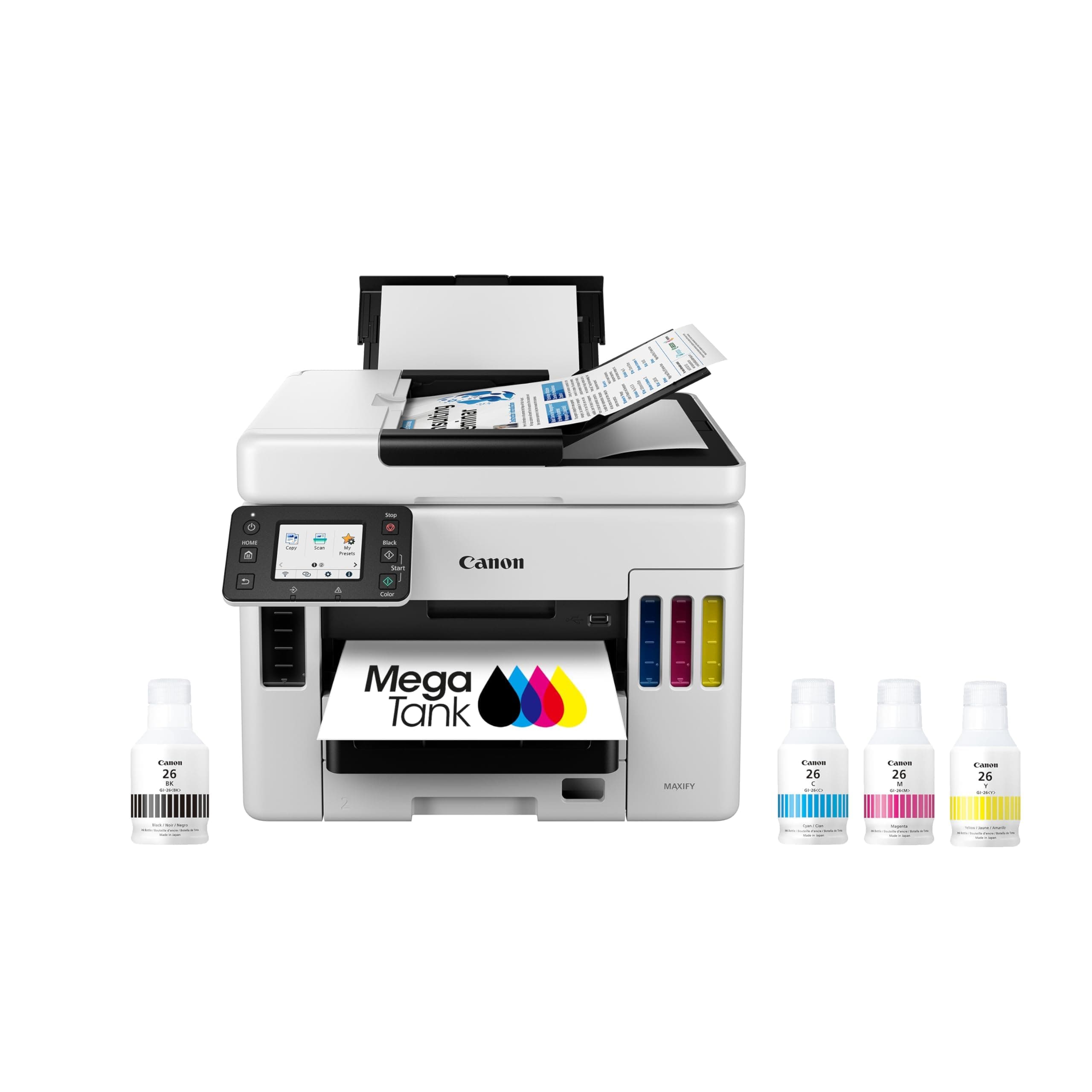


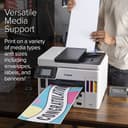
🚀 Elevate your office game with the Canon MAXIFY GX7021 — where power meets wireless freedom!
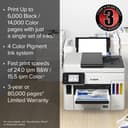
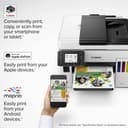
The Canon MAXIFY GX7021 is a wireless all-in-one inkjet printer designed for small offices, offering print, copy, scan, and fax capabilities. It features a 2.7” color touchscreen, automatic duplex printing, and a 50-sheet auto document feeder. With up to 2 years of ink included, it can print up to 6,000 black & white or 14,000 color pages per ink set, supporting high-volume, efficient workflows.


| ASIN | B09VR7GFSH |
| Additional Printer Functions | All In One |
| B&W Pages per Minute | 24.0 |
| Best Sellers Rank | #30,312 in Office Products ( See Top 100 in Office Products ) #43 in Ink Tank Printers |
| Brand | Canon |
| Built-In Media | MAXIFY GX7021 Wireless MegaTank Small, Office All-in-One Printer, Set of Ink Bottles (GI-26: BK, C, M, Y), Documentation, Power Cord |
| Color | White |
| Color Depth | 16,8 Bits |
| Color Pages per Minute | 15.5 ppm |
| Compatible Devices | PC |
| Connectivity Technology | Networkable , USB, Wireless |
| Control Method | Touch |
| Controller Type | iOS |
| Customer Reviews | 4.1 out of 5 stars 441 Reviews |
| Display Type | LCD |
| Dual-sided printing | Yes |
| Duplex | Automatic |
| Global Trade Identification Number | 00013803352887 |
| Hardware Interface | Ethernet, USB |
| Ink Color | Color |
| Item Dimensions D x W x H | 12.4"D x 16.2"W x 15.8"H |
| Item Type Name | Inkjet Printer |
| Item Weight | 28.6 Pounds |
| Manufacturer | Canon |
| Maximum Copies Per Run | 50 |
| Maximum Copy Resolution Black and White | 1200 dpi |
| Maximum Copy Resolution Color | < 4800 x 1200 dpi |
| Maximum Copy Speed Black and White | 24 ppm |
| Maximum Media Size | 8.5” x 14” |
| Maximum Print Resolution Black and White | 1200 dots_per_inch |
| Maximum Sheet Capacity | 600 |
| Maximum print Resolution Color | 1200 x 600 dpi |
| Model Name | MAXIFY GX7021 |
| Model Number | 4471C037 |
| Model Series | MAXIFY |
| Number of Trays | 3 |
| Other Special Features of the Product | Wireless |
| Paper Size | 8.5 x 14, 8.5 x 11 |
| Print media | Paper (plain) |
| Printer Connectivity Type | Networkable, USB, Wireless |
| Printer Output Type | Color |
| Printer Type | Inkjet |
| Printing Technology | Inkjet |
| Processor Count | 1 |
| Resolution | 1200 x 600 |
| Scanner Type | Flatbed |
| Special Feature | Wireless |
| Specific Uses For Product | Office |
| Total Usb Ports | 1 |
| UPC | 013803352887 |
| Unit Count | 1.0 Count |
| Warranty Description | 3 year |
| Warranty Type | limited warranty |
J**N
The everything printer
Initial Review Oct 3, 2022 Canon GX7021 All-In-One Printer The short version is this is a good printer. It is loaded with features, is fast, and of course the ink tank design is far preferable to the ink cartridge design. I recommend this printer. Now the long version. A key parameter for me was the printer must have both two sided scan and two sided print. These must function without manual intervention to flip and reinsert pages. It was not easy doing the research to meet these goals, especially the two sided scanning feature. Research worked best by downloading the user manual for each printer, also to ask users if the auto duplex scan was included. Sadly many people saw the advertisements that said, “Duplex Printing” or “Two sided printing” and thought that applied to scanning. In the end I could not find what I was looking for under $500. I just had to accept the fact that I was going to have to spend more than I’d ever spent on a printer. For about five years we’ve been using an Epson XP-830 which is a small, ink cartridge, full function little printer. That Epson died so we needed a new printer. The little XP-830 does have duplex scanning and duplex printing. I was surprised to see so many printers these days do not have duplex scanning. Aside from the duplex scanning we also wanted: - Color printing - Duplex Scanning and printing - Front loading and front eject of printed documents - The ability to remotely select 8x10 plain paper or 4x6 photo paper - One of the new ink tank designs - WiFi - Print from PC or Smartphone - Scan to PC - Print on card stock - Auto Document Feeder This printer does all of that and more. The one parameter we just couldn’t get around was a lower price. These things are expensive. After I ordered it my wife (the majority user of the printer) asked how much it cost. My response was, “You don’t want to know.” Setup was easy but took about ½ hour. That was mostly about loading the ink into the printer and allowing the printer to go through startup steps. The printer is relatively quiet but has a quite mode setting which will slow certain operations. As we’ve only had the printer for a few weeks I can’t speak of it’s reliability. Does it jam? Does it print clearly and properly? So far so good. Printing a photo isn't fast. But to copy pages it is quite fast. I knew this was a winner when my wife was pleased at how fast it is. I like the ability to control the printer from my PC or Smartphone with the Canon app. 2 x 250 sheet trays will keep us going for months without loading more paper. The price is the one undesirable factor. If you’re a small business this might be the printer for you. If this is just a family printer and you do a lot of printing this also might be a good choice. If you can live without the 2-sided scan feature you might find a less expensive printer. Or if you’re like me and you just have to have that feature this is the best one I’ve found. I recommend this printer
P**K
Bought As Replacement For Epson Eco Tank 4850
Solid Product So Far , Quick Printing Easy setup Functionality is Easy to Maneuver, Storage Capacity is Wonderful, Is Bulky But Well Worth it Given its more of an Business / Home Office Printer , Print Quality Is Excellent Fax Feature is Great to Have , Colors Are Vibrant and Clear And Connectivity is Excellent, I’m Happy With this purchase as I’m not afraid to touch it like the Epson - material is Not frail or flimsy - Has 3 Trays For Various Functionality Which is Wonderful to Have The ADF FEED WITH 2 Sided Scanning and 2 Sided Printing is A Life Saver Love the Transport Feature That Shuts Down the Ink Flow before Moving The Unit. This is My First Canon Product, But So Far I Am In Love With This Printer , Definitely Worth Every Penny and Would Highly Recommend it Review For Model : Canon Maxify GX7021
M**P
If you want a reliable printer that will save on ink money, this is for you.
Product: Canon Maxify GX-7021 Bought: February 1, 2023 Usage: ~20-50 prints daily, 6 days a week. Mostly invoices, sales, artwork for logos Page Stats: 14220 total pages printed - 6955 B&W, 7265 Color Cost: Purchased for $599 Ink Cost: Canon GI-26BK = $27, LCL compatible GI-26BK = $11 Maintenance Required: Moderate to Low Internet Setup: Wired LAN (by preference; tested wireless/mobile printing and those work fine as well.) I will keep this concise because I am only here to state the facts from my year and a half of experience with the Canon Maxify GX-7021. This is my first "inktank" printer, but after many years of paying $25-60 every few weeks to a month or so for ink cartridge replacement on my Epson, I was ready to try a new alternative. Skeptical at first because of the high up-front cost of the printer, I can say confidently that it was worth the investment. Wanted a no-nonsense solution for my business and this printer delivered. In 18 months straight of constant use, I have had to refill the black ink 3 times and colors only once. I've replaced the maintenance cartridge 2 times. Only maintenance issue I have had to deal with is that the auto-print head clean is not the most reliable; I just open the printer and clean the head myself manually every few months or so if I ever notice smudging or other marks. It is quite an easy process if you know what you are doing. *MAIN REASON FOR <5 STARS*: scanning on the glass more often than not has produced sub-par scans. My business requires scans of logos on apparel at times, and the top scanner has a tendency to darken and shift the colors of the item being scanned. I am aware that lack of light passthrough is likely the culprit in this issue but it is an issue for me nonetheless. Overall, the product works as intended, and with just a mild amount of care of the machine it will continue to print clean and quality pages. Equally as important, it has saved me almost enough ink money to pay for itself in just a year and a half. I absolutely recommend the GX-7021 if you need a reliable daily driver.
A**A
Best Printer I've Ever Owned
Purchased the Canon printer to replace a Brother printer that went through ink cartridges every month. We use the Canon for personal and small business printing. I needed an all-in-one with a scanner and an ADF for larger documents. I did compare with a similar Epson printer and chose the Canon because the scanner could accommodate larger documents. Pros: 1. I have not had to add ink to the machine since I purchased it. I can't believe it. I have printed 200 cards with several photos on the cards, work documents that include color maps and photos, tons of other documents, color signs and nametags for an event. I have had to do one maintenance ink nozzle cleaning. My Brother printer needed to be recalibrated after every big job and wasted sooooo much ink. 2. It is efficient and fairly quick and quiet. 3. Scanned documents look good. 4. Two trays for paper and a rear feeder for envelopes make it unnecessary to constantly change paper settings or reload different paper. 5. Print quality for black and white and color documents is excellent. Cons: 1. Scanner software from Canon for the desktop is not great, kind of clunky, and seems like it's from the early 2000s. 2. The tray for the finished printed documents is very small, and won't hold a big amount of paper. Larger documents end up on the floor. 3. The touch screen is a bit small. I have big fingers. 4. Scanner does OK. The Brother scanner was fabulous - I could scan in 50+ pages with no problem, really the only plus for that all-in-one printer. Canon scanner does the job. I don't leave the room if scanning in more than 10 pages. The quality of scanned documents is good. Overall, I love the Canon Printer. It's efficient, does good quality copies, and I'm not spending hundreds on ink cartridges.
C**Y
October 19, 2024 Still an Absolute piece of garbage!
Third Review see below for older reviews. This printer was $700+ and it's not even 6 months old. I should have written this review three months ago! Every single day it's something. You print a test page to make sure all the ink prints. Start printing and with no notice at all, 30 pages in and there's no black ink. I cleaned the print head, did the nozzle check, cleaning then deep cleaning again, which by the way, seems to just pour out at least a half a cup of each color of ink. Seemed fine and again... it just stops printing ink. Even when only scanning, it's almost constantly running to clean itself. You have to babysit almost every single page to make sure it keeps printing. God forbid you need to print 20 pages and just walk away. The last few won't have any black ink, and the few pages before stopped printing just enough black ink that you have to throw the paper away and reprint. The maintenance cartridge is a big as an adult 8 shoe and I'm already on the 4th one that has filled. When the cartridge is close to full, you can't scan or print or do anything. It's just an absolute piece of garbage. No big surprise. I don't know why I hoped this printer would be better since it's an eco tank that you can refill with the liquid ink bottles. I've spent more money on wasted paper than I ever have on ink. Second Review (Please see below for original review) September 9, 2023. I have been having a few really weird problems the last few days possibly due to solar flares? I print via a USB and suddenly the printer has started to spool pages and is just not printing right now at all. Yesterday it started printing 2 pages to a page and using landscape printing without me changing any of the settings. The blue ink printed light pink so I did the maintenance cleaning which dumped 1/4th of the ink from all cartridges and filled the maintenance cartridge. (That I ordered here on Amazon for $21). It seems every single time I try to print now there's a whole brand new problem. I print 102 pages double sided but I only do one and I give the printer at least an hour before I do another one. Today it printed page 1 to 4 and a fourth of page 5 and automatically deleted the document in the print query. So, I tired printing page 5 to 102 double sided and it printed to page 88 and deleted the document again. The blue did finally print blue again and I still have not been able to finish printing this one document, still leaving about an hour between attempts. I am going to turn it off for a while, unplug it, and if I continue to have problems I'll try to reset it using the available menu on the touch screen. Maybe a turn off and back on will fix it. I do have to say, I have printed at least 4 cases of 10 reams of paper before having a single problem. I'll post another update tomorrow on Sept 7, 2023 Ink bottle refills are only $11. I have printed at least 5000 pages so far and used 1/2 the black ink (132 ml of black that came with it). Each bottle is 132ml. Only used 1/4 yellow, blue and red. Not 1 tiny problem so far. I will update if need be. Had about a month. Super happy with it! Can scan 50 pages at a time, super bonus! Has 2 paper trays.. I put recycle in bottom and can click print, printer properties. main tab and choose the bottom paper tray. As of today I give it 10 stars! It prints super fast.. I try to print only 50 pages at a time to give it a rest and have only printed 100 at once just a few times with no problems. I average about 300 sheets a day November 2023 No time for a long review as I have spent hours trying to get it work. I swear I'm spending three times more on ink because it's always stopping to clean and all I am doing is scanning. Update October 2024 I have now gone through 10 of the maintenance cartridges that are approx 12 inches long by 3 inches wide and 2 inches tall. They fill up pretty quickly because the printer continuously cleans itself although while printing, all of a sudden, ink is just missing from the page. I'm sure it's because the machine is constantly just pouring it in there so you can buy more ink and more maintenance cartridges. The cartridges are big enough I think it will hold well over 2 cups. You would think that will all the ink pouring through with cleaning that the nozzles wouldn't clog and it would work. No. You have to manually clean it 14 more times. Yesterday it took 23 attempts before it finally accepted the new cartridge was installed. New problem today is it won't scan more than 10 pages. It scans up to 50 pages at a time, but not today. and for the last several months I have tried to scan one single page and it says it's jammed. It easily goes through when you click "ok" and then it scans just fine. If you do nothing but scan, it still has to go through the cleaning and pour out more ink about every 20 scans or so. I am so fed up with it I think it might be easier to place your paper on a window and trace over it to make your copy. 1 star is too good. I give it a minus 10!
B**K
Best Home Office Multifunction Tank Inkjet, period.
Perfect upgrade after EPSON ET3850 wifi board randomly decided to quit working. Much reliable, faster, higher quality scanner with single pass duplex. Significantly faster printing and better text/color illustrations/graphics print quality with faster flipping for duplex printing. Seemingly more reliable Wi-Fi. Better setup experience, more intuitive user interface. Better, less bloated, modern-looking and functional desktop and mobile companion software. In a reasonable size, smaller than a similar capacity color laser with just a fraction of supply costs. Moreover, user replaceable maintenance cartridge and print head.
J**N
Great Printer Beats Epson Hands Down
Owned an Epson Bulk Tank Printer ET-3850. Complete junk. Printed marginally OK and was very miserly on ink however the paper handling was awful. Pack a lunch if you need to scan anything. Anyway returned it to Costco (they were great). After much research, we chose the Canon Bulk Tank Printer GX-7021. What a printer. It prints much faster, scans very fast and has duplex scanning and printing. Zero paper jams or incomplete scans. Printed color page is night and day better than the Epson. Photos are crisp and bright. The only issue I can come up with is it doesn't do borderless prints. I suspect that they save that feature for their photo printers but its a small issue. SO if you are in the market for a terrific printer look no further. This printer will hold almost 2 reams of paper. Its a great small office or family printer. Great Job Canon!!!!
N**I
Best for small businesses
Perfect for small businesses! I have had this printer for almost a year. I paid over 700, so the current price is a steal! I have owned several other home printers but for biz I wanted something that could duplex scan AND duplex print! It has a feed tray, I put my double sided originals in and it sucks them up, scans both sides simultaneously, then prints out double sided!!! What a time saver! I print in both B&W and full page color. I’m always impressed with the quality and how quickly and quietly it prints. I’m writing this review because I have finally run out of ink, and it’s almost been a year of regular use!! From past experiences with other canon mega tanks: do NOT buy generic ink. I used to only buy generic ink for all my previous cartridge style printers, but when I put generic ink into the 6000 line of canon mega tanks, it stopped working. So spend a few extra dollars, and it’s only once a year, and get canon ink.
Trustpilot
Hace 2 semanas
Hace 3 días