We remain fully operational. Our teams are working around the clock to ensure your deliveries continue safely.

Descargar la aplicación


Servicios al cliente
Sobre nosotros
Copyright © 2025 Desertcart Holdings Limited
Descargar la aplicación


✈️ Elevate your cockpit game — fly like a pro, land like a legend!
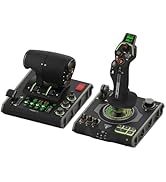
The Turtle Beach VelocityOne Flight Universal Control System is a premium, all-in-one flight sim controller designed for Xbox Series X|S, Xbox One, and Windows 10/11 PCs. Featuring a realistic 180° yoke with hall effect sensors, modular throttle quadrant with customizable levers, integrated rudder and brake controls, and a full-color flight management display, it delivers an authentic and immersive flying experience. With 26 programmable buttons, 12 analog axes, and a secure clamping system, it’s engineered for both casual simmers and aspiring pilots seeking precision and customization.












| ASIN | B09JM8SX8G |
| Additional Features | Ergonomic |
| Best Sellers Rank | #808 in Video Games ( See Top 100 in Video Games ) #5 in PC Game Flight Controls |
| Brand Name | Turtle Beach |
| Button Quantity | 26 |
| Color | Black, Red |
| Compatible Devices | PC |
| Connectivity Technology | USB |
| Controller Type | Yoke |
| Customer Reviews | 4.0 4.0 out of 5 stars (2,388) |
| External Testing Certification | Não aplicável |
| Global Trade Identification Number | 00731855007165 |
| Hardware Platform | xbox_series_x |
| Item Dimensions | 19.01 x 7.2 x 19.5 inches |
| Item Dimensions D x W x H | 9.8"D x 6.46"W x 19"H |
| Item Weight | 10 Pounds |
| Manufacturer | Turtle Beach |
| Model Name | VelocityOne Flight (TBS-0715-02) |
| Package Quantity | 1 |
| Power Source | Corded Electric |
| UPC | 731855007165 |
J**N
Turtle Beach Customer care is Number 1
I spent a long time researching what controller I wanted to use for my MSFS2020 I am a student pilot, and I wanted something that felt like I was actually in the seat of a Cessna 172. I heard hundreds of people talk about the Turtle Beach Flight Yoke and controllers. Let's first say my wife thought I was losing my mind spending that much money on a controller, but I was always raised and taught you get what you pay for. So, with that being said this is a long review but worth the read. My first week of having the Turtle Beach controller it sat on my desk still wrapped up I was spending as much time as possible reading up on it and watching video after video. I will say this once you get everything dialed in correct it honestly feels like you're in the seat of a plane and you are ready to fly. So, the unthinkable happens after only using it 3 weeks it breaks, I was practicing my takeoff and landings and was noticing the yoke wasn't reacting to what I wanted it to do. Turns out a small piece inside the system broke off and this prevented me from landing the plane. At this point I was through the roof mad that how could something as good as Turtle Beach Yoke system go bad in a month. I contacted Turtle Beach Customer Service and spoke with Viele Grüße Sascha very helpful. Customer Support Agent Outstanding service they listened to my concerns and within days had a shipping label made for me to send the controller back and as that one was on its way back a new one was sitting at my front door. This is Truley what great Customer service is all about. So, with that being said, Turtle beach flight yoke system is the closest thing you will get to the real feeling flying a plane. and you always got top notch Customer support behind you making sure you are being taking care of.
A**R
Well made and well played
I use this device for Microsoft Flight Simulator. I will give a heads up that the initial setup for the prop and fuel mixture controls will take some figuring out, but right out of the box I was able to fly, steer, and use a lot of controls on the yoke and side programmable buttons. It feels sturdy and there are additional options for mounting. You can clamp mount (which I do) or you can use the included gel pads that help keep it from moving around while in use. The clamp mounting is great with a top drawer access on the yoke assembly to get to the hex tool and bolts. Very very simply to use and get going. The gel pads definitely work because it took a bit of paint off of my desk, so keep that in mind if you plan to use them. Overall I have and will continue to recommend this item.
B**E
Terrible Quality Save Your Money!
First off the device does what is intended and is a yoke and throttle quadrant but that's about where it ends. The device was well packaged and was shipped inside of two boxes. Not needed and wasteful but ok it works. When I first pulled the Yoke out of the box and inspected it when I flipped it over internal parts started moving around like something is broken inside. Sounds like a screw with how loud it is. I thought great going to need to return it. But the Yoke still works. The springs are jerky and not really smooth at this time. This makes fine adjustments a complete pain in MSFS. To top it off I take this thing off my desk whenever I am done flying and put it back in the box. While putting it back in the box for the very first time I noticed a POV hat had come off while removing it from my desk. I thought interesting it must just pop off like normal ones no biggie. But the actual part it connects to is broken! Not even 8 hours old and a POV hat is broken. For the price this thing should be far better than it is. This is a $199 setup at best! The ONLY saving grace for this pile of crap is the throttles. Its the only one that has the same throttle found on most trainers. The big down side to them is you HAVE to use them with the YOKE so I cant buy a better yoke and use the throttles. Had I not just spent a bunch of money on my ground school and PPL training I would be returning this and buying the honeycomb stuff. Stay clear of this device if you are at all serious about GA sims or actual flight training. It will leave you disappointed and it will break at the slightest touch. Pure garbage.
R**.
Better than expected
This yoke and throttle quadrant by Turtle Beach has turned out to be better that I expected. I previously used a yoke by CH Products, which was almost useless due to its poor design and quality. The VelocityOne Flight yoke system is much better. I had read that there was a 'stickiness' problem with the yoke shaft causing problems in pitch control. Mine unit has none of that. It works smoothly. When I first received the unit, my computer (and MS Flight Simulator) only recognized the throttle quadrant and did not detect the yoke at all. I thought the unit was defective, but then I suspected that the problem was with the drivers in Windows 10. I updated the drivers that showed up in the Device Manager for VelocityOne but that made no difference. It was only when I updated the two drivers listed under "xBox controller", which only appear when the unit is plugged in, that the yoke was recognized and it then worked exactly as it should. I highly recommend this system for use with Flight Simulator.
G**R
Everything worked except yoke in/out (pitch control)
VelictyOne Flight System: No yoke in/out (i.e. no ability to take off). All other functions worked except that one, which is pretty darned important! I believe I was sent a defective unit. The yoke was slightly off centered, biased slightly to the right. The yoke moved in and out but no response was registered from the "Training" panel on the tiny LCD display or from the xBox itself. Returning the unit. Willing to try another one but "replacement" was not an option, so I will be getting my money back. The unit itself feels pretty solid, and the clamping system is very, very good. Rudder pedals: They look physically well-built. However, to use them independently you need WinDoze. So, you can use them standalone for an 8-FPS blue screen every 30 minutes experience on a $2000 system, but not for a 30-FPS quality experience on a $450 game system. Huh... Incidently, I BOUGHT the VelocityOne Flight System. It was defective: everything worked PERFECTLY except the yoke pitch control -- kind of important for things like taking off and landing. Will probably give it a second chance, since the competition's management is fighting with each other and they are not producing new units -- this might be the only XBox option. UPDATE: It's actually a really good system -- provided you get one that WORKS. The rudder system is heavy and solid, the yoke is smooth, the controls are sensibly placed. We had a rough and turbulent start but looks like a smooth flight now that I got the original defective VelocityOne Flight replaced (and should be refunded for the defective one).
D**N
Works great, looks cool.
I was trying to decide between this and the Boeing controller and my thought was that the Boeing controller looked cooler but this was more practical because it has controls that mimic the type of aircraft that I might one day learn to fly. And in that respect I couldn't be happier, the pull out throttle and mix controls do work just like the matching controls in a Cessna 172. What I didn't expect was how cool this thing does look. I thought the LED stuff was a gimmick that I wouldn't care about but it really does look pretty awesome. And the controller feels great as well, I really enjoy flying with it as opposed to a flight stick.
B**R
It’s good! But I returned it.
Summary: If you already have flight controls, you probably won’t be happy with this. If you have cheap stuff or nothing, you will probably love it! I wouldn’t say I’m a sim snob, but I’ve got quite a few hours under my belt. Have been using the fancy Logitech H.O.T.A.S for several years and decided to switch to a yoke. I was stuck between this and the expensive Honey Combe gear, but landed on this one due to the sale price. Observations: It is somewhere below premium, but not cheap feeling. 3/5 The pull throttle, prop, and mix controls are the best part. 5/5 The 4 levers are ok, very light on the push, but they do have a reverse detent. 3/5 Never used the trim wheel. It freaks the plane out when you use the yoke buttons then the wheel. 1/5 The button on the throttle are handy but a little small. 3/5 The indicator panel is finicky at best with PC. 1/5 The yoke feels fine to me, however I’ve flown stick my entire sim career. 4/5 Rudder on the yoke is very nice if you don’t have pedals. 5/5 The default button mapping is good, but a little crowded on the yoke. 4/5 And my biggest grip and what led to my return. The flight screen… 1/5 Very frustrating to navigate, but hey it’s a little screen… the real problem is they include flight profiles, but I could tell the did anything on PC! This would be a great thing, if it actually disable the sticks, or pull throttle. I couldn’t tell what it was doing and there is no customization that I found to it. All that being said; if you have nothing, this will be great. Perfect first controller, or upgrade from cheaper options. If you already have something nice, you will probably be a little disappointed. I really did consider keeping it and just working through the issues, but I would rather take the money spent on this and get a true premium option, especially if the amount of set up is the same.
S**N
So amazing
I got it at the best price I’ve seen for a while. My son loves it. He is taking flight lessons and still loves to use this set up.
Trustpilot
Hace 2 meses
Hace 4 días