
Descargar la aplicación


Servicios al cliente
Sobre nosotros
Copyright © 2025 Desertcart Holdings Limited
Descargar la aplicación


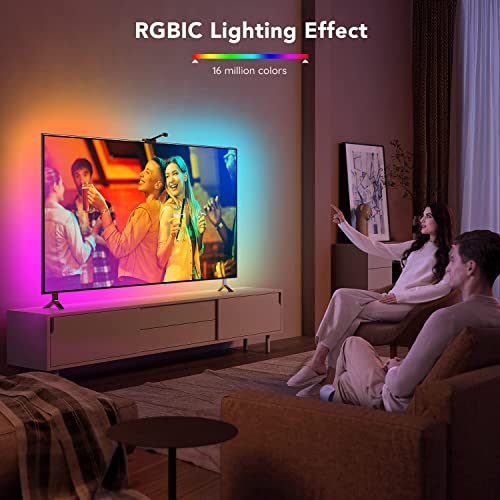
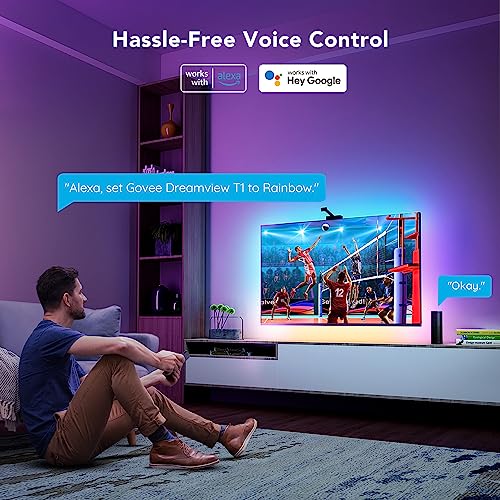


✨ Transform your TV nights with smart, cinematic backlighting 🎬
The Govee Envisual LED Backlights for 75-85 inch TVs feature a 16.4ft RGBIC LED strip paired with a 1080p intelligent camera that captures on-screen colors in real-time. Compatible with Alexa and Google Assistant, it offers voice and app control with over 99 scene modes, dynamic multi-color lighting, and music sync. Designed to enhance viewing immersion and reduce eye strain, this modern smart lighting system is perfect for gamers, movie buffs, and tech-savvy millennials seeking a premium home theater upgrade.


| ASIN | B09J4PPFK2 |
| Batteries Included? | No |
| Batteries Required? | No |
| Best Sellers Rank | #182,343 in Tools & Home Improvement ( See Top 100 in Tools & Home Improvement ) #1,091 in LED Strip Lights |
| Brand | Govee |
| Bulb Base | Wedge |
| Color | Multicolor |
| Control Method | Voice |
| Controller Type | App Control |
| Customer Reviews | 4.6 4.6 out of 5 stars (30,975) |
| Date First Available | November 8, 2021 |
| Included Components | 1080p camera included, 16.4ft TV LED Backlights included, Adapter included, Control box included |
| Indoor/Outdoor Usage | Indoor |
| Item Length | 16 Feet |
| Item Weight | 1.59 pounds |
| Item model number | H6199 |
| Light Color | Multicolor |
| Light Source Type | LED |
| Manufacturer | Govee |
| Material | Plastic |
| Number of Items | 4 |
| Number of Light Sources | 150 |
| Part Number | H61991D4 |
| Power Source | DC |
| Special Feature | Onscreen Color Capture, Govee Envisual Color-Match |
| Special Features | Onscreen Color Capture, Govee Envisual Color-Match |
| Style | Modern |
| Theme | Movie & Gaming |
| Voltage | 12 Volts |
| Wattage | 24 watts |
G**S
Awesome TV Backlight FX! Linked to Google Assistant and Google Home
I initially got this after taking a look at a couple of Youtube reviews and comparisons between this and some well-known name brand similar products; which actually don't do what I was looking for. After taking the plunge and purchasing this product, I went to work setting it up. It takes about 3-5 minutes ( and I have a 55" curved TV, which I hoped wouldn't have been an issue). You just follow the very simple setup directions after downloading the app on your phone... put the orange squares on the denoted areas around the outer perimeter of your TV, hook up the Camera and control box... and you are ready to set up. I initially got this to play PC games on my Curved TV and later found out that we all should have backlighting on our TV's' ; as without it, we are in all reality - actually causing harm to our eyes over time. The response and reaction time was just as I had seen in several Youtube Videos ( super fast and immersive as well as you have the ability to sync it up with music you are playing via Bluetooth. There are many great built-in FX as well as a brightness control and custom scenes/mods to choose from. Once I had this configured, I linked it to my Google Home and Google Assistant. Now all I have to do is tell Google Assistant when I want it off/on as well as what brightness level I require without having to touch the app or pick up my phone, in order to control it. Then when it is time for bed... I just tell Google Assistant to "turn all TV's off" and also have the option to tell Google Home " all lights out " and just like that.... we are good to go to bed without having to worry about strictly having to rely on a hand-held digital device to operate the control application. Very a reasonably priced device compared to other similar products and it has worked flawlessly so far - I could not be happier with my purchase! [ I actually want to add more to it and the Govee lighting systems they manufacture. Love at first sight. It even, helped a good friend while they were here as they generally become and or are sensitive to many of my very bright smart bulbs; which made a major difference when they come to visit. The immersive real-time background color that follows whatever you are watching on your TV [ movies, video games, music videos...etc]. I have wanted something just like this for a long time and I finally found the right product to fit my needs.
C**T
Even Better Quality than the 50"-65" Version
I owned an 4K LG 65" OLED E6 (2016 model) and about 4 years ago decided to try the smaller version of Govee Immersion backlighting system with the 1080p camera and RGBIC LEDs. It worked well enough. I installed the camera on the bottom of the TV due to LG's OLED TV design where the top of the TV is just thin glass with all the electronics on the bottom 1/3. It just so happened that the width of the LG bottom was a perfect match to the width of the Govee camera clamp - a no brainer.. I calibrated the system several times using different methods from using the Govee orange stick on blocks, room lights on, TV off to the methods used by several of the Govee Immersion users on YOUTUBE- using the virtual orange blocks with TV on tuned to the Govee set up video on youtube, room lighting at the ambient level actually used when watching (or lights off if that is the way u watch TV). Got it calibrated as best I could but still had some problems with REDs or BLUEs saturation or flesh tones too red or washed out. I chalked that up to limitations with my home theater room setup, the Govee product or a combination of things. When I upgraded my 65" LG to the LG 77" C1 - I debated whether to move the system over (Govee talked me out of that - when I asked if I could just purchase a longer LED string they explained that the camera was also different - obviously - it have to "see" much larger screen surface therefore the macro "fish lens" the camera uses was different as was the length of the camera holder bar. So after looking at other systems or maybe no system at all - I decided to buy this model - 75" to 85" version - not expecting a big improvement - WAS I EVER WRONG - The longer LED sting fits better that the 65" model - probably because my TV was at the LIMIT of the smaller version whereas with larger version, my TV size is in the middle of it's range. I was able to mount the LED string approx 3/4" from the edge on all 4 sides - with the LG C1 - this kept me away from any steep angles and "humps" caused by the placement of the internal electronics - the LED strip sat flatter all around (on the 65" the bottom row of LEDs were at a worse angle causing bottom lights to have less reflective effect. The RGBIC segments are noticeably brighter than the smaller set. The LG C1 has the power indicator LED and RF remote control sensor at the bottom of TV in the exact center and the bottom thickness of the TV is too wide to support the Govee camera bracket - so I put my fabrication thinking cap on (surprised that no one I found on youtube had a decent solution). I had some 3/4" x 1/2" wood scrap in the garage and cut it to length (2.75") to fit the Govee Camera backplate. I used the sticky adhesive on the thin front lip of the camera mount that overlaps the front glass panel to keep the camera at the correct downward angle then I laid the wood narrow side (1/2" side) flat on the bracket (You can use some extra adhesive to better hold the wood to the plastic camera bracket - I used E-6000 - a very thin layer - clamped wood for a few hours if u go this route before installing on TV- so adhesive dries and doesn't get on your TV glass) moved wood brace towards back of glass until a nice snug fit - you want to be able to remove bracket/wood assembly if need be in the future. Once I has the correct spacing between the wood brace and TV glass so camera stand steady and at the correct outward angle then if using glue, mark, add thin layer of E-6000 or equivalent, clamp & wait about an hour until adhesive sets - then center on top of TV - the wood stands in back of bracket 3/4" tall, the slot that is formed between the wood (3/4" tall) and the front lip of the camera bracket (1/4" tall) is what holds the camera assembly in place on top of the TV as the LG TV Glass is what fills that slot. Neatly route cables (Camera, power, RGBIC LEDs) and attach to the connection block - make sure you take into account the movement of your TV Wall Mount system - mine moves in 8 different directions and telescopes outwards quite a bit, so where you stick this connection block is important as you don't want the wires to be pulled out of there connectors. In my case I was lucky to arbitrability leave 3/4" of glass on the outside edge of all 4 sides of the TV - this left just about the right amount of glass so that my fabricated camera clamp system worked and fit - if LED strip was any closer to the edge of the TV the LEDs would have interfered with the wood I glued to the camera bracket. Updated App/Improved 1080p Camera: I was plesantly shocked over the improvement of the Immersion system for the 75"-85" as compared to the 50"-65". I calibrated using the YOUTUBE "virtual Orange block" method and I followed the updated video instructions from both Govee & these "expert" users - the first major change in the calibration process is to make sure your TV is properly calibrated to "factory specifications" for your TV model, different picture source types - e.g. - SD (standard definition content) HD (high definition - 1080p), UHD (Ultra High Definition - 4K or 2160p), HDR (High Dynamic Resolution - HDR 10 or HDR 10+). Dolby Vision HD 1080p and Dolby Vision UHD- 4K/2160p) - with each video type if supported by your TV, would have a different set of controls/adjustments/calibration attributes - that should be properly set and saved to be used automatically next time TV switches over to that resolution. This coincides with room light = make sure you set the TV up in the room light u will be using most of the time. Calibrating Govee using YouTube method was a breeze - ran thru it several times each time to a finer degree of precision - the Govee Immersion now projects those peachy flesh tones near perfection, the updated app with the White Balance practically cures those bright Red issues- and most important is calibrating TV especially the over saturation - the Govee saturation bar no more than 20%, Intensity 80-100 & white balance to match your TV mine is slightly left of center although it depends whether I have my Blue Filter (cool white filter to reduce eyestrain) on or off - "normal" This is in fact another way to adjust the TV backlight from cool white to warm white - if u change this White Balance on Immersion app should follow, There are EXCELLENT youtube Test Videos for Immersion - some are just fun or demo to impress your friends - other are to test the hardest colors/patterns to dial-in (calibrate) - lots of good information. Either Way OUT OF THE BOX this Immersion system is far better, it's brighter, better color accuracy much improved color rendition, App provides better and faster calibration and the color changing speed and ability to follow even the most complex screen color changes in much improved as if the color processing engine was upgraded - Govee denies any major hardware improvements other than the new camera with wider lends to capture the edges of the larger screen & more LEDs & more powerful power supply to support more LEDs (I think it also makes brighter. I integrated Immersion into my home theater wifi contolled Alexa system - but find myselg using it only to fine tuning as ther is no need to constatly make adjusments like I did with previous model - EXCELLENT & WORTH IT.. Ifit is not doing everything I said it could do then u did something wrong My Main ERROR when I put the new ones on my new LG 77" is I put all new Lumary 6" Full color LED recessed lights 8 in 2 rows on ceiling and 65 Reiga smart ceiling fan with light center of room & 4 wall sconces with Treatlife full color smart lights - Camera is top mounted - when these lights are on they reflect off TV screen - I FIXED by programming Alexa when I say turn on home theater to tuen all lights t 1% intensity, fan light off, color all lights GOLD and turn off 2 ceiling and 2 wall sconces closet to TV - fixed problem (Also made me realize previous install with camera on bottom may have been impacted by wall & ceiling lights) Home Theater Room Renovation: I renovated my entire Home Theater equipment upgrade (Replaced 20 year old Onkyo DS 989 to Emotiva RMC-1, new amps reused Def Tech main Speakers but added 4 new ceiling Toshiba 10" x 4 for Dolby Atmos & all speakers received new high power (300 Watts per channel) amplification - added 1 new subwoofer (18"/500W ULD 18 Velodyne) for a total of 3 Bass Management controlled subwoofers and 3 free (speaker output level controlled) subs. Total of 17 speakers as part of home theater system and 4 outdoor speakers (Zone 2) - all Home Theater Room lights, fans, blackout window shades, including Govee Immersion TV Backlights Lights and home theater components are wi-fi controlled via Alexa. Left Ceiling White (wife would not let me change it) - Wall with TV is now Flat Navy Blue as is opposite wall where new home theater seating is Four new Valancia Tuscany Chocolate brown Recliners, power recliner, headrest, lumbar support, each with removable table, LED lighting for cup holders and control panel - also Blue LEDs under chair lighting - 2 side walls - one i outside wall with smart Ikea Gray fabric Blackout Smart Shades (Alexa Controlled - walls painted Flat Titanium - side walls - with windows and with door to Family Room - considering wood bi-fold doors for 2 wide doorways - one to rear of house Family Room the other on wall with TV to front of house main entrance and 2nd level stairway to provide better privacy/sound control - ceiling speakers also need to be better encapsulated/insulated to prevent sound to 2nd story bedrooms.
S**Y
جميله خذيتها وقت خصومات
L**L
Lo compré para mi pantalla de 75 pulgadas y debo decir que eleva la experiencia de visualización bastante. Ya sea para películas, tv o videojuegos es una gran opción. La instalación es muy fácil y las instrucciones son muy claras, su aplicación permite personalizar la experiencia de varias formas. Creo que el producto es caro, pero vale totalmente la inversión.
P**S
I have enjoyed using these lights with my TV, especially at night time. I have a very thin OLED TV (LG CX) so the camera doesnt fit on top of the TV like it shows in the pictures. Instead I have it lying on my TV board facing upwards towards the TV. It is difficult to keep it in one place so I will give this 4 stars, but I definitely recommend it to people who want backlighting for their TV. There is a calibration video which is easy to find on YouTube too if you do not want to attach the foam blocks to your TV when setting it up.
W**W
I recently purchased this Govee TV LED Wifi backlights and I am thoroughly impressed with its performance. The installation process was a breeze and connecting them to my WiFi network was a seamless experience. The app that comes with it is user-friendly and allows for easy customization of the lighting effects. The backlights have added a new dimension to my TV viewing experience and I can highly recommend them to anyone looking to upgrade their home theater setup. The color accuracy and brightness are top-notch and the lights sync perfectly with the on-screen content. Overall, I am extremely satisfied with my purchase and believe this product is worth every penny.
T**I
The treatment was more than wonderful and my shipment arrived exactly as described. I contacted the seller to change the shipping location and he did what was necessary quickly and professionally and the way the shipment was packed was more than wonderful. In addition i install on my 65" TV all the colors matching with the TV colors.
Trustpilot
Hace 1 día
Hace 1 semana