We remain fully operational. Our teams are working around the clock to ensure your deliveries continue safely.

Descargar la aplicación


Servicios al cliente
Sobre nosotros
Copyright © 2025 Desertcart Holdings Limited
Descargar la aplicación


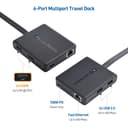


🚀 Elevate your workspace — dual 4K power and fast charging in one sleek hub!
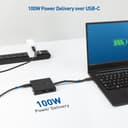
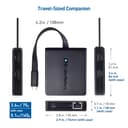
The Cable Matters USB C Multiport Adapter is a versatile docking station featuring dual 4K HDMI outputs, two USB 2.0 ports, gigabit Ethernet, and 60W power delivery. Compatible with USB-C and Thunderbolt 3 devices on Windows, it offers reliable multi-monitor support and fast wired internet in a compact, portable design ideal for both office and travel.


| ASIN | B0746P6LPP |
| Additional Features | Bus-powered, Dual Monitor, Power Delivery, LED Indication, Portable |
| Brand | Cable Matters |
| Color | Black |
| Compatible Devices | Monitors |
| Customer Reviews | 4.1 4.1 out of 5 stars (356) |
| Enclosure Material | Plastic |
| Hardware Interface | Ethernet, HDMI, Thunderbolt, USB, USB 2.0 |
| Item Weight | 0.01 Ounces |
| Manufacturer | Cable Matters |
| Mfr Part Number | 201056-BLK |
| Model Number | 201056-BLK |
| Number of Ports | 5 |
| Operating System | windows |
| Total Usb Ports | 2 |
| UPC | 818707021651 |
J**H
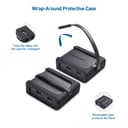
Lot of sketchy or glitchy USB-C hubs out there that don't fully support the protocol or just are not well designed products. This one just works. Either with my Note 9 for Dex (USB-C), my HP laptop (TB3) or any other device compatible with this type of adapter, it just works. My laptop has an issue with every dock I've tried where it doesn't recognize USB ports or connected external monitors 75% of the time without disconnecting and reconnecting a dozen times. This device works correctly about 90% of the time and when it doesn't, I only have to disconnect the external power supply (my laptops) from it and it works fine. This is a fault of my laptop, not this adapter. If you don't need Thunderbolt speeds outward from this adapter, you'll be perfectly happy with it. It's perfect for travel and as a static device. I have two and use one at my desk as a dock and travel with the other. With my Note 9 with Dex, I don't even need to bring a computer with me, if I don't want as long as I have a monitor and kb/mouse at my destination. Con: Rubberized cover is bulky and not all that necessary. Luckily it is easily removable.
A**.
Works so great for my dual monitors or 3 with laptop open. Helps to charges if you connect the laptop charger. So much more cost friendly then the brand name ones and works just as well.
M**E
Edit: Upgraded to 100w USB-C wall wart today and everything works perfectly. If your PC wants 65w, you need MORE POWER to make the USB2 ports work and the computer not to complain about power. This is everything I wanted in a doc. RJ45, Dual HDMI for two monitors, and USB for keyboard&mouse. The only negative is that the power delivery is limited to 60w but the computer wants 65+ watts. I have a 65w power adapter that came with the PC, but putting this in line with the power adapter gives an error every time it boots up that I have to bypass. Otherwise, its pretty good.
A**R
I feel like I've been living under a rock until I bought this. So cheap and small, doesn't require a power adapter and supports 2 x 4k screens. Only wish the USB cable was bigger but then it wouldn't be so easy to pack for travel. Couldn't recommend it more.
B**A
The reviews for this specific product on Amazon.com said great things about this dock so I decided to get it. After using it for about 2 months, here's what I think of it. What I like most about it is its size. It's very small and lightweight, so it's great for travelling which is what this dock was designed for. The rubber case that it comes in slides off fairly easily so works as a stationary dock too. The build quality of the dock is also great. The thunderbolt 3 cable that goes into your computer is flexible but sturdy, though I do wish it could be a little longer. What I don't like about this dock is that it is riddled with small problems that come up constantly. The dock allows for two monitors to be connected to your laptop. I have two monitors connected to the dock. I want to say that over half the time I start my laptop up, only one monitor will actually receive a signal. It's not even a consistent issue either. I've swapped plugged the monitors into different ports and used different cables, but it's always a different monitor that's the issue, which is incredibly annoying. I can solve this problem by unplugging the dock from my laptop and plugging it back in, but that means I can't put the dock anywhere out of reach to free up space on my desk. It always has to be close so I can unplug it and plug it back in. The second major issue I have with this dock is that the USB ports on the side are essentially useless. There are two USB 2.0 ports that you can use, but don't expect to use anything of real significance on those ports if you're using two monitors. I plugged in a USB sound card (DAC) into the dock and right away the dock began to power cycle (there's a small light on the dock that would turn on and off). This meant that the USB sound card couldn't be used with the dock, which defeated the whole point of having a dock because now I have to plug more than one thing into my laptop. Small inconvenience, but it's an inconvenience this dock is supposed to resolve. I'm not sure if this is a design flaw in my laptop, or in the dock, but it is annoying either way. When I contacted Cable Matters about both issues, thankfully I was given excellent customer support (a big reason why I bought this dock). They let me know what the cause of the problem was right away The power cycling can be solved by providing the dock with a power source via the USB C port on the side. So, I plugged in a phone charger and instantly all the problems were fixed. Cable Matters was right. Here's what should decide whether or not you buy this dock. My laptop can be charged by the thunderbolt 3 port, but only if enough power is delivered. When I use a phone charger to power this dock, my laptop starts charging too. But, the power being delivered to my laptop is so low that it's charge is decreasing more than it's being increased (especially when sending signal to two monitors and a USB device). In the long run, this will damage the battery in my laptop, so I won't be doing this. So, you should reconsider buying this dock if your laptop charges by thunderbolt 3. If your laptop can not be charged by thunderbolt 3, and you have a phone charger and USB C cable laying around, this dock will be perfect for you. For me, I'll have to pick something else.
Trustpilot
Hace 1 día
Hace 3 días