We remain fully operational. Our teams are working around the clock to ensure your deliveries continue safely.

Descargar la aplicación


Servicios al cliente
Sobre nosotros
Copyright © 2025 Desertcart Holdings Limited
Descargar la aplicación

🎶 Elevate your sound game with the Impact LX49+ — where pro control meets instant inspiration!
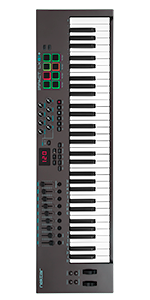
The Nektar Impact LX49+ is a 49-key USB MIDI controller designed for musicians and producers seeking tactile, professional-grade control. Featuring velocity-sensitive semi-weighted keys, 8 backlit drum pads, 9 faders, and 8 knobs, it offers deep integration with popular DAWs like Bitwig, Studio One, and Ableton. Compatible across Mac, PC, and iOS platforms, it includes a Bitwig Studio 8-track license and Cherry Audio plugins, making it a versatile, plug-and-play powerhouse for music creation.




| ASIN | B01HZWL64O |
| Additional Features | Backlit |
| Best Sellers Rank | #27,285 in Musical Instruments ( See Top 100 in Musical Instruments ) #107 in Computer Recording MIDI Controllers |
| Brand | Nektar |
| Brand Name | Nektar |
| Color | Dark Grey |
| Compatible Devices | Laptop, Desktop, iPad, Mac, Windows, DAWs (Bitwig, Cubase, FL Studio, GarageBand, Logic, etc.) |
| Connectivity Technology | USB |
| Connector Type | USB |
| Control Method | Touch |
| Control Type | Keyboard Controller |
| Customer Reviews | 4.5 out of 5 stars 960 Reviews |
| Global Trade Identification Number | 00859383002305 |
| Hardware Interface | USB |
| Hardware Platform | PC/Mac/iOS |
| Human Interface Input | Buttons |
| Included Components | Bitwig Studio 8-Track Licence card, Impact LX49+ Keyboard, USB Cable, User Manual |
| Instrument | Keyboard |
| Instrument Key | Any |
| Item Dimensions D x W x H | 10.51"D x 31.65"W x 3.03"H |
| Item Type Name | MIDI Controller |
| Item Weight | 3.2 Kilograms |
| Keyboard Description | MIDI music keyboard |
| Manufacturer | Nektar Technology Inc. |
| Material Type | Plastic |
| Mixer Channel Quantity | 9 |
| Model Name | Impact LX49+ |
| Model Number | Impact LX49+ |
| Model Year | 2016 |
| Noise Control | None |
| Number of Keys | 49 |
| Platform | Mac, iOS |
| Product Dimensions | 10.51"D x 31.65"W x 3.03"H |
| Product Style | LX49+ |
| Size | 49 Keys |
| Special Feature | Backlit |
| Supported Software | FL Studio |
| Total USB 2.0 Ports | 1 |
| Total USB Ports | 1 |
| UPC | 859383002305 |
| Unit Count | 1.0 Count |
| Warranty Description | 2 year manufacturer. |
R**N
Excellent 49 Key Midi Controller! Get this one.
This is a a great value and a very versatile midi controller. It works will all major DAW software including Ableton Live (despite some of the descriptions to the contrary about it being difficult to use with Ableton Live). I had no issue using it with Ableton Live or Reaper however, it works best with PreSonus Studio One Version 5 and the included license for the Bitwig DAW. The Nektar seems easier to setup completely (apart from the piano keyboard, the volume and mixing controls are easier to setup in Studio One and Bitwig but I also got them to work in Ableton. Reaper was the most difficult setup but it does work.) within those DAWs and it also has no issue with notation software like Musescore, Sibelius and Notion. The keyboard itself has semi-weighted keys so it is easier to play than a regular piano so if you're looking for a more piano-like keyboard, try a keyboard with fully-weighted keys (the Nektar is semi-weighted). The drum pads work very well as do the mixing controls. This is an excellent, feature-rich value at the <$200 range so I highly recommend this Nektar LX49.
R**G
Nice, works great!
Setup was easy and painless with Reaper. I installed some really old versions of Reaper and had to use a generic set up and still it worked great/works great. I had to delete the roaming data to reinstall it on reaper's newer version after my tinkering in old versions. It feels solidly built. I am glad I didn't go with a cheaper model or one that was harder to set up. I am able to buy Reaper for $60 and play with free VSTs to my heart's content. I looked at more expensive software and synths but really for my level of expertise and dedication, Reaper and free VSTs is where I need to stay. But the keyboard worked with lots of different software without a problem for the basic features. I am not experienced enough to comment on the extra bells and whistles this comes with as I have not played with them that much. But they seem to be working. I feel like it will last and it was not much more to buy this instead of a less well made keyboard. I'm happy with this one. The 49 key is as large as I can fit on my desk. I ended up getting a mini keyboard and mouse to use while it is out. My husband added a shelf above my desk for it when I am not using it. The shelf is 2x10 and it overhangs slightly with the cord removed. I am using a powered USB hub with it and have had no issues with power being interrupted. The keys themselves seem full size, not skinny little things. It has some weight to it. I am really happy with this product and would buy from this company again in the future if I wanted to upgrade. I love having the extra keys so I can get a range of sounds out of the synths, for me the 49 key is perfect for now.
A**R
The Software included gives Nektar a BAD REPUTATION
Great keyboard and works great with Studio One. However, don't purchase the keyboard relying upon the included Bitwig Studio software. It is terrible and actually its inclusion gives Nektar a bad reputation. It doesn't load properly on MANY computers and attempts to get it to work, to contact support are Very time consuming and didn't fix the loading problem. Again, I'd give the keyboard a 5, but they need to replace the included software!
J**R
Decent hardware, great software DAW integration at a very reasonable price
I have purchased three midi controllers from three different makers over the past 2 years. This one in particular was a gift for my son, although I did try it out with him for a while after he opened it. Thus, my opinions are on that short use. Hardware: Compared to the other two midi controllers I own (Akai MPK249 and NI Komplete S 49 MK2) the hardware of this controller is not as nice. However, it is also MUCH less expensive, so that should be expected. Compared to other midi controllers in this price range, the hardware seems about the same as others. So, more or less a wash IMHO. Software / DAW integration: This is where Nektar products shine in my opinion. If your DAW is on the list of supported DAWs, then the integration really helps make this controller far more usable than most other controllers. I have heard that Moog and other high-end controllers in the $2k price range have great DAW integration as well, but I wouldn't know. From what I saw and from what my son has told me, it automatically maps the transport and smart controls in Logic ProX to the rotary encoders, and maps the faders to the mixer controls. Very nice compared to what most midi controllers provide out of the box. Compared to my Akai MPK which has virtually no DAW integration, this is MUCH better. Compared to my Native Instruments Komplete S49 MK2, the DAW integration is about the same. (If you know about NI S49 MK2, you know the main point is integration with NI Komplete software, not really the native DAW instruments. In this regard the Nektar's integration with stock Logic instruments is better than my NI S49 MK2). Let's face it, unless you're a professional musician performing on stage, software integration is what really makes a midi controller useful, so in that case this is one of the best priced options you could make IMHO.
J**N
Fantastic keyboard for use with Logic Pro
First of all this has turned out to be a great midi keyboard. I searched for a couple of months for something that would be a good fit for an iMac/ Logic Pro set up and was close to buying the Arturia brand but I felt when finally comparing Nektar to Arturia they were very similar products however Nektar had the edge both in value for money and ease of use. The Nektar looks good and all the buttons and knobs do something. Once you go through the software integration process you will discover that the track volume controls are already mapped to Logic. Very handy. The knobs for control of your synthesizing needs are not and I am yet to manually map these. The keyboard feels fine. There is good enough sensitivity to the keys for loud and quiet play. I’ve played piano for thirty years and the keys were as expected for a midi. Plastic. Surprisingly I have used the pads. They are fun and if you like creating your own drum beat then they are good to have. To summarize I’m very happy with this midi. I’m still learning all the functions of Logic and Nektar but it’s good value, easy to use and FUN!!
P**H
Look no further
I am a skilled musician, been at it for over 15 years (multiple instruments) but i never owed a midi keyboard, or any piano for that matter. So while i do not have a ton of things to compare this to, this is an absolutely amazing investment to my music collection. All quality construction, they keys have a nice wight to them and will recognize how hard you hit the key quite well, all the many, many knobs can easily be programmed in your DAW, with out the box support (in my case FL studio). This thing has added such a dynamic to my recordings i absolutely love it. I will be getting my lil bro one for xmas. Very nice build quality and easy to use out the box. Many nice knobs you can program to control many, many levels in your DAW. Fun to dabble and learn simple piano licks, but nice enough to where a piano player will enjoy playing this. and obviously infinite sounds possiblities with your VSTs out there.
E**C
Couldn't get much better than this for your money
Love Love LOVE this machine! It is too awesome! I love the ease of use. I love how responsive the touch pads are and I love the size of the display and all the knobs and buttons. As an added bonus, my DAW recognized it right away and integrated it seamlessly with the other midi controllers that I use. The Impact LX49+ has a great look and a solid stature. Perfect for a serious DAW musician who wants to maintain a little portability.
A**R
Production A
Good product
Trustpilot
Hace 1 mes
Hace 1 mes