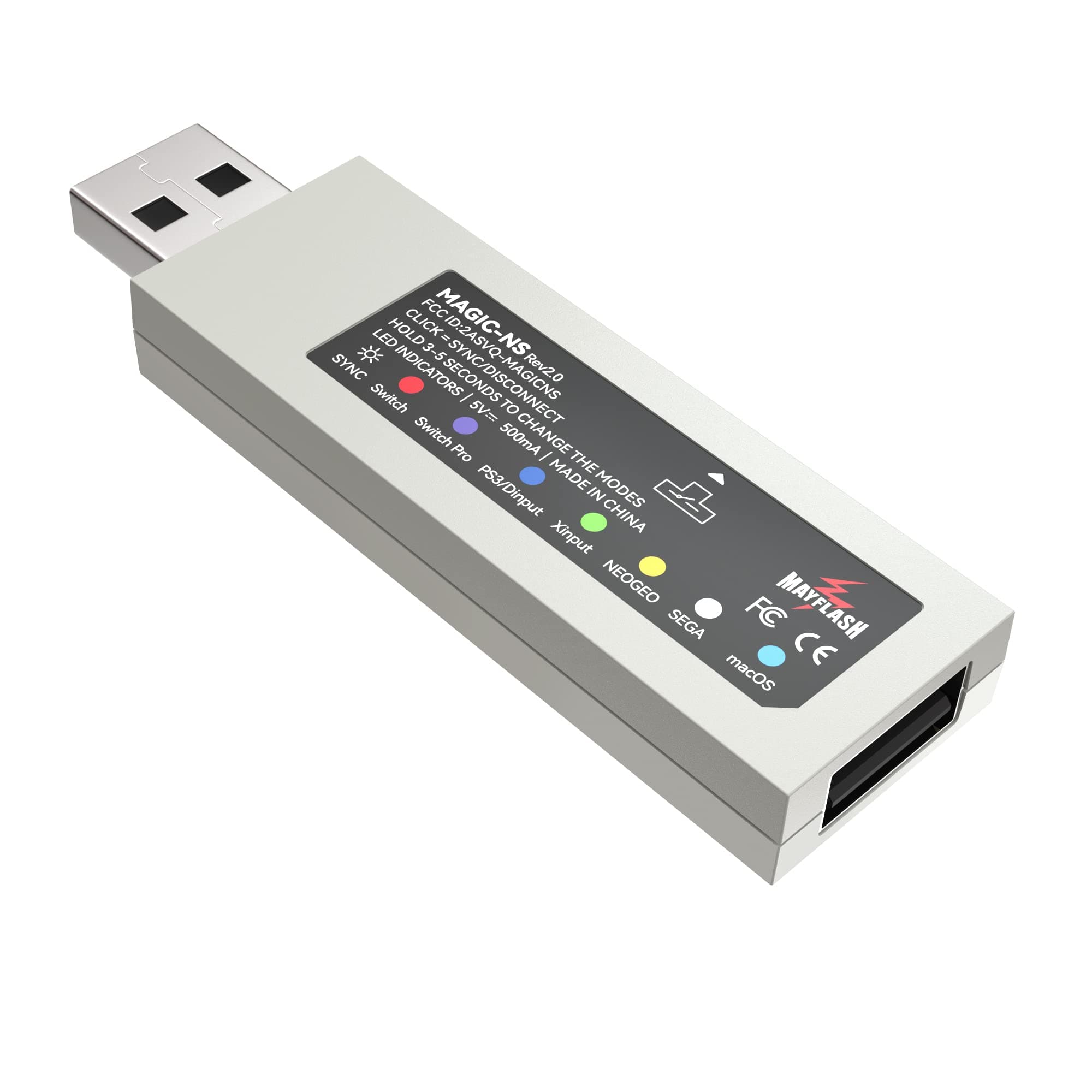
🎮 Level up your gaming setup with ultimate controller freedom!
The Mayflash Magic-NS is a compact, versatile Bluetooth adapter that enables seamless wireless and wired controller use across Nintendo Switch, PC, Mac, Steam Deck, and classic consoles. Supporting top-tier controllers like Xbox Elite Series 2 and PS5, it features turbo mode, adjustable rumble, and 6-axis motion for immersive gameplay, all wrapped in a sleek USB-C design with ongoing firmware updates.


| ASIN | B079B5KHWQ |
| Best Sellers Rank | #4,926 in Videogames ( See Top 100 in Videogames ) #11 in Nintendo Switch Cables & Adapters |
| Item model number | MAGIC-NS |
| Manufacturer | MAYFLASH |
| Product Dimensions | 7.3 x 2.1 x 0.9 cm; 40 g |
G**H
Xbox Controller on my Nintendo Switch
Does exactly what it claims to do. Using my Xbox One controller with this on my Nintendo Switch. It took me 2 minutes to update the firmware to the latest version prior to me using it. Very happy with this.
P**C
Worked Well
It works as described! Great product, easy to configure!
M**.
La verdad es muy buen producto funciona sin problemas y con cualquier control para al switch, he probado ps3, ps3, 360, generico, wiiu pro, tambores taiko de ps4, control de ritmo hatsune miku. Todos han funcionado sin problema lo malo es que ahora tras usar tanto el control pro del switch me pasa al revez solo quiero usar el control pro del switch en todas partes pero este adaptador no funciona con ps4
A**A
---Update:--- My Magic-NS adapter has been working perfectly for nearly 4 years, but I recently ran into an issue and am updating to help others. I've been using the same Xbox One S controller with the Magic-NS adapter on my Switch since my original review without ever updating the firmware on either. I got an Xbox Elite Series 2 for Christmas and had difficulties switching my new controller to the Magic-NS adapter via bluetooth. This is how I got it to work: 1. The Xbox One S controller that I had been using wirelessly with the adapter had become bugged. The controller would not disconnect from the adapter and would also not reset. In order to solve this, I connected my Xbox One S controller to my PC via USB cable and updated the firmware on the controller. This caused the controller to change from classic Bluetooth to BLE, which effectively disconnected the controller from the adapter. 2. I updated my Magic-NS adapter to the latest version by connecting it to my PC and following the instructions that it came with. 3. I connected my Xbox Elite Series 2 controller to my PC via USB cable and reverted the firmware so that it uses classic Bluetooth instead of BLE. I then plugged the Magic-NS adapter back into my Switch dock, made sure it was on the purple setting and attempted to sync the controller wirelessly once again and was successful. It's important to note that it takes much longer for the Elite Series 2 controller to wirelessly connect to the Magic-NS adapter than the One S controller. Once synced, it stays that way. It's been working flawlessly ever since! ---Original Review--- Boy, am I glad I bought this! After purchasing a Switch at the beginning of the year, I was checking out all of the great accessories that are available and wanted to get a controller to use for when I have it docked instead of always having to use the joycons. I quickly learned that many controllers for the Switch run rampant with problems as well as being ridiculously overpriced (looking at you, Switch Pro Controller). While I wouldn't mind spending money on something of good quality, I just can't purchase something that so many consumers report stopped working right after the return window / warranty runs out. So I decided to have a look at some adapters. I have many Xbox controllers because I own a 360, One S and Series X. I've always preferred the design of an Xbox controller over anything else and thought it would be ideal to be able to use one with my Switch. Upon receiving my product, I was pleased to find that I didn't need to connect it to my pc for any updates for it to work properly. I'm currently using my Xbox One S controller and all I had to do was put the adapter on the purple setting and enable Switch Pro mode on the console. The adapter fits perfectly in the back of the Switch's dock and after about 5 months of using it, it has never disconnected or given me any issues. I like that I can adjust the vibration on the controller to make it stronger or weaker depending on what game I'm playing. There are a few things that I think would improve this product: 1.) Turning on the Xbox controller doesn't take the Switch out of sleep mode like it does with the console it's intended for. You have to wake the Switch up via the home button on the joycon. 2.) After putting the Switch to sleep, the controller stays on. I remove the battery pack to turn it off instead of waiting forever for it to eventually go to sleep thus unnecessarily draining the charge on the battery pack. 3.) I have the button mapping for the controller set to reflect how an Xbox controller should work. While it does save my preset, I have to go into the settings and select it each time I use the controller because it defaults to Nintendo's settings. Regardless of the improvements I feel would make the adapter better, it's important to remember that controllers for other consoles have never been intended to work on a Switch; so the fact that the adapter does just that makes this a genius hack and excellent accessory for the Switch. Despite the minor inconveniences I mentioned, I'm grateful to have found this product and recommend it to anyone who doesn't want to waste money on the low quality, overpriced controllers that Nintendo licenses.
J**D
Just make sure to get the right model for your devices. Worked even with Razer V2 Chroma.
T**S
I bought the previous model (V1.0 rather than V1.2) a long time ago and I am happy to say upon putting it into my recently purchased Switch 2, it still works. Great piece of kit that can save you a ton of money on pro controllers.
S**A
Zgodne z opisem. Działa.
Trustpilot
Hace 2 semanas
Hace 4 días