We remain fully operational. Our teams are working around the clock to ensure your deliveries continue safely.

Descargar la aplicación


Servicios al cliente
Sobre nosotros
Copyright © 2025 Desertcart Holdings Limited
Descargar la aplicación


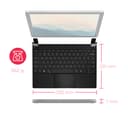

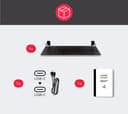
💡 Elevate Your Productivity: The Brydge Keyboard is your Surface's new best friend!
The Brydge Microsoft Surface 12.3 Pro+ Bluetooth Keyboard with Trackpad is designed to enhance your Surface Pro experience. Featuring a 70% larger precision touchpad, it offers seamless multi-touch gesture control and is compatible with Surface Pro models 4 through 7. Its lightweight, travel-friendly design makes it ideal for professionals on the go, while the one-year warranty ensures peace of mind.


| ASIN | B08CWQY7FH |
| Additional Features | Bluetooth precision touchpad for Windows, laptop-like experience |
| Antenna Location | Office |
| Best Sellers Rank | #353 in Tablet Keyboards |
| Brand | Brydge |
| Built-In Media | USB Cable |
| Button Quantity | 78 |
| Color | Silver |
| Compatible Devices | Surface Pro 4,5,6,7,7+ |
| Connectivity Technology | Bluetooth |
| Customer Reviews | 4.1 4.1 out of 5 stars (447) |
| Enclosure Material | Plastic |
| Hand Orientation | Ambidextrous |
| Item Dimensions L x W x H | 13.39"L x 8.86"W x 1.3"H |
| Item Weight | 660 Grams |
| Keyboard Backlighting Color Support | Single Color |
| Keyboard Description | Wireless |
| Keyboard Layout | QWERTY |
| Language | English |
| Manufacturer | Brydge |
| Model Name | Brydge 12.3 Pro+ Bluetooth Keyboard with Trackpad for Microsoft Surface Pro |
| Model Number | BRY7011 |
| Number of Keys | 78 |
| Power Source | Battery Powered |
| Series Number | 7011 |
| Style Name | Classic |
| Switch Type | Tactile |
| UPC | 787790155249 |
| Unit Count | 1.0 Count |
T**R
Best Windows Keyboard & Touchpad I have tried!
It takes a lot to impress me enough to write a review, but this keyboard did it. I was already having buyers remorse for having spent so much for just a keyboard and touchpad and feared the worse, especially after watching a negative review on YouTube! (If you use this product with a Surface Pro, as intended, then make sure you fully update your drivers and even google the Marvell network driver issue that could cause mouse stuttering and lag.) Other than the faults that Microsoft could create for you - this is a perfect setup even for non-Surface users. I use this keyboard with a Macbook running Windows 10 and it does a fantastic job. And the large Alt key is absolutely perfect - I swap my Ctrl key over to Alt, and Alt to Win, Ctrl changes btwn Ctrl and Win. I know my setup sounds a bit complicated but that is only because I prefer mac style keys on Windows which I do via my Kinto app which uses Autohotkey. To the user that complains about the media keys being the default... instead of complaining you could pretty easily remap all of your media keys to F keys and the actual F keys to media keys via Autohotkey. You might feel toggling the priority should be possible - and maybe the company will listen and issue a firmware update - but short of that it can be fixed with a small amount of effort. The touchpad is exactly what one would expect from a precision touchpad - it simply works. It is a dive board setup as are many, if not all Windows touchpad meaning it is easier to press at the bottom than the top, but nothing quite works as well as the mac touchpad equivalent. However, due to the poor driver support, even the unofficial drivers that work slightly better, this touchpad works better than the one built into macbooks running Windows overall. It certainly works better than the one on my work dell and that was the primary reason I purchased this item, my work dell had no ability to click when the touchpad was pressed down and it makes it feel broken to me. This product completely fixes that. Technically this also works on iPad's, but do not expect the perfect modifier key alignment. The touchpad will also not work at all on iOS and I am doubtful that anyone on a jailbroken device will get it to work, perhaps if you're still on iOS 9 though.
T**N
Slick and Beautiful
I love this product. I'm so impressed with the fit and finish that I'm writing this review mere minutes after opening it. The key travel is wonderful. I exclusively use Lenovo ThinkPads for work, which are reputed to have the best keyboards in the industry. This keyboard's key travel is slightly shorter, but the switches are just as crisp and positive in tactile feedback. The touchpad is perfectly sized; large enough to be comfortable, but small enough that I've not had any false touches with my thumbs' base joint, unlike on the Microsoft Surface keyboards. It has a slight texture, unlike the glass-smoothness of the Mac. Personally, I like it. The non-control surfaces have a similar texture, but slightly rougher so you know if you are on the touchpad or not. The hinges are solid, but don't feel so stiff that I worry about breaking the screen. I'm on an ancient Surface Pro 4, and the u-shaped mounting brackets fit it loosely. They're rubber-lined so the Surface itself doesn't slide if I hold the joined unit at a slight angle, but I would _not_ tilt the joined unit 90 degrees - the mounting brackets just don't hold it tightly enough. Depending on your use cases, this may be a shortcoming. For me, I hope to use the tablet as a digital art platform, so being able to easily remove it from the keyboard without fear that it will ruin the Surface is definitely desirable. Note that one of the other reviewers said that it gripped their Surface Pro 7 so securely that attempting to remove it caused the screen to crack. I can say that I've tested placing it and removing it from the brackets at least ten times and each time it held competently and was easy to lift out without any perceived strain on the Surface, but again, I have a Surface Pro 7. The keyboard's hinges are cleverly designed so the keyboard is slightly inclined when opened. The angle is less steep than the Microsoft Surface Pro keyboard, but it's free of the annoying bounce if you are a heavy-handed typist like me. There are 3 levels of backlighting in addition to no backlighting at all. At its brightest, it is not very bright - enough to see the key cap translucent letters and the outlines, but not so bright as to irritate. For my finger memory, I would wish it kept the same Fn key layout as the Microsoft Surface Pro keyboard, but I'm sure Brydge had their reasons to make the subtle changes in what the F1 - F12's alternate Fn keystrokess do (e.g. vol up, vol down, etc.) In closing, this is the first text I wrote on this device. I was very pleased with the look, the feel, and the overall integration with the Surface Pro 4, so much so I wanted to share my initial impressions with potential buyers. At $150, it is much more expensive than other BT keyboards, but the ability to use it on my lap, or just the freedom from the 'bounce' when bottoming out the keystroke, is well worth it in my eyes, with my money.
D**O
Sturdy keyboard that does its work very well
I've been using the original Microsoft Keyboard for Surface for a year, but I haven't felt fully satisfied with it since it felt a bit on the flimsy side and sometimes I got some keystrokes missing. Nothing too bad, but enough to make me consider changing it for another keyboard. So when I did my research, the Brydge keyboard came on top, and lucky for me, it was on discount. What I like: It feels great to type on and it's absolutely silent. Every function that comes in the original Surface Keyboard is perfectly replicated here, including the backlight. The hinge is strong and the keyboard + surface combo won't fall off easily. What I don't like: It's heavy ! It feels as heavy as the Surface. So it kind of defeats the purpose of the Surface as a lightweight PC tablet. And the magnets are a bit on the strong side, so when you close the computer it goes hard on the keys, so be careful. Besides that, I'm pretty happy with it. I miss a bit opening and closing the stand, which isn't necessary anymore and I kinda enjoyed that. But on the other hand, you can remove the Surface from the keyboard if you want to use it as a tablet. Oh, and this product got lost in the mail, but a quick chat with Amazon support solved the issue. Thanks !
E**Z
It is much nicer to type in than in the Microsoft keyboard and turns your Surface into a laptop.
J**K
I'm using this keyboard with the Surface Pro 2017 LTE (Surface Pro 5) and it has changed the game for me since my original surface keyboard finally failed. There is sometimes noticeable lag with Surface Pro 5 bluetooth but manageable once connected for a couple of minutes. A win in my books.
E**Y
Battery life is amazing. Use it everyday and I havn’t charged it since I got it. Easily the battery lasts over a month on one charge. It’s heavy but not too heavy that it’s not portable. Slightly expensive but definitely worth the money in my eyes. Definitely worth getting if you want a sturdy keyboard for your Microsoft Surface Pro.
J**E
Great quality keyboard! Wish I knew about it years ago. Fits my Surface Pro 4 perfectly. Fantastic build quality including the hinge. Easy to connect and use.
C**A
Product is fantastic and support team also. Was sceptical from the reviews on Amazon but now I can say it definitely add value to the Surface
Trustpilot
Hace 3 semanas
Hace 2 días