We remain fully operational. Our teams are working around the clock to ensure your deliveries continue safely.

Descargar la aplicación


Servicios al cliente
Sobre nosotros
Copyright © 2025 Desertcart Holdings Limited
Descargar la aplicación

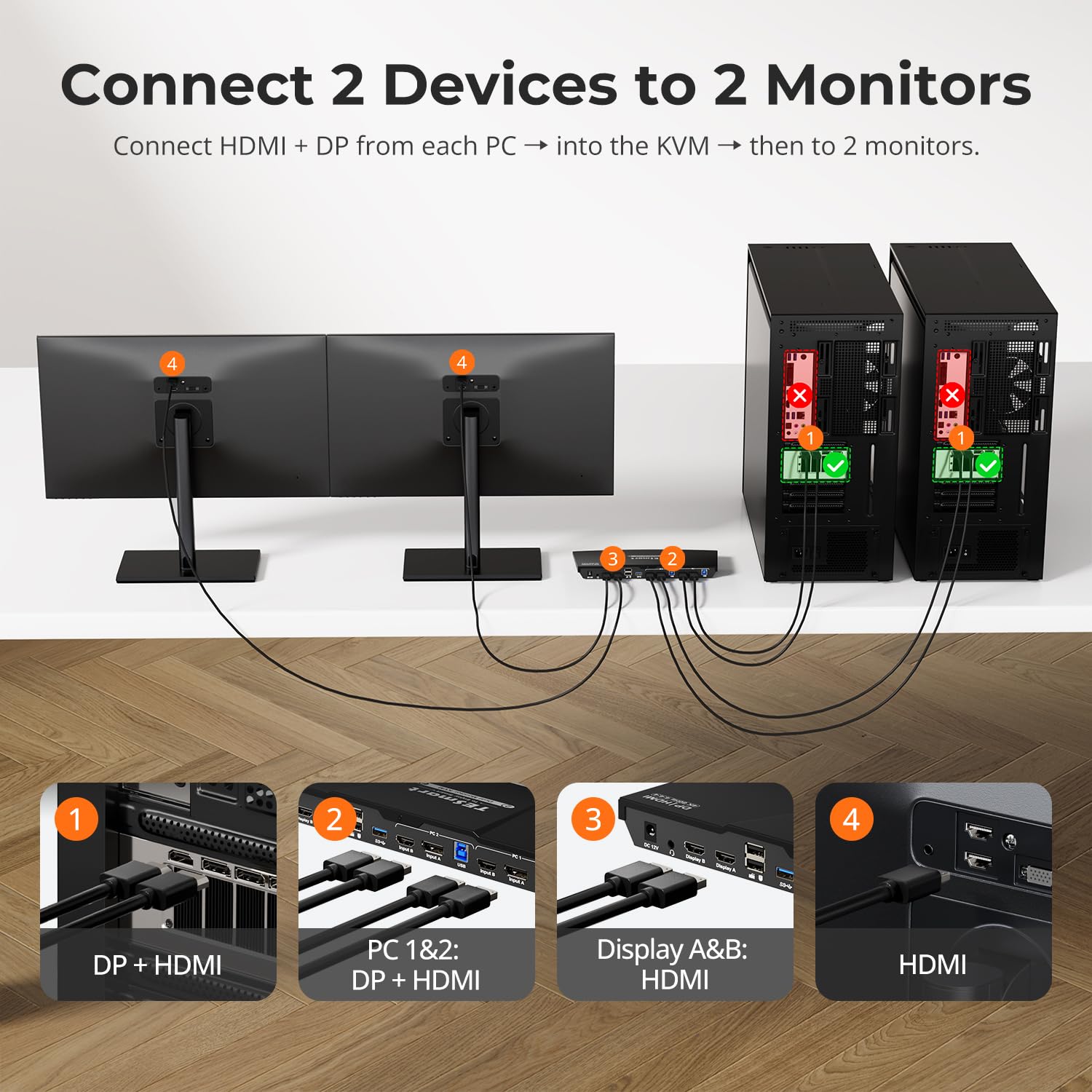
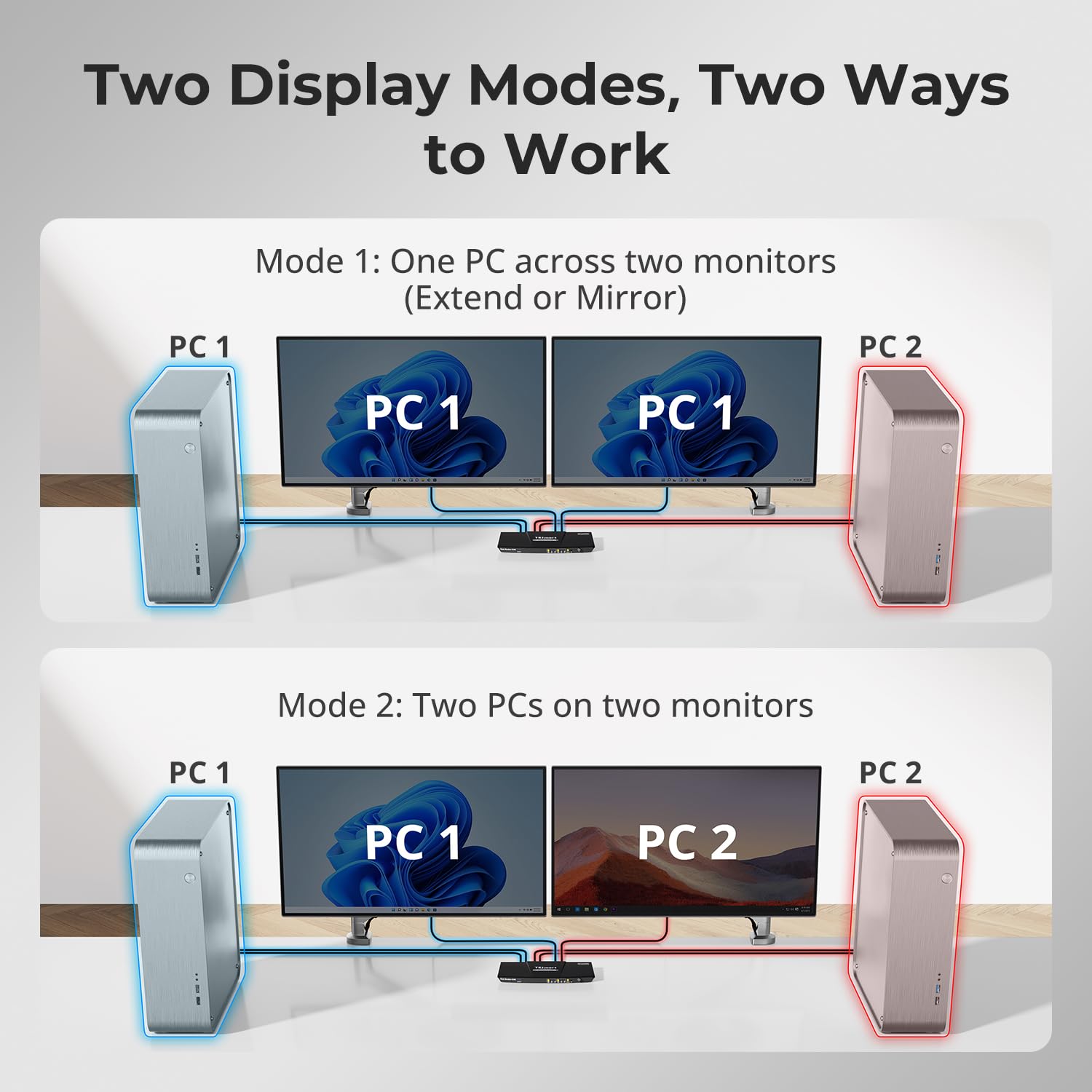

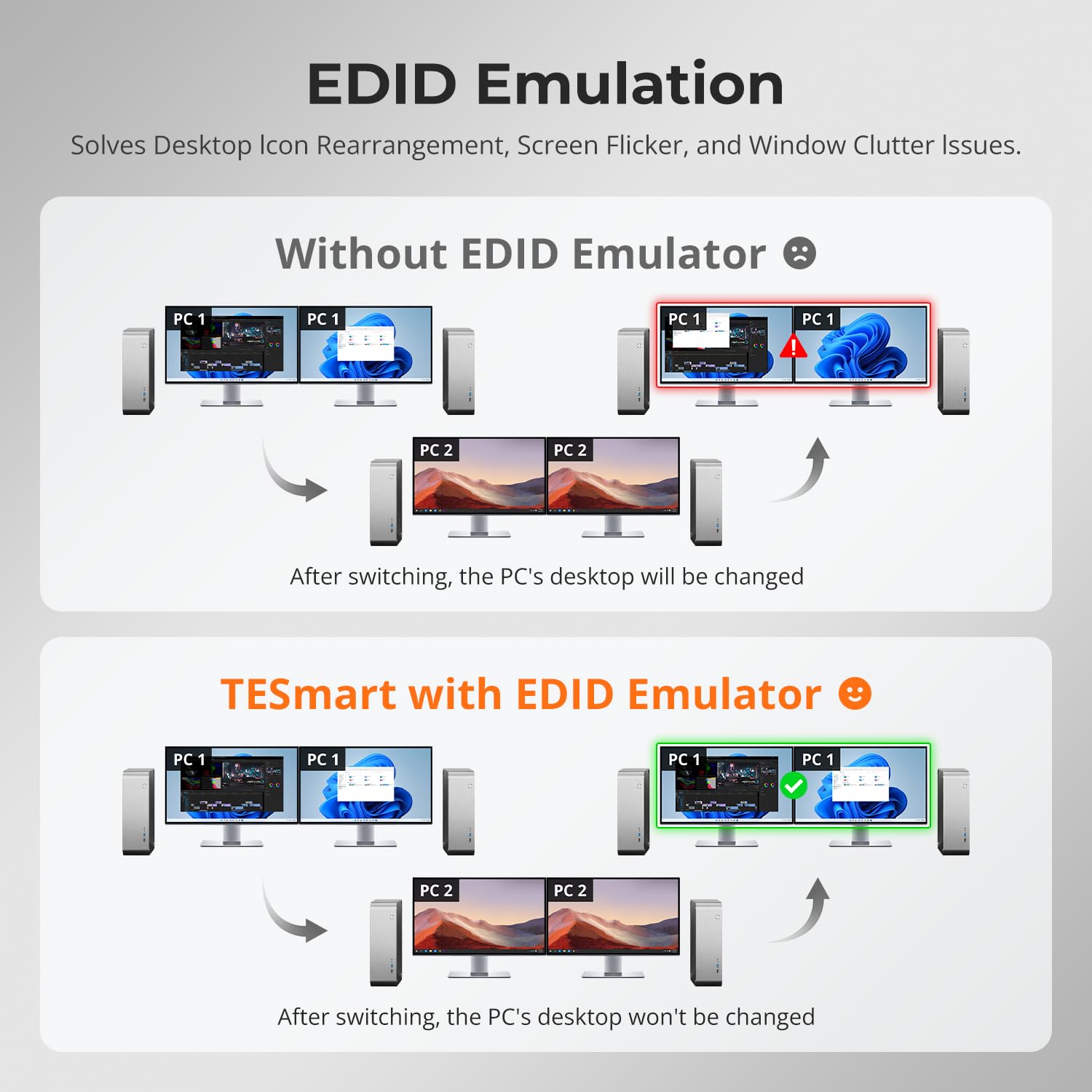
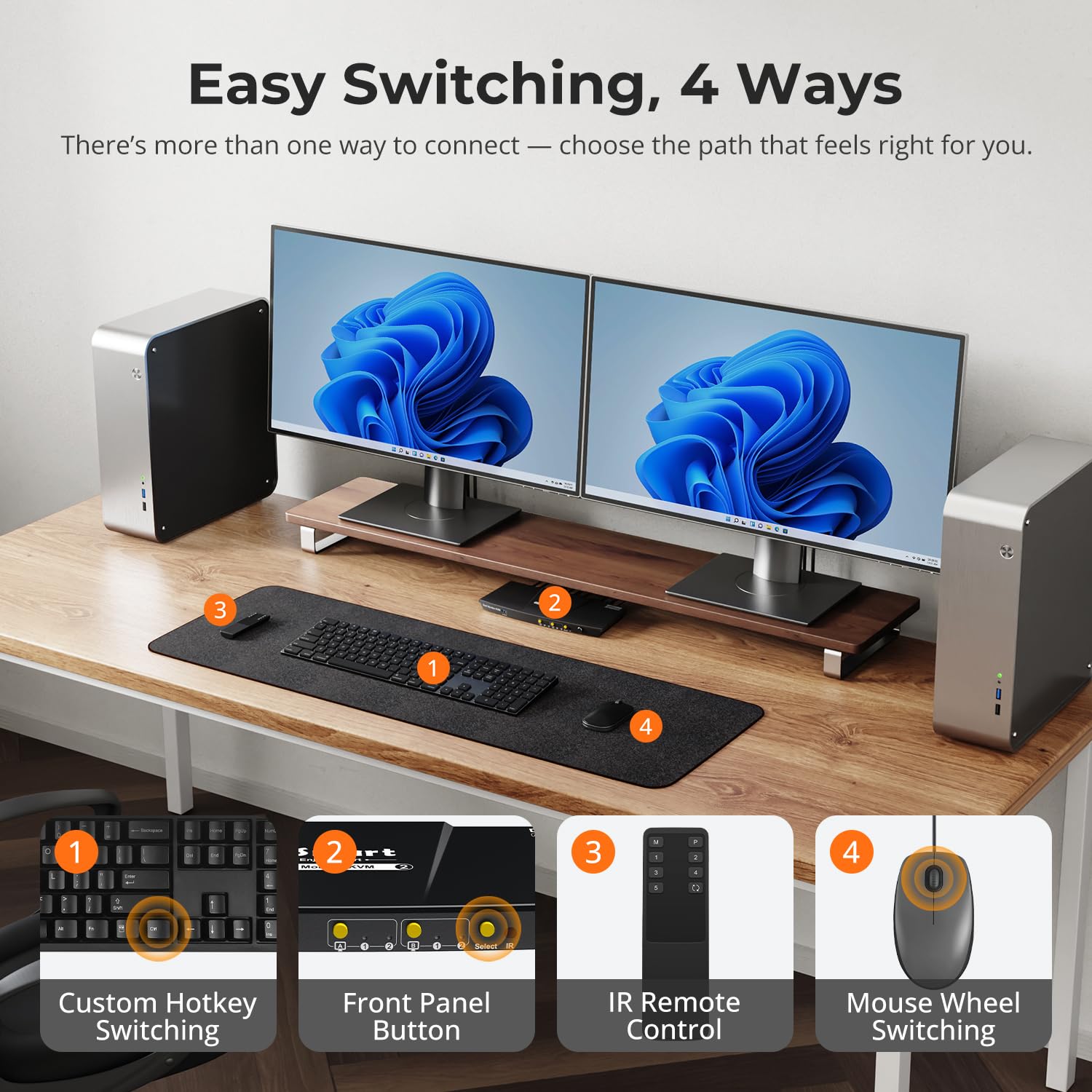
🚀 Elevate your workspace: Dual 4K control with zero compromise!
The TESmart USB 3.0 DisplayPort + HDMI KVM Switch empowers professionals to seamlessly manage two computers with dual 4K@60Hz monitors. Featuring ultra-fast USB 3.0 ports for peripheral sharing and charging, versatile switching options including hotkeys, buttons, and remote control, plus EDID emulators to maintain flawless display settings, this compact, metal-built device is designed for high-efficiency multitasking and enhanced productivity in demanding work environments.


| ASIN | B0CGMWXBM6 |
| Actuator Type | Push Button |
| Best Sellers Rank | #266 in KVM Switches |
| Brand | TESmart |
| Brand Name | TESmart |
| Circuit Type | 2-way |
| Color | Black |
| Connectivity Protocol | Infrared |
| Connector Type | Plug In |
| Contact Material | Metal |
| Contact Type | Normally Open |
| Control Method | Push Button, Remote |
| Controller Type | Push Button |
| Current Rating | 2 Amps |
| Customer Reviews | 3.6 out of 5 stars 583 Reviews |
| Item Dimensions | 11.81 x 4.33 x 1.18 inches |
| Item Weight | 1.32 Pounds |
| Manufacturer | TESmart |
| Material Type | Metal |
| Model | TES-HDK0202A2U-USBK |
| Mounting Type | Panel Mount |
| Number of Items | 1 |
| Number of Positions | 2 |
| Operating Voltage | 12 Volts (DC) |
| Operation Mode | ON-OFF |
| Specification Met | CE, RoHS |
| Switch Type | Push Button |
| Terminal | Solder |
| Unit Count | 1.0 Count |
| Wattage | 24 watts |
S**R
Solid dual-monitor KVM
When I was searching for a 2-monitor KVM, there were few appealing choices but I'm very happy with this TESmart model. Initial configuration was a bit finicky while I was getting my bearings, but ultimately it does exactly what I want, reliably for the last two years already. It's compact and sturdy and pleasantly designed. Mind you, I switch displays using keyboard hotkeys, so I don't need to access the device, so it's installed on a shelf under the desk, so I rarely see it. Very occasionally (once every 6 months or so?) I do need to turn it off and on again when _something_ gets confused. I certainly won't hesitate to upgrade to a higher-end TESmart switch when I need support for higher resolution or USB-C or more monitors/computers -- especially since after registering with TESmart (they don't automatically recognize Amazon purchases, but give credit for these if you reach out to them with proof of purchase) you get extended warranty, discounts on new purchases and trade-in credit for old devices.
J**S
Some info if you're on the fence
I was going back and forth between a couple of different switches and I finally decided to pull the trigger on this. If it sucked I'd return it. I still have it and use it and the one click switch is great. Details below. I have a gaming laptop with a Rtx 3090 and a 2k 144hz monitor. Not losing this frame rate was my major concern. I also have a 1080p 140hz monitor for work. I decided to go with the hdmi/dp version since my work laptop has a Dell performance dock but I don't have that many dp ports coming out of my gaming pc. I was considering a dock or going usb-c to dp to just do dual dp but ultimately I just pulled the trigger on this one. Like I said I have the work computer running to a Dell performance dock via dual usb-c since I pick up and go often. From the dock is the supplied hdmi, a dp cable and the supplied USB cable into the kvm switch. On the gaming laptop I decided to go from the mini-dp with a mini to dp cable and a "4k" hdmi cable into the switch. I bought my own USB cable for the aesthetics. For peripherals I had to add a powered USB hub to the one non keyboard and mouse USB ports. I'm not sure what's going on there but when my corsair keyboard and my razer mouse were plugged into the dedicated keyboard and mouse ports they weren't just not rgb-ing they were non-functional. USB hub.. RGB and working. The only issue with this set up is the keyboard hotkey's do not work or at least I've been unable to get them to. The remote does the trick and is super easy. For viuals first make sure you have tried your devices in every layout( laptop open, closed, split between the pcs) before you start tweaking things. Windows seemed to reset my resolution alot the first few days. When it comes to performance on my work computer everything is almost identical. Every so often I'll see some visual lag when I'm doing a cpu intense task but its so few and far between if I stop looking for it I'll stop seeing it. Gaming though was a struggle at first. For whatever reason getting over 120fps was causing severe articfacting, I know it's not "rated" for 2k 120 but this is 2022 baby so I'm pushing the boundaries. I've been successfully gaming with no artifacts at 125fps on Warzone 2. Valhiem pegged at 144fps, Witcher 3 around 130fps and it looks beautiful. The games lost about 5 frames so if that's what you're going for just know you're losing some. The trick truly was upgrading the hdmi cable and ensuring the games are in full screen exclusive(this would reset like I said before). The artifacting comes back once a while but a quick restart or unplug and plug of the hdmi from the gaming pc straightens it out. I'm happy so far. Switching off the work pc was a big deal for work life balance and not seeing anything when I'm trying to have my time the same place I work is good enough for me, even if I lose 5frames in warzone lol. I would recommend this switch.
J**S
Worked for about three days then died
I really wanted this KVM to work. It's compact, has a metal case, comes with cables & remote control, and has a pleasing look. Packaging was well done - a step above generic product boxing. The item and included cables feel sturdy and worked well initially. I first connected a single 2K monitor with DVI-to-HDMI cable and it worked well. Then I removed the 2K and replaced it with a single 4K monitor and it worked with no problem. I connected video using both Displayport and HDMI ports and they both worked. When connected to my laptop, the KVM was smart enough to know when the laptop case was opened and adjusted its displays accordingly (laptop screen became primary, main screen became secondary) without losing previous icon location on the laptop screen. I was very pleased at this point. However, after a few days of light use the thing stopped displaying video completely. No matter if I used the Displayport or HDMI port, nothing would show up on the screen. Keyboard and mouse still worked, but video and audio (carried over HDMI) stopped working. Tried removing all cables and power cycling the unit but to no avail. Tried only connecting one computer/monitor, but still no video. I never had the chance to connect the 2K and 4K monitors together, so cannot comment on this functionality. When the KVM was operational, it maintained icon location when switching between computers and the switch itself was pretty quick (about 3 - 5 seconds). I really wanted this to work out, but it just didn't last - even with very light use. Returned for a refund.
M**A
Minor Issues with Setup but Works Fine!
Well, I just got this KVM switch and have no issues with setup. Works great! Well, had to figure out that the audio came via the monitor and the HDMI cable so had to select the monitor as the output device. Wanted a KVM switch that handles audio and also with the EDID emulators... My computer wasn't waking up from sleep via the keyboard/mouse but then did a reset of the device and now that function works. Only negative is that 2 AAA batteries didn't fit into the remote so that accessory is unusable.
G**H
Does what it's supposed to... except when it doesn't (keyboard/mouse won't work with switch)
Since I've been working from home during this pandemic, I needed a way to have both my work computer and my personal computer setup and usable without having to play the "switch the cables" game every time. After doing some research and talking to a couple of my tech buddies, I settled on the TESmart (4) Dual Monitor KVM switch. Shipping and receiving was fast, and came properly packaged and undamaged. And the setup is mostly easy. And the switch does work, I can definitely flip between both systems and and dual monitors on both. And the small form factor was a definite plus as my desk at home is not very big. The problem, and for me it's fairly major, is that no matter what I do, I cannot get my Razer Ornata Chrome (keyboard) or my Razer Deathadder Elite (mouse) to work. TESmart "says" they will work (the picture on this very page shows a mechanical keyboard + mouse that are similar (in both shape and size) to my Razer devices. I've plugged them into the USB Keyboard and Mouse ports on the switch, nothing. Plugged them into a USB 2.0 hub and then into the USB 2.0 passthrough on the switch, still nothing. Plugged them both in directly to each computer, works just fine. And the TESmart website gives absolutely NOTHING in means of helping to figure out what is the real issue (other than the fact that this model listed is NOT the updated 2020 model, which I feel is very ignorant of TESmart to do... but hey, it's the corporate way to say, "Let's offload our old stock that we know is junk and not provide actual good service to people who are paying $175+ for equipment."). So my only solution is to either buy a new KVM switch and hope it worked, or just buy a different keyboard and mouse. And since I'm already out ~$200, I'll buy a $20 keyboard/mouse combo deal and just hookup the set to my work computer, leave my higher end Razer devices connected to my personal computer, and just switch keyboards and mice as needed. Yes, I'm aware I could return the switch, but I believe I'm outside the return window for this, as I have wasted a LOT of time trying to get this to work on my own. I'm very disappointed in this device, and very much regret buying it. But that being said, if you are using a regular keyboard and mouse, then I'm guessing you will be fine and won't have the same issues I have been having.
C**N
Flawless with PC, Mac, and all peripherals
I have an iMac and a custom-built PC both at the same desk. This switch, paired with a powered USB hub, has allowed me to switch between these two computers with the press of a button. It takes ~2 seconds to swap from one computer to another and the EDID emulation this switch enables keeps all my windows & applications in the exact same location across all of my monitors. Obviously, by default, the switch enables you to use one mouse, keyboard, and set of monitors between two computers - but when combined with a powered USB hub, I can add all of my other peripherals as well, including my wireless headset and any other USB powered peripherals I pick up in the future (webcam) Another important detail - this switch has worked out of the box with the different display adapters I've thrown at it (DVI->HDMI and DisplayPort -> Thunderbolt). Prior to purchasing this switch, I wrote a rather nuanced questionnaire to the TESmart support staff to be sure it would accomplish what I needed and their support replied quickly, succinctly, and incredibly knowledgeably. Now that I've eliminated the need to swap wires when switching computers, I've been able to really clean up my cables and my workspace is incredibly clean. I will never use two computers without a switch again.
O**O
Extremely Disappointed - LED Issues and USB Hub Failure
I purchased the TESmart DisplayPort + HDMI KVM Switch with high hopes in 2020, but unfortunately, my experience with this product has been nothing short of frustrating. From the very beginning, I encountered multiple issues that have severely impacted my overall satisfaction. One of the primary features that drew me to this KVM switch was its touted USB hub functionality. Regrettably, this aspect has been an ongoing source of disappointment. Right from the start, the USB hub struggled to function properly. Attempting to use various peripherals through the hub often resulted in intermittent connectivity problems, making my workflow a nightmare. Fast forward to the present day, and the USB hub has now completely given up the ghost. It's no longer operational, rendering a key selling point of this KVM switch utterly useless. Adding to my dismay, the situation with the blue LEDs on the front panel has deteriorated over time. Several of these LEDs no longer function, and this has only added to the overall poor impression of the product. While I can understand that minor issues might arise with electronics, it's incredibly disappointing to see such fundamental aspects of the device failing within a relatively short span of time. While I must acknowledge that the dual monitor functionality has remained functional, it's important to note that this is just one facet of a KVM switch that promises much more. Having to deal with a non-functional USB hub and a deteriorating front panel has overshadowed any positive aspects of the product. After just a couple of years of use, I find myself in the unenviable position of having to seek out an alternative solution. It's clear that the TESmart DisplayPort + HDMI KVM Switch does not provide the reliability and longevity that I expected when making my purchase. In light of these significant issues, I cannot in good conscience recommend this product to others who are looking for a dependable and durable KVM switch solution.
T**R
Excellent for work from home, 2 years later and I would recommend this purchase
I purchased this KVM in July of 2022, and have now had it for 2 years. The model numbers at Amazon do not match the model #s from TESmart, but I believe Amazon's model # HDK0402A1U matches up with TESmart's HDK202-E23. Pros: >Not only dual screen for either computer, but you can also split screen and have the monitor for one computer while working on the other. It's fantastic and I love it SO MUCH. >You have 3 options to cycle through display modes, a remote, a button on the KVM, and keyboard hotkeys (Scroll, scroll, 1|2 - SO convenient!) >After-sales support is available, even if you purchase through Amazon Cons: >There are no driver updates available. You will never get your vulnerabilities fixed. >Randomly drops keyboard mouse (every few MONTHS). A quick power cycle fixes this. >Tech support does support you after the fact, but in the issue below, they recommended I buy a new KVM program with their trade-in program. >Warranty is only 3 years if you register at time of purchase, otherwise it's 1 year A problem I found in July 2024! I thought to review this because suddenly my KEYBOARD stopped working on one device. In Windows 11, a security change locked down, blocking the "insecure drivers". In Windows Settings / Privacy & security / Windows Security / Device security / Core isolation details / Microsoft Vulnerable Driver Blocklist "Microsoft blocks drivers with security vulnerabilities from running on your device" I selected Off/Disable and the KVM it's working again. This obviously introduces vulnerabilities to your machine so use this fix at your own risk. This fix was only temporary, and you can take my 3.5 / 4 star review t \o the bank, because I'm purchasing it again.
Trustpilot
Hace 1 semana
Hace 1 mes