We remain fully operational. Our teams are working around the clock to ensure your deliveries continue safely.

Descargar la aplicación


Servicios al cliente
Sobre nosotros
Copyright © 2025 Desertcart Holdings Limited
Descargar la aplicación


⚡ Upgrade your space with smart control that’s always a tap or voice away!
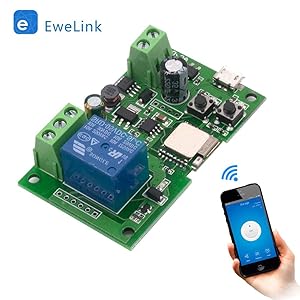
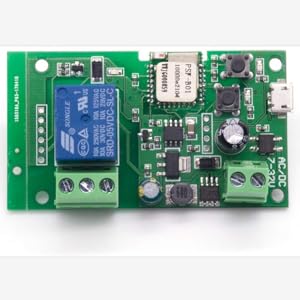
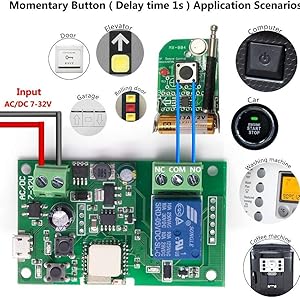
The Newgoal DC1 wireless jog relay switch module transforms traditional electrical devices into smart home essentials. Compatible with 2.4GHz WiFi and controllable via the eWelink app, Alexa, Google Home, and IFTTT, it supports both momentary and self-locking modes for versatile automation. Designed for DIY enthusiasts, it enables remote control, voice activation, scheduling, and shared access, all housed in a compact, durable panel-mount module powered by DC. Ideal for integrating smart control into lights, fans, garage doors, and more.



| ASIN | B085HNKWR8 |
| Batteries Included? | No |
| Batteries Required? | No |
| Best Sellers Rank | #102,224 in Tools & Home Improvement ( See Top 100 in Tools & Home Improvement ) #236 in Electrical Outlet Switches |
| Brand | Newgoal |
| Color | DC1 |
| Connector Type | Screw |
| Contact Material | Silver Or Copper |
| Contact Type | Normally Open |
| Customer Reviews | 4.2 4.2 out of 5 stars (520) |
| Date First Available | March 5, 2020 |
| Item Weight | 1.37 ounces |
| Item model number | NG8000002- |
| Manufacturer | Newgoal |
| Material | Copper |
| Mounting Type | Panel Mount |
| Number of Terminals | 2 |
| Operation Mode | Automatic |
| Package Dimensions | 3.7 x 3.23 x 0.79 inches |
| Part Number | NG8000002- |
| Size | Ewelink |
| Smart Home Compatibility | Smart Home Compatible |
| Style | DC1 |
| UPC | 738628665812 |
S**E
Works as promised – great for DIY smart home stuff
I bought this relay switch to use with some custom smart home projects I’ve been working on. I’m not super technical, but I’ve been getting into home automation and wanted something that could work with Alexa and the Ewelink app. This little module does exactly what it says. It’s pretty small, which is good because I’m using it inside a project box. The setup wasn’t too bad — just connect your wires, download the app, and follow the steps. Took me a couple tries to get it connected to Wi-Fi, but once it was on the network, it worked like a charm. It supports both momentary and self-locking modes, which was important for my setup. I used it to control some lights through a button I built into the wall, and it works perfectly. You can also toggle it with voice commands via Alexa or set up routines in the app. I even tried an IFTTT recipe and that worked too! The build feels solid enough — not cheap plastic that cracks easily. And since it’s DC-powered, I can hook it up to a small battery pack or power supply depending on where I’m using it. Only thing to note: this isn’t plug-and-play if you’re not into DIY. If you don’t know how to wire a switch or aren’t comfortable with basic electronics, this might not be the product for you. But if you are, then it’s a really handy tool to have. For the price, I think it’s a great buy. No issues so far and it’s been running reliably.
E**H
---Bitch to set up, WORTH IT...
I originally got the 4 channel and spent over an hour getting it to work... And it run great now... So I added this 2 channel today. AND Spent another half hour playing with it to get it connected.... Flakey things, but once they are registered and set up they are fantastic! Fast too.... Works great with Alexa, and cheap! A few things to do when setting these up.... 1 - Make SURE your phone/Wifi is on a 2.4GHz... Set up a temp channel on your router is needed. Once you are set up you can use 5... 2- Put your phone in airplane mode with just Wifi and location on.... 3 - Place the device and you phone CLOSE to your router/Wifi source... I'm talking a few feet.... 4 - If the setup fails or times out, try try again... I may take several times, doing the same thing, for it to work (????) The directions that came with this (2 channel version) shows a picture and directions for a one channel.... Yikes! Anyways, the middle button of the 3 is the pair button... Power on and then hold it down until the LED flashes fast.... On power up the LED flashes twice then one long. This is NOT pair mode.... Constant flashing fast is.... Once set up, it works great at long distances and on 5g. Good luck!
C**N
So I cringed reading many reviews. But I was able to adopt the board with the instructions included
So the instructions were great. I would love a 8 or 16 channel version of this device... First you setup an Access Point (WIFI) for 2.4 NOT 5Ghz so rename the WIFI SSID for 5G and not the same name as the 2.4. Then follow the instructions. I logged my phone onto that network when I started and if you follow the instructions with it I was able to do this in 2 minutes minus the reading of the instructions to see how to do this. Also if you long press the APP buttons you can rename the switches. Also you can name the board with a meaningful name. So I just got the other board that I ordered after the first one was ordered. This is really cool. IF you create a Smart Automation you can set it up where if you press the button on one board and then turn relays on on another board. Think of this you have outside lights front and back yards. You can set up control to switch them ALL on using multiple bards via the Smart then Automation and then pus the Plus sign go to When devie status changes select a control and then the switch position then when you turn it on or off then select run device and select the next control which switch and on or off it creates the control. Also go in to the modules and activate the offline notification to let you know if a module is not responding on the network. I set a message sms task so that when the relay is activated it sends a notice and then created another for the off condition. I am having fun with these. So either the bad reviews were a older revision of board or someone that did not follow the instructions. Wish my battery tender monitors were so easy to set up. The main key is 2.4Ghz WIFI if you try to use a dual band named SSID 2.4/5Ghz you will have issues adopting the board can not determine the difference and the WIFI will insist on being right. Home=2.4Ghz Everything-else5G=5Ghz That is what you should see on your phone when you setup. Worked very fast for me. I think I want a few more of these. The buttons and the ability to add a remote set are a hug plus. The MODE switch I might remove to easy to change to modes that I do not want to use but that is my install yours may vary. I also check this and it works via cellular across the internet as advertised. Under setting, There is a power on mode when power is applied all relays turn on from a power loss. You can also turn all switches on at once. You can change the device mode there and set the momentary time. unless you set the power on setting when power is returned all relays are in the off state. I did a pretty solid check of the device. I have a project that I am working on that I will try to make a video of you wont believe it until you see it.
P**B
Works well adjustable momentary setting comes as you see no case
Works good had this 2 days so far so good ..has adjustable momentary settings for for momentary mode hopefully don't go into sleep mode like the TYWD 4CH-RF when I purchased prior to this one I mainly purchased a 4-channel Wi-Fi relay to control my air conditioner my air conditioner in my bedroom has push buttons so I pulled out the front panel I unplugged the circuit board and I solder two red wires to the back of the positive button and two white wires to the back of the eco button , and ran the four wires out the front as I put everything back together I connected the two red wires to the common and the normally open part of the first relay and then the two white wires the same to the second anyway fired up the app now I can turn on my air conditioner an hour before I leave work and I turn off the Eco setting on the air conditioner because my house is drafty and my air conditioner seems to work better without it... My only complaint so far is what you see is what you get there's no case
W**M
worthless
Wont pair with the Tuya app or Smart life. Documentation is limited no details, "Press + Button" turn Bluetooth on you phone is not a manual. Have other Tuya stuff work OK after 4 hours, a waste of time
D**A
Makes a great garage door opener.
Installed in garage on an older garage door opener with no WIFI and it works great with my WIFI and my iPhone.
A**O
Busqué esta tarjeta para manejar con Tuya. Y funciona sin problemas después de emparejamiento rápido y sencillo como cualquier otro articulo compatible con Tuya! Permite activar los relés en 3 modos diferentes: 1. on/off = presiona el botón en tuya y el relé se activa, presiona otra vez y el relé se desactiva 2. pulso = presiona el botón en tuya y el relé se activa y se desactiva después de un tiempo ajustable (mínimo 0.5 segundos): esto sirve por ejemplo para simular presionar un botón del mando (solo se puede programar un mismo tiempo para los cuatro relés) 3. interlock = solo uno de los cuatro relés se activa. Si activas otro relé, el anterior se desactiva. El relé se queda activada hasta que presiones otra vez el mismo botón. También se puede programar un tiempo. Por ejemplo 30 minutos y luego se desactiva. Se puede alimentar con un adaptador de 5V de USB o bien a través de cualquier fuente de alimentación de entre 7 a 32V AC o DC siempre que suministre más de 500mA. Muy contento con la compra!
Y**B
Tuya smart programı ile kullanıyorum. Sorunsuz bir şekilde çalışıyor
A**X
Estaría mejor si pudiera usar un control de RF 433
P**E
Funktioniert mit Tuya und Alexa ohne Probleme. Alle 4 Kanäle sind unabhängig steuerbar. Das Modul gibt es für etwa gleichen Preis auch mit Gehäuse, das wusste ich nicht, schade.
C**O
Utilizo app Android TuyaSmart, ha sido un poco complicado a que familia partenece este producto pero en final leyendo bien la documentacion ( en Ingles ) he podido configurar sin problema. El producto ha llegado en tiempo en una caja individual y dentro un sobre adecuado. Compra excellente muy recomendable, la voy a repetir.
Trustpilot
Hace 5 días
Hace 1 mes