We remain fully operational. Our teams are working around the clock to ensure your deliveries continue safely.

Descargar la aplicación


Servicios al cliente
Sobre nosotros
Copyright © 2025 Desertcart Holdings Limited
Descargar la aplicación


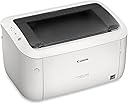


🖨️ Print smart, live sleek — your minimalist office essential.
The Canon imageCLASS LBP6030w is a monochrome wireless laser printer designed for home and small office use. Delivering fast print speeds of up to 19 pages per minute, it features a compact footprint and supports wireless printing from compatible devices. With a 150-sheet paper capacity and energy-efficient operation under 2 watts in saver mode, it balances performance with sustainability. Canon’s genuine toner yields up to 1,600 pages, and a 1-year limited warranty ensures dependable service.





| ASIN | B00K5UZO0Q |
| Additional Printer Functions | Print Only |
| B&W Pages per Minute | 19 ppm |
| Best Sellers Rank | #23,765 in Office Products ( See Top 100 in Office Products ) #32 in Laser Computer Printers |
| Brand | Canon |
| Built-In Media | imageClass LBP6030W Wireless Laser Printer |
| Color | White |
| Color Depth | 1 bpp |
| Color Pages per Minute | 19 |
| Compatible Cartridge | Canon Genuine Toner 125 (1,600 page yield) |
| Compatible Devices | Laptops |
| Control Method | App |
| Controller Type | Android |
| Customer Reviews | 3.9 3.9 out of 5 stars (4,104) |
| Display Type | LCD |
| Dual-sided printing | No |
| Duplex | No |
| EU Spare Part Availability Duration | 1 Years |
| Global Trade Identification Number | 00013803217711 |
| Hardware Interface | USB, USB 2.0 |
| Initial Page Print Time | 8 seconds |
| Ink Color | Black |
| Is Electric | Yes |
| Item Dimensions D x W x H | 9.8"D x 14.3"W x 7.8"H |
| Item Type Name | Laser Printer |
| Item Weight | 11.02 Pounds |
| Manufacturer | Canon, Inc |
| Maximum Copies Per Run | 100 |
| Maximum Copy Resolution Black and White | 600 x 600 dpi |
| Maximum Copy Speed Black and White | 19 ppm |
| Maximum Media Size | 8.5 x 14 inch |
| Maximum Print Resolution Black and White | 600 dpi |
| Maximum Sheet Capacity | 150 |
| Maximum print Resolution Color | 600 x 600 dpi |
| Model Name | Canon imageCLASS |
| Model Number | LBP6030W |
| Model Series | LBP6030 |
| Number of Licenses | 1 |
| Number of Trays | 1 |
| Other Special Features of the Product | wireless,compact |
| Output sheet capacity | 100 |
| Paper Size | 8.5 x 11 |
| Power Consumption | 2 Watts |
| Print media | Paper (plain) |
| Printer Connectivity Type | Wi-Fi |
| Printer Output Type | Monochrome |
| Printer Type | Laser |
| Processor Count | 1 |
| Resolution | 2400 x 600 |
| Scanner Type | Sheetfed |
| Series Number | 6030 |
| Specific Uses For Product | Home, Office, home office |
| Total USB 2.0 Ports | 1 |
| Total Usb Ports | 1 |
| UPC | 013803217711 682957482339 |
| Unit Count | 1.0 Count |
| Warranty Description | 1‐year exchange/carry‐in |
| Warranty Type | Limited Warranty |
| Wattage | 840 watts |
M**N
nice printer, poor install software and manual
Until recently I was using a canon inkjet printer with all of the typical cartridge issues and costs. After it finally died I decided to give up color printing and replace with a simple laser printer. This canon fits the bill. Print well and page rate is fast. Works fine with wifi, although an ethernet option would have been nice. I only just received the unit but it works well and am hopeful it'll work better than inkjet. Now the semi-bad. The install manual is a waste of space. It's not hard to setup but it should be clearer. First step is a hard connect to your computer using the USB. You'll need to go to the Canon USA website and search support for printer name. Download the driver package for your operating system (mine was win11). There's a tab on the support site with WIFI guidance. It should be pretty straightforward after that. It's a bit disappointing the drivers didn't download directly from microsoft and the software is a bit old-fashioned. I used the network setting tool first and then to the ufrii directory to install the driver. However, I suspect you can just run setup in the bootup directory in one step rather than two.
W**N
What a bad printer
It looks nice. It came with a CD though. Do you remember CDs? They used to come with computers a really long time ago. Modern computers don't have them anymore. It came with a few sheets of paper. Not really a manual, mostly pictures. The only useful thing it was the advice that the mac driver probably wouldn't work. I tried plugging the printer into the computer I wanted to print from via USB. My computer saw that it was there, and that it was a printer! I could only print plain ascii text, and it didn't work. Nothing ever printed. I do have a really old CD drive. It has USB-A, and modern computers have USB-C. The CD is only Windows or Mac. So I eventually found an adapter combination that would let the mac power the CD drive so that I could read it! My first trip through the software produced absolutely no results. So I started over with a different USB-A to USB-C adapter and got it to work! I had to download a driver like the manual said. So now I can print...from a computer I don't need or want to print from. The ubuntu forums say that drivers exist, and it can be made to work, but they also say that the driver are gone from canon, so I have no idea if I'll be able to get this printer working directly. I might have to write a script to wrap lpr with a call to ssh to print my documents. All in all, the printer itself seems nice, though I have only printed a few pages so far as amazon only gave me the printer and the toner and not the paper I ordered, apparently I get paper tomorrow. The actual setup and administration of this printer is terrible. Now that it is working, I notice that it isn't very good at printing the letter capital H in italics. It looks fine in the PDF, but won't print. Actually, if I put multiple italic H characters in, most of them print. But most isn't really good enough... EDIT It took three days, but I finally got the print driver to work so that I can print. It turns out the driver installed from canon neglects to mark libcupsimage2-dev as a required package. CUPS prints an error about the driver called before the driver that errors out which is incredibly misleading. As for print quality, it doesn't compare to the HP Laserjet M806 that I usually use at work. But for $97.25 it is more than acceptable. It is also noticeably cheaper than an M806.
W**U
Easy to use and nice printing
Printing fast and nicely. The wifi-connection is easy to set. It is delighted to use the printer without a line. Overall, it is a good choice with a nice price.
D**R
Canon Wireless (laser) Printer
July 2024 update: A sudden power drop/surge apparently damaged the wireless in this printer. It has been a great printer up to now with absolutely no problems. I have ordered a replacement at a good price, because of its otherwise excellent performance. Addendum: Starter cartridge printed poorly. Replacing with new made a hyuuge difference ;-) Just received and setup this printer a couple hours ago, so this very early review is of course subject to later update for any problems that may occur over the next few weeks, months. I setup this printer using the installation video available at the Amazon site where the printer is sold. Setup without a hitch using the USB cable connected to a laptop. My desktop PC which is located in my LR, well away from the printer. So setting that to print wireless was a quandary since their was no further instruction for setting other devices in the house up to print. I am not quite sure what I did to setup my desktop because using the same instructions as before still requires connecting a USB cable, so setting up using the router WPS button instead seems to have worked since I accomplished the task and my desktop is now printing wireless. Still I did not immediately see my printer in devices and printers at first glance but then it showed up. I know this sounds stupid and confusing but I have to say it felt kinda stupid and confusing. All is well that ends well though and both of my devices are now printing wireless. This printer is replacing it's exact mate (LBP6000) only that printer was not wireless. My previous WIFI 5 router had a print server so I've been printing wireless to that printer for years. Now no WIFI 6 router that I can find has printer server to their USB ports. Crazy stupid IMO since I've been using Netgear routers for decades. No more. My new TPLink WIFI6 is a very good router and more than competitive with other manufactures in terms of value, quality and performance. And now I can print wireless again. Anybody need a really good LBP6000. ;-)
B**R
Works great, difficult setup
This is a great printer, it's just a bit harder to set up and find the drivers. I've only used it once, but the starter toner works nice, so you don't have to get a new toner right away. Set up was way easier when I followed this youtube tutorial: Canon imageCLASS LBP6030w - Initial Hardware & Wireless Setup for Windows (You can search for it) I like how compact it is compare to other printers because I'm in a small apartment with not enough space.
R**L
El producto cumple y es de excelente calidad, pero mi ignoracia por la falta de investigacion me hizo ver que los toner son carisimos, asi que mi instinto mexicano me obliga a revenderla ya que al ser de importacion el regresarla no es una opcion viable, se que existen genericos pero es una impresora de apoyo y el tenerla guardada la pondra triste y si algo me enseño toy story, es que no puedes hacer a un lado algo o alguien por algo mas nuevo.
V**V
Good printer, good price
N**O
Não atendeu minhas expectativas pois não tem interface nativa com o IOS.
R**1
working just fine. No issues. But it was slightly costlier on Amazon than another platform which I noticed a while after. Delivery period was also too irritating. Really disappointed about the latency in delivery.
A**R
Stopped working after ~2 month. It cannot take the paper from the tray, it tried to but the sheet is not moving when I give any amount in the tray. Sad because it was working great until now.
Trustpilot
Hace 1 mes
Hace 2 meses