We remain fully operational. Our teams are working around the clock to ensure your deliveries continue safely.

Descargar la aplicación


Servicios al cliente
Sobre nosotros
Copyright © 2025 Desertcart Holdings Limited
Descargar la aplicación

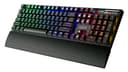


🌟 Light Up Your Command Center with Clicky Confidence!
The Azio MGK1-RGB-BLU is a premium mechanical gaming keyboard featuring tactile Kailh Blue switches, a robust gunmetal anodized aluminum faceplate, and versatile RGB backlighting with six preset modes plus custom options. Designed for Windows users, it offers full NKRO via USB, a detachable palm rest for ergonomic comfort, and convenient shortcut keys including a volume wheel and Windows key lock. Its braided 6ft cable ensures durability and flexibility, making it a standout choice for professionals and gamers seeking performance and style without software complexity.


| ASIN | B014M8Z4E2 |
| Additional Features | Backlit |
| Antenna Location | Everyday Use |
| Brand | Azio |
| Built-In Media | USB Cable |
| Button Quantity | 87 |
| Color | Navy |
| Compatible Devices | Gaming Console |
| Connectivity Technology | USB |
| Customer Reviews | 4.2 out of 5 stars 806 Reviews |
| Enclosure Material | Aluminum |
| Global Trade Identification Number | 00851104001062 |
| Hand Orientation | Ambidextrous |
| Item Weight | 2.3 Pounds |
| Keyboard Backlighting Color Support | RGB |
| Keyboard Description | Gaming |
| Keyboard Layout | QWERTY |
| Manufacturer | Azio |
| Model Name | MGK1-RGB |
| Model Number | MGK1-RGB |
| Number of Keys | 104 |
| Power Source | DC power supply |
| Recommended Uses For Product | Everyday Use |
| Special Feature | Backlit |
| Style Name | MGK1-RGB |
| Switch Type | Clicky |
| Theme | gaming |
| UPC | 851104001062 782386497529 |
| Unit Count | 1.0 Count |
| Warranty Description | NO |
U**3
Move over Cherry....There's a new kid in town!
Going into this purchase I was weary, like most people are when moving to a new switch. I was thinking, "What are these Kailh switches going to be like compared to other knock off switches, when setup against cherry mx?". Well, they are the greatest thing to happen to the computing world in a long time. They sound just like cherry mx blues, but have a feel that is totally unique to the switch itself. Nice soft bump, and yet a click that I love more than anything else in the world. I actually let my wife and daughter use this KB with their laptops to type papers with because I just love the sound it makes. Like an 80's type-writer. They love it too. Everyone who likes to type anything will love typing with blue switches, as it will let you know that every keystroke has registered with that classic click sound. Unlike the cherry reds, "which are better for gaming for most people, myself included", blues are more suited for typists. Going over the overall look of the KB itself...It just looks basic, but still stunning. The nice red on black is great,but the white accent lighting really makes it shine.Going along with the all white led scheme I have going with my current build, it just looks great. I think white, when compared to all the blues, reds, greens, and other colors out there, just look more elegant.May be plain to some, but sophisticated in my mind-set. The build quality is quite excellent when compared to the other AZIO boards I've owned in the past. Like my old Levetron Mech-5. First mechanical KB I ever owned. Before I knew about how different the switches could be. That thing is a ginormous plastic paper weight! I was happy to see that AZIO finally listened to their fans and created a mechanical KB, without all the crazy stuff on the Levetron series, and finally put a back light on it. That is very helpful when gaming or even just hitting a single key in the dark. The lighting itself is great in my book. Featuring a few different lighting modes: on constant with 4 brightness levels, off, and reactive mode. Reactive mode is a kind of cool mode. The keys only light up when pressed. I've never seen this on a keyboard before, as far as I know, it's never been done before. No functionality, just a new kind of feature. NKRO + 6KRO nice and easy to switch between if you have an older MB, or to enter BIOS settings. After owning a ton of mechanical KBs in my life, and I mean A TON! This kind of reminds me of a cross between the Corsair K70 and the CM Storm Quickfire TK. It has the gun metal backplane and the volume roller of the K70. Yet, the layout of the media keys and overall look of the Quickfire TK. As a matter of fact, my keys from both of those KBs fit this thing. That's kind of awesome too. It fits my gaming keys from my old K70. Overall a very good keyboard. You probably won't find a better one for the price v features anywhere in my opinion. Thanks AZIO and thanks AMAZON! (this prudct was purchase with gift cards, your results may vary)
W**T
Wow, just wow
This was more then I expected, Khalil blue keys are great, while many argue "cheap", there is no proof to this. The truth is there the same as cherry mx blue switches just made by another company, and there great. The click made by these keys is very satisfying. The RBG: The colors are great, many options available to satisfy. There bright, with many brightness settings, the colors are vibrant and pop. Every bit as good as a high end keyboard. Wrist rest: While I would have preferred a cushioned rest, the UV coated one provided gets the job done, not only is it detachable, but it is actually comfortable. I also found it to be solid as well, snaps on to the back side of keyboard and stays. Wire: Very impressed, for the price I expected a thin string of a cord, but that is not the case, in fact it's a very think and braided cord, about as thick as an hdmi cord is. Very nice. Keycaps: There cheap caps, but they do feel nice and get the job done. This is probably one of the biggest price cuts done here. There basically clear plastic with black paint on top, common among low end keyboards, they will fade given a year of use or so. If so inclined, you can but nicer caps. Board: This is probably my favorite part of this keyboard. It's a very nice brushed aluminum in gunmetal color. Not only does it look great but it gives it a feel and esthetic of a much more expensive keyboard. There is also feet on bottom to incline if you prefer. Switches: As stated above already this board uses Khalil blue switches, they use same materials and manufacturing processes to produce as a cherry mx blue switch, with no noticeable difference. They have a nice audible click and are very responsive, many have complained larger keys like "shift" make a different sound then smaller keys, but this is not my experience. Overall they are nice, there cheaper to make without any noticeable reduction in quality. Packaging: Includes the following: Keyboard Wrist rest Red plastic key puller Manual Feedback/Contact us note The packaging is great, felt very premium, keyboard is presented upfront with accessories below. There is heavy foam on either side, as well as a plastic sleeve for both keyboard and rest. Manual is simple and easy to read, but isn't really needed as keyboard is simple to operate and customize. Software: None needed, unlike other brands who need software that is confusing and slow to customize their boards, this one needs none. All modes are accessible with the function button, including a custom mode, which allows you to set each key to desired color. Shortcut keys: There are a few shortcut keys, such as calculator, search, music and email, as well as a few others. There are media controls, a mute key and a rubberized, gripped volume wheel very similar to corsairs k70. All very nice inclusions, all keyboards should have. USB? Unfortunately no, as some include USB and even headphone ports, there are no ports available anywhere on this keyboard. Not too much of a fuss for me, but some may be upset. Plug and play: This is simple to use, just plug in and start typing. Some keyboards require two USB 2.0 ports or a single 3.0 ports to power led's. But this does not require a USB 3.0 to work and only needs one 2.0. Complaints: Only real one for me in the rest, which I would have liked to be padded. Things for you to consider before buying: Keys are loud, wouldn't recommend for office or other public setting, they can easily annoy others. Rest isn't padded but still comfortable. Key caps are cheaper, if you want nicer ones or plan to get this board and buy replacement, it might be better to just buy a higher end board with better caps already installed. Price, this board can usually be found for under $100 for the rgb model. Both the RGB model and the base mkg model use blue switches, which are loud. However the non RGB mkg-1 uses brown switches, which are a bit quieter and have a tactile feel to the keys, not sure why this is, just something to consider. This is a great board, have had no issues with it and it is of much better quality then expected. Highly recommended for someone on a budget who still wants a good quality board that will look great and performs for many years to come.
A**D
A high-quality keyboard at a great price.
I had bought this keyboard to use in building a system for a friend. And let me make one thing clear from the outset: HE had picked the keyboard out and wouldn't listen to any other choices. Period. (So I should have seen it coming - he refused to accept it when it got here and I will return it. But ignore that for the purposes of this review.) I build probably 10-30 systems a year, both for friends/family and at work. So I see and get to try a lot of Keyboards. And on top of that I'm also a systems architect (glorified code freak) and I usually spend at least 10 hours a day on two keyboards myself. So I'm familiar with the quirks of a great many keyboards. This one has a touch and feel almost as good as the Corsair K70 (with MX-Blue switches). It's heavy enough to stay in one place on my desk, and it seems to be very sturdily built. The back-lighting is really good - actually I do prefer white to a color for back-lighting - and it has multiple adjustable levels. The "wave" effect of the lights when the keyboard is powered up is fun to watch, too. The only thing I couldn't find on it was a "BIOS" mode for for the keyboard. If you aren't running through a KVM switch that probably wouldn't be an issue for you, but everywhere I work I go through a 4- or 8- port KVM switch so it IS critical for me. And that feature may be there - I simply didn't find it. The finish is very good and the feel of the surface (of the keyboard - not the keytops - is very good overall. Honestly except for not being able to access the KVM switch easily , I probably would have kept it to use myself (and gotten my friend whatever he picked out and was willing to pay for). I don't have any idea on the longevity of this keyboard, but it has a very sturdy and well-made feel to it, so I wouldn't be surprised if it lasted a long time. (Personally I typically go through 2-4 keyboards a year, but that's because I'm on computers at least 10 hours a day, 7 days a week - and sometimes a lot more than that. Overall I would not hesitate to recommend this keyboard to friends or family. (I'll probably use it for future builds, too, and if I had found a "bios mode" switch on it, I would have given it 5 stars instead of 4.)
C**A
Great keyboard for the price!
I love this keyboard. I have to say the best thing about it is definitely the price which is seconded by its beautiful metallic finish which gives it a classy, stylish look. The blue switches feel great to the touch and are just firm enough to feel like a solid press, then that pleasant sound of blue switches which most people are already familiar with which is also there. The keyboard comes with pre-installed hotkeys which help bring up applications such as web browser. calculator, media player etc. It also has some keys which help control media playback right there. My breakdown list of why I chose this item over others that have a similar price: > The volume wheel: It feels solid and with good volume increments-decrements. > The backlight: I am generally not crazy about any kind of back light on any of my hardware, but this keyboard comes with an always-lit mode with several dim modes and a temporal-lit mode where individual keys stay lit for a fraction of a second after they are pressed. > The hardware is simple and elegant, with few space on the edges around the keys and no wasted extra space just to fit the company logo. Also with good spacing between keys and a nice layout. All in all, great use of space. I also really liked the accent on the bottom even though I did not expect it at the time of unboxing. > Not as heavy as other keyboards: unlike many other mechanical keyboards this one feels nice and lightweight, not that you would be moving your mechanical keyboard around that much but it definitely is a plus. > Heavy duty thick USB chord: The chord has a nice brading around it which makes it feel strong and sturdy. > Nice key typeface: I feel the size of the key typeface as well as the font on each individual key fits really nice with the overall design of the keyboard. > Removable wrist rest: I have to admit the best part of the plastic wrist rest is the fact that you can remove it altogether. If you are into them its really nice, but it's good to be able to easily remove it if it uses up too much space. cons: > I would like it if the hotkeys were more configurable. I know the plug-and-play-ness of the keyboard is a sell point, but I'd at least like to be able to choose which media application opens up when I press the media player hot key. The same applies for my web browser and my e-mail hot keys. As of right now I don't have many other cons, but I will update my review as I notice more things, particularly the responsiveness of the keys and the firmness of the switches after a couple of months of use.
B**N
Great budget mechanical keyboard.
I was sold on upgrading to a mechanical keyboard, but now that I have I don't think I'll ever go back. This keyboard looks very sleek and it just feel quality. I like that this particular mechanical keyboard does not have anything that's unnecessary. The keys feel quality and the metal base also feels quality. The function keys are useful, however I wish there was a sleep one, or just a few extra programmable keys in which you could assign a few macros to. I know I could change one of them to do so, but it would be nice if the functionally came with the keyboard. I really like how the keyboard is just white. I don't feel the need to pay more for the ability to change the color of the LED in my keyboard, and the white and black light and key colors is just very sleek. I also really like the mode where you press a key and it lights up. This mode isn't really useful, but it is very cool. Overall the lighting is really good, and I think the keyboard looks especially cool with all the lights off and only the keyboard and monitor emitting light in the room. I also like the hand rest. It is just a hard plastic feel, but it is much nicer than nothing and I don't think I want to pay more for a cushion one. This keyboard is definitely louder than my old membrane keyboard, but to me its not distracting. I keep my desktop in my room so I have no one to bother. I feel my typing speed has gone up since I bought this keyboard, but my error rate has also gone up. I am hoping that this will decrease as I get used to the keyboard. I would like to try a blue keyboard next and see if I like it better than this brown keyboard. They both have their pros and cons and I like how this particular keyboard offers options for both where other mechanical keyboard only other one or the other. Overall I am very happy with this budget mechanical keyboard and I would recommend it to anyone who is wondering if they would benefit from a mechanical keyboard.
M**J
Although this keyboard looks a lot like the corsair k90 i would say that it feels ...
Although this keyboard looks a lot like the corsair k90 i would say that it feels and sounds pretty cheap when you use it. Overall the build quality isnt bad, it looks like a mid price range keyboard and if you want something that is still mechanical but won't break the bank, this might be an option. The best part of this keyboard is that the keys can be set to illuminate upon keystroke which makes for a neat light show. Cons: The keyboard is designed to basically be a flat support frame with keys attached on top. This is fine in theory as the keys look like they are floating and has a neat look to it, but the pitfall is that the numberpad keys are too raised to allow comfortable access to the volume scroll wheel and mute button. you will end up pressing a key or just have to make a genuine effort to reach them. There are no dedicated media keys and this means that you have a function key where you would normally have a right hand window key. I prefer the window key to be there, since i use it and also, having to fn+key makes it a little troublesome to change songs or whatnot. Overall, the keyboard feels good, the kailh blue keys are just fine perhaps just a little bit squeaky but nothing that will make you hate the keyboard.
A**P
Such a great keyboard, BUT....
I previously had the SteelSeries Apex keyboard. It was decent, not mechanical. I thought I would enjoy the LED customizations but I ended up not caring. There is a reason I brought this up, discussed later. I liked the reviews and the price of this keyboard, so I took the chance. I didn't read too much into features since I actually prefered not to install any software on my PC. I just wanted mechanical and basic lighted keys. When I checked out the pictures, I really liked the sleek design to the body, the raised keys, and a no-nonsense approach to the layout. Was excited to get Sunday delivery from Amazon Prime as well. Unboxing: Item was shipped in its retail box, with a shipping label stuck to the outside. The packaging was sturdy and as long as the box isn't stepped on, looks like it was designed to be shipped as is. I like this since I do not need any more empty cardboard boxes at my house. Everything was themed the same, giving me a nice experience getting everything out of the box. It was in a typical plastic bag with some silica gel preventing from moisture building up. Opening the plastic, the keyboard feels real sturdy, but not too heavy. It has a nice small footprint. The USB cord looks like you can use it to strangle the Incredible Hulk, it is thick, long and wrapped with a tangle resistant cloth. The underside and side panels are red plastic, with the top being a nice powder coated black aluminum plate. The hole cut-outs for the LEDs and the volume control pop with a beveled shine of aluminum. I also immediately noticed that the special characters are printed below the corresponding normal key. This is obviously for the LED function. I have had other keyboards do this and it does not bother me. The wrist pad is plastic with the top being a brushed finish that gives it a soft, rubbery feel. Setting it up: The wrist pad was easy to attach. I was able to run the cord using the same velcro I had before. This keyboard only requires a single USB port and not 2 like my SteelSeries Apex. The USB connected as expected. The lights started to work immediately and noticed they were in a light-as-you-type mode. It did take about 3 minutes for Windows to find the drivers for the keyboard. I was able to locate the FN key and play with the controls and hot-keys immediately. Took about another 3 minutes to figure everything without any manuals. Everything seemed to function as expected. Opened up a blank document and started typing. Noticed immediately that they keys and the spread is much closer than expected and what I experienced with my Apex. Pros: Out of the box fully functional/No software even available. Very responsive. Small footprint. Well priced. Looks great without being gaudy or attention seeking. The sound and the feedback to the fingers. Everything not mentioned in Cons. Cons: They keys are slightly small for my hands and fingers. I expected it to be smaller than my last one, but not this much. I will get used to this and would not prevent me from buying this keyboard again.
A**S
Great features at a great price, but watch out for for the occasional defective keyboard
Edit (19/08/16) Wow, I really had gotten a bad keyboard. I felt very disappointed having paid 75.59 dollars on a mechanical keyboard only for it not to feel that much better than your run-of-the-mill rubber dome. Though it was still within warranty when I had written the review on Amazon I had already given up on all hope for replacing the keyboard as I had accidentally chipped part of a key's stabilizer when trying to find out why the key felt so sticky. Luckily Azio replied to my review and offered to provide customer support. Even though I had indeed voided Azio's warranty by messing around with the keyboard, Azio still agreed to send me a new replacement keyboard. I'll admit they made a mistake at first and sent the wrong model as the replacement (MGK1 instead of MGK1-K), but I contacted them again and then I sent back both the erroneous keyboard and the defective keyboard once I had received the correct one. I thought mechanical keyboards were a joke, but now I can truly feel the difference. These switches feel great and feel the same as the Cherry Brown switches I tried out at a Fry's store. Even the plastic on the keycaps somehow seems of a higher quality. I do remember the character printed on the F12 key being different so I may have gotten an old or refurbished keyboard sold as new, which may explain the unnecessarily large shipping box which was not present in the replacement keyboards. The semicolon does key feels slightly off and the aluminum faceplate got slightly scratched during shipping, as well as the braided cord being somewhat unthreaded nearing the end part. They're not major issues though and I won't be sending back the keyboard just for them. Undoubtedly there are better keyboards out there, but for 59.99 or even 69.99 this is a good keyboard with plenty of features, just watch out for faulty products and make sure to return them ASAP so as to not void your warranty. Original Review This is a long review, so be warned. I tried to be as thorough as possible. Overview Positive: -Mechanical brown switches -Full size keyboard -N-key rollover, no keystroke ghosting issues -Low price for a mechanical keyboard -White backlighting -Simple design that isn't gaudy unlike other "gaming" keyboards -Includes a palm rest and a keycap puller -Scroll wheel and mute button Neutral: -Keys are fully raised over the aluminum face plate -Non-standard font on keys, but not quite as stylized as other "gamer" keyboards -Soft braided cable, but can unthread a bit at spots that experience contact friction -Media keys accessed through function key combination -Have to cycle through backlighting modes using a single key -No software needed for going through backlighting modes -Long travel distance on keys -Windows 10 logo on the Windows key -6 key rollover for use with legacy computers -Keycap puller is red instead of black -Smooth feel on the keycaps (kinda makes your fingers sweaty though) -White backlighting has a light blue reflection on the aluminum face plate -Low refresh rate on the backlighting kind of gives a "ghosting" effect of the backlit keys if you focus on them and quickly look away -A sequential lighting animation plays every time you turn on the computer on plug in the keyboard -Clicky mute button -The Brown switch's tactile bump isn't that noticeable most of the time unless you press the key slowly which puts it closer to linear switches rather than clicky, tactile switches in terms of feeling -The actuation point on each key is slightly past the tactile bump (inherent to every brown switch) Negative: -Kailh switches aren't as consistent or smooth as Cherry MX switches -Backlighting relies on a single LED on the top side of the switch so words on some keys like the Enter key aren't fully backlit. -Cheap plastic keycaps -The stabilizers on the wider keys are wobbly and prone to breaking -Palm rest warms up quickly after a few minutes of use Review I guess I bought into the mechanical keyboard hype. PCPartPicker listed this as one of the few full-sized mechanical keyboards with brown switches and white LEDs (surprisingly uncommon) for under 100 dollars, so it being the one priced the lowest with the right amount of features I decided to purchase it. The AZIO MGK1-K is a full sized keyboard which means you can make use of alt codes through the number pad and have an easier time on calculator applications such as the one that comes preinstalled on Windows and can be accessed through one of the function keys on the keyboard. It also includes a volume wheel and a clicky mute button which kind of runs against the purpose of a silencing key. The volume wheel takes a few rolls to really change the volume so I personally prefer to use the one on my speakers. The white backlighting has 4 brightness levels and 3 modes which cycle ON, OFF and reactive, which lights up every keystroke with a fairly bright light (brighter than the max brightness setting on the fully backlit mode), all of which are toggled through a function key combination running from F10 to F12. The backlighting modes need to be cycled through the F12 button so you need to go through a couple more keypresses to get from the OFF mode to the ON mode. Not a big problem, but having the backlighting modes on separate keys would be nice, even if a few media keys would need to get removed. On the media keys I can't comment too much since I don't really use any of them but the calculator one. The windows lock key is somewhat useful for gaming, but the indicator lights are a bit too bright, especially when playing at night. Another windows key that needs mentioning is the Windows key, which displays the Windows 10 logo. This is fine if you're using Windows 10, but if you're not it serves as a constant reminder of Microsoft's intrusive practices surrounding Windows 10. It doesn't really stand out though so you can brush it off with ease. Another comment into the characters displayed on the keys is that they're not your standard Arial-style font, but are not nearly as bad as the font used on Cooler Master keyboards (the character used for the A key is atrociously ugly). The switches it uses are Kailh Brown switches which are pretty similar in feel to Cherry MX Brown switches but feel slightly scratchier when pressed from the sides and aren't as consistent across the board which means some keys will feel slightly more light and smooth (somewhat similar to linear switches like Reds or Blacks) or sturdy and scratchy through the keypress. This isn't really an issue, but most authentic Cherry MX keyboards don't suffer from this. My biggest problem with this keyboard is the lack of quality control concerning the wider keys, in particular the stabilizers which are quite flimsy and make some keys feel very uneven depending on where you press, Cherry style stabilizers such as the ones found under the Addition and Enter keys on the number pad would be a welcome addition to this product. The Space key doesn't quite line up with the rest of the keys on the right side and makes a wobbly sound when pressed from that side, which being right-handed is where I press most of the time. Another egregious example is the Enter key (and also the left shift key) which feels far too stiff when pressed from the right edge of the key. The left hand Shift key has this problem too, but I don't mind it that much as it's not as used as the Enter key. This can be fairly disruptive when typing lightly so I'd be returning the keyboard for this reason if it weren't for the fact that I chipped off a part of the keycap stabilizer when trying to pull a keycap to fix it (the dreaded Enter key) without the included keycap puller (I didn't use it this time because it kind of scratches the cheap, smooth plastic) so I'm no longer eligible for a full refund. With only about 2 days within warranty, I probably won't be returning it since I'd need the full refund and about 30 dollars more to get another product with similar features. All in all this would be a decent 8/10 keyboard if it weren't for the dubious construction quality. 75 (tax incl.) dollars is cheap for a backlit mechanical keyboard, so if you don't mind too much the keyboard's feel (which is why you're buying a mechanical keyboard in the first place) it's fine. There are better alternatives out there, but the difference in price is great so get them if you have the money. Don't settle for a product of lesser quality looking to save a few bucks. Either get a cheap ten dollar rubber dome or get a mechanical keyboard with quality switches and solid build quality. Budget keyboards aren't terrible, but they're budget for a reason.
Trustpilot
Hace 2 semanas
Hace 1 mes