We remain fully operational. Our teams are working around the clock to ensure your deliveries continue safely.

Descargar la aplicación


Servicios al cliente
Sobre nosotros
Copyright © 2025 Desertcart Holdings Limited
Descargar la aplicación

🌡️ Stay ahead of the curve—control your climate like a pro, anytime, anywhere!
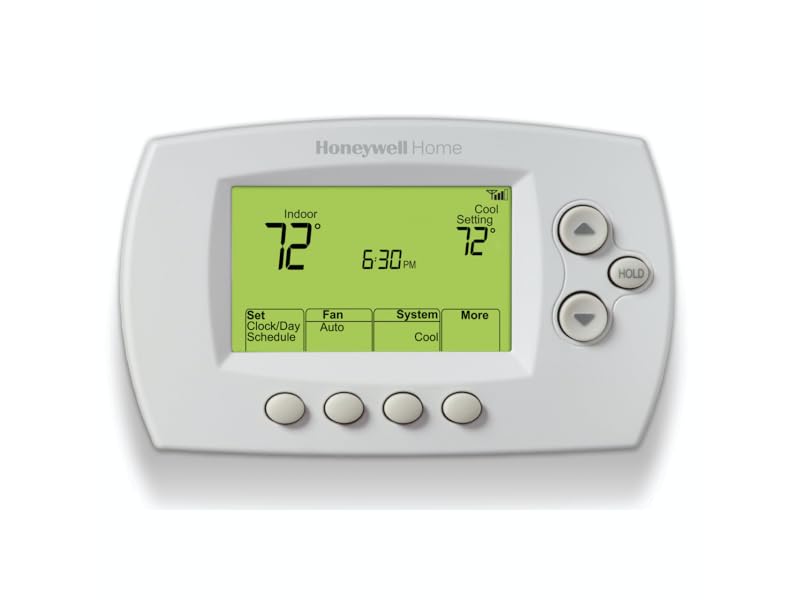
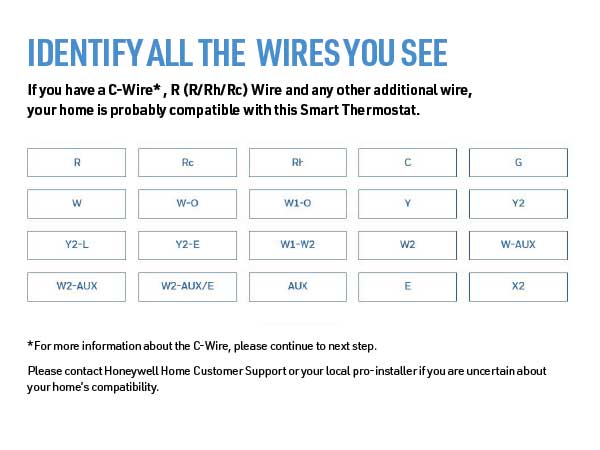
The Honeywell Home RTH6580WF is a Wi-Fi enabled 7-day programmable thermostat designed for modern homes. It offers remote temperature control via smartphone apps, integrates with major voice assistants, and features Energy Star certification for efficient energy use. With a user-friendly backlit display and smart learning technology, it adapts to your schedule to maximize comfort and savings. Ideal for forced air, hot water, steam, and heat pump systems, it requires a C-wire for power and supports DIY installation, making it a reliable, cost-effective upgrade for tech-savvy professionals.







| ASIN | B00Y6M2OUC |
| Additional Features | Auto Changeover, Daylight Savings Time Ready, Energy Star certified, Smart Response Technology, Wi-Fi enabled |
| Backlight | Yes |
| Best Sellers Rank | #6,436 in Tools & Home Improvement ( See Top 100 in Tools & Home Improvement ) #14 in Home Programmable Thermostats |
| Brand | Honeywell Home |
| Brand Name | Honeywell Home |
| Color | White |
| Connectivity Protocol | Wi-Fi |
| Connectivity Technology | Wi-Fi |
| Control Method | Voice |
| Control Type | App Control |
| Controller Type | Amazon Alexa, Google Assistant , Vera |
| Customer Reviews | 4.2 out of 5 stars 15,451 Reviews |
| Display Type | LED |
| Finish Types | White |
| Included Components | Quick reference card, Quick start guide, Screws and anchors, Thermostat, Thermostat ID card, User guide, Wallplate (attached to thermostat), Wire labels |
| Item Dimensions D x W x H | 1.5"D x 5.75"W x 3.5"H |
| Item Type Name | Wi-Fi 7-Day Programmable Thermostat |
| Item Weight | 16 ounces |
| Manufacturer | Honeywell Home |
| Manufacturer Warranty Description | Warranty. |
| Material Type | Plastic |
| Model Name | RTH6580WF1001 Wi-Fi Thermostat |
| Model Number | RTH6580WF1001/W1 |
| Mounting Type | Wall Mount |
| Number of Batteries | 2 AA batteries required. |
| Power Source | Corded Electric |
| Product Dimensions | 1.5"D x 5.75"W x 3.5"H |
| Product Style | A. Wi-Fi Thermostat |
| Shape | Rectangular |
| Special Feature | Auto Changeover, Daylight Savings Time Ready, Energy Star certified, Smart Response Technology, Wi-Fi enabled Special Feature Auto Changeover, Daylight Savings Time Ready, Energy Star certified, Smart Response Technology, Wi-Fi enabled See more |
| Specific Uses For Product | Air Conditioner, Furnace, Heat Pump |
| Specification Met | energy,energy star certified |
| Temperature Control Type | Heating and Cooling |
| UPC | 085267771955 |
| Unit Count | 1.0 Count |
| Voltage | 24 Volts |
| Wattage | 24 watts |
A**N
Good Choice, Solid Performance
Bottom Line: The installation was ALMOST effortless, and the performance has been rock solid. I'm very pleased by the unit and would certainly buy it again. I, too, had to unplug the unit once during installation in order for it to complete the temporary wifi connection to my android phone. However, that was the only hiccup. Otherwise, the installation went smoothly. In short order, the wifi link to my WPA2-encrypted router was complete, using a 2.4 GHz channel per instructions. For the past month, I've monitored the home remotely to determine if I needed to engage the aux heat strips during unusually cold periods. I currently live 500 miles farther south, and have not yet moved into the home, so remote control of the HVAC was the purpose for the purchase. The thermostat interface is simple and basic, but entirely sufficient. I don't have to mess with it to see the relevant information; it's all there on the main display. As a recently retired electronics engineer, I have an extreme distrust of new technology, because most companies chase the easily-wowed but ignorant masses with pretty bells and whistles at the expense of design maturity and reliability. To a former design engineer for the military, this is a frustrating trend. Similarly, I cannot abide the intrusiveness and privacy concerns over voice-activated devices monitored by Amazon and/or Google (or whomever). You can do all that lazy nonsense with this thermostat, but I don't want or need it. I want and need rock-solid internet connectivity and sufficient remote control for when I'm in a different state and I'm worried that the heat pump won't be able to pull enough heat out of the air to warm the house. And in this scenario, Honeywell delivers. As with all purchases, particularly electronics, there is a risk of buying a lemon or experiencing infant mortality with one or more electronic components. Fortunately for me, I saw no evidence of quality concerns with the device. It appeared well-made, competently assembled, and sufficiently documented. I do urge people to follow the instructions carefully and slowly. I suspect I moved too quickly, possibly doing steps out of order, which may have caused my wifi hiccup. Either way, it was easily corrected with the power cycle and more carefully following the instructions. I have no issues with the phone app. It works fine and allows me to do everything I want to do. It's streamlined, effective, and reliable. Surprisingly, it doesn't annoy with poor design details or irrelevant BS. (Not looking to be entertained by my thermostat. I just want the bloody thing to work and do what I tell it to do, when I tell it, without becoming a new and contrary personality in my life.) In this regard, the app has been a pleasant surprise. In summary, if you are looking for a solid performer and you value reliability over gee-whiz style and the latest marketing fad, then consider the Honeywell RTH6580WF. It's a very good value, delivering full performance at a much lower cost than most alternatives. Consider repurposing all that saved money towards something of greater life impact than a "stylish" thermostat. Good luck.
F**1
Working Great After Initial Head Scratching over Wiring and Wifi Network
I am very pleased with the unit and it is performing exactly like I hoped, after a month of usage. Its very cool to be able to modify and monitor the temperature setting of my home on my iPhone or laptop from anywhere. Since installing it I have not yet taken a long trip away from home but I know that when I do its going to bring some piece of mind to be able to check in and make sure the house is warm and not freezing up. Scheduling: I really like the ability to set the daily/weekly schedule from the web interface. If you've ever tried setting schedules on thermostats with only a few buttons on the face plate you can probably relate to how frustrating it can be. For this unit however, the web interface through Honeywell Total Connect makes it quick and easy to make schedule changes. The app for iOS works well for this also though I prefer the regular web interface. Reliability: Once the unit was connected and happy, which took a little bit of work (see below), to date I have had no disconnects or some of the other issues reported by some reviewers. Wiring Setup: This took some head scratching but it in the end wasn't too bad. Upon removing my old thermostat, of course I found I had no "C" wire, and the labels on the old thermostat did not match the Wifi thermostat (the old thermostat had "G", "W", and and "RH/RC" wire, with only "G" matching). However I found that the instructions that came with the Wifi unit had decent enough cross-correlation for what to do with non-matching labels ("RH" was actually "R" for example). To deal with the missing "C" wire I was lucky to find a number of unused wires in the wire bundle running to the furnace with the existing wires -- I chose one and it became the "C" wire, hooking up to the Wifi thermostat on one end and my furnace (a York Diamond 90) on the other. Wifi Setup: This was surprisingly more painful then the physical installation, but once finally connected I had no issues. I had repeated "Connection Failure", error code "E02" which according to the manual means I was entering an incorrect Wifi network password -- but I was not. Through a lot of internet searching I found out my problem was I had a space in my Wifi network (SSID) name, which the Wifi thermostat does not tolerate. Removing the space from my network name solved the problem, however only after also changing my network security from "WPA TKIP PSK" to "WPA2 AES PSK" (the former is supposed to work however it would not work for me, at least with my particular router-Wifi thermostat combo -- oh well it was time to start using the better wifi security setting anyway!) Switching Wifi Networks: I replaced my old router with a new router recently (with a new Wifi network name) and tried to go through the network setup again. Not sure how to have it join the new network, I tried resetting the unit by removing the face plate from the wall, waiting a few minutes, and putting back in place -- well this only resulted in having to set the clock again and it was still looking for the old Wifi network. Tried this a few times with no luck. If I had read the instructions again I would have seen there is a section called "Disconnecting Wifi" with a particular set of key presses to have it forget the previous network and start the Wifi search again (hold down up and fan keys for three seconds, then change setting #39 to "0"). Did this and quickly had it on the new Wifi network. This is good to know how to do as I imagine you would need to do this if you changed your Wifi network password as well. The documentation is good, especially regarding installation and the wire hookups. They could add more Wifi troubleshooting hints -- it was frustrating when it was giving me an error suggesting an incorrect Wifi password when that wasn't the trouble at all. If I experience any major issues I will revisit this review but so far I am happy.
R**E
Moderate setup; some rewiring required. App ok, smart integration meh. HUGE data usage
UPDATE APRIL 2024 (1.5 years): Still working fine, still loving it. It’s probably my favorite smart home device, and I got lots of them. So nice not having to drag my lazy…to go and adjust the temperature. Was nice to have when I had actual furnace issues and didn’t have to constantly run up-and-down the steps (though Lord knows I need to) to switch it on/off or adjust the set point- just do it from the app. Can’t believe how cheap it was (purchased used); it’s even cheaper now for a used one. I feel much better having gotten this over a Nest or Wyze or Amazon unit. I get a monthly email report showing usage (in hours). I refuse to get the promo through my utility company for a $50 rebate, because they still have excessively high rates anyway, and then they could have control over my unit. ORIGINAL REVIEW: I bought this several months ago but waited until Christmas Eve to install it. (Not the best time if something goes wrong.) I already have a Honeywell non-Wifi programmable thermostat which has worked relatively well the past few years, and have installed programmable thermostats in other homes over the past 20-plus years. I had purchased a Wyze thermostat also but after seeing so many poor reviews and complaints, I shelved it in favor of a thermostat from an actual thermostat manufacturer. Of course installing those required no rewiring, as they were battery operated and did not require a C-wire. This thermostat, like most other smart wifi-connected thermostats, requires a C-wire to power the unit. Seeing I only have 4 wires with no C-wire, I had wanted to run a new 5-wire thermostat cable to my furnace, to have a C-wire, by connecting the new cable to the existing cable and pulling through the floor/wall. But after having found where the cable goes up from behind the furnace having almost no access, and looking in the wall cavity with a bore scope and seeing that pulling a new cable would likely snag, I finally deemed it as nearly impossible. Luckily the new Honeywell t-stat comes with an addendum of instructions and even a jumper wire to convert the G-wire to a C-wire. What’s nice is that this means Honeywell basically legitimizes what is generally considered to be a “hack”. You move the existing G-wire to the C terminal on both the board and the thermostat - pretty standard procedure. What’s different is that the jumper wire then goes between the G and Y terminals on the control board (even after moving the wire from G to C). I have no idea what the purpose of the jumper between G and Y is; I’ve never seen or heard anyone else mention this. You still lose separate fan control (because nothing is connected to the G terminal at the thermostat). I actually decided to take a tip from electrician videos and used pigtails from the C and Y terminals on the board, as I was not confident the small screws would retain 2 or 3 wires at a time. I basically cut and stripped small lengths of extra thermostat wire, and attached one to the C terminal. Then on the other end I used a small wire nut to combine with the other existing wire(s) which were already going to that terminal. I did the same for the Y terminal. This to me made a cleaner installation, and would be easier to modify in the future should I wish to go back to the old thermostat, or install a C-wire adapter, or even finally have a 5-wire cable routed. It only needs to have the wire nut removed, rather than unscrewing the terminal. (Seemed logical to me after having done this on several electrical outlets and switches. 🤷🏽♂️) The unit powered on as expected, and I went through the setup process, which is mainly setting the day & time. I have a plain gas furnace and central air conditioning, and the thermostat was already configured for that. It has many configuration options for different types of HVAC systems; one in particular allows you to have an Auto mode where it can switch between heating and cooling (rather than manually switching as most thermostats do). I tried this for a while but set it back as I saw no value in having it in my climate. To connect the wifi, you change your phone’s wifi to the signal put out by the thermostat. Then you connect to it using the Total Comfort Connect app. You have to create an account, which I did on my PC, but you use the same login credentials in the app. It was fairly straightforward. Even with the phone connected to the 5 GHz signal, it was still able to link the device to the 2.4 GHz signal under the same SSID (I didn’t have to turn off the 5 GHz signal, as some other smart devices require). You can control and program the thermostat either through the app or via the web page. You can change between heating and cooling modes, and also between fan modes (though again, the “On” setting is irrelevant; the thermostat will click but nothing happens). I also managed to link the app with Alexa (which I use more often) and Google Home (which I rarely use), just to try each one. In each the functions seem to be much more limited; in fact in Alexa you can ONLY control the temperature, not the heating/cooling mode. Google Home allows this, but that’s about it. One shocking thing is that I checked my router’s app, and it reported that just in the first hour after installation, the thermostat had used 1.3 GB if data. That seems like a huge amount for something that isn’t a streaming device. It’s not clear what that amount of data was used for. Right now it seems to read the inside temperature 2-3 deg F lower than the digital thermometer I have in the same room. This is weird because the previous Honeywell thermostat used to read the same temperature. UPDATE MARCH 2022: Meh, still ok but not game-changing or disruptive tech. I like the convenience of being able to adjust the temperature without going to the thermostat, but other than that it doesn’t offer much. No substantial energy savings to speak of. I linked the TCC app to Alexa, and it shows an estimate in the Energy Dashboard. I’m not sure if it’s accurate or not because it’s making a guesstimate of the gas usage. Would be nice if I could set a routine in Alexa so that if the temperature reads below/above a certain point, it kicks on the heating/cooling until a desired set point is reached. Actually in Alexa you can’t even change the heat/cool mode; only the temperature. No issues with the wifi disconnecting like others have reported.
M**A
Great WiFi T-Stat for the Price!
I purchased a two pack of these and so far am very pleased with their operation. To clarify, the reason the "C" connection is needed is that these units run off 24VAC that is normal for HVAC thermostat controls. They do NOT have a battery backup so that is necessary for operation. Be sure to check the wiring of your old thermostat and use a multimeter to ensure you have 24VAC between RED and COMMON on your existing unit. Wiring installation was straight forward and typical or most HVAC thermostats. As some have mentioned, the Wi-Fi setup is not quite as easy as some apps which simply allow scanning a QR code to add a IOT device to the home network via the manufacturer's app. That being said, carefully following the instructions provided and using a smart phone to add them to the home network is easy enough if you take your time. Once set up is completed via the Honeywell webpage, controlling the devices, setting schedules and notification alerts is EXTREMELY easy on the website (see photos)! Additional features like configuring for use with a heat pump or electric heat, Smart Response Technology (where it learns how long it takes your system to reach a setpoint and adjusts schedule start times accordingly) and Auto Changeover (where the device selects Heat or Cool mode to maintain a certain temperature) are only accessible through the device itself and not available remotely. This makes sense since these settings would only be adjusted one time. For those who are wondering, after adding these units and downloading the Honeywell Total Connect Comfort app to confirm connection, they can be added to the G home very easily from the G home app which allows basic operation control (mode and temp setting). The Honeywell app provides more control including scheduling but notifications can only be set up via the Honeywell webpage. If you are looking for a really good Wi-Fi thermostat solution at a reasonable price from a reliable company, I highly recommend these units.
L**.
Only lasted 2 years!
If I could give it zero stars I would. I purchased this thermostat almost exactly 2 years ago this month. I read 14k predominantly positive reviews, but remember reading a review that it only lasted 2 years! I thought what are the odds? Well they weren't in my favor and the thermostat crapped out after 2 years! First I had a problem with functionality but that was because my C wire wasn't connected at the furnace. I called my HVAC guy a friend and he connected it and it worked. Then I tried connecting it to my wifi, initially there was difficulty connecting, I did everything the manual stated but it didn't work. So I called tech support followed the same steps over the phone and it connected. I didn't want anything overly complicated so I chose this thermostat. I'm basically home and increase, decrease the temperature when I want manually or by the app. Which is not great, takes several seconds to connect. Once it disconnected from my wifi, couldn't reconnect so I logged in from their website and reestablished connectivity, it happened again. So the app is meh. It's summer here and it's hot and I don't keep the air conditioning on too low don't like it cold but I came home two evenings ago and it felt warmer than usual. I thought the air conditioner should go on soon and cool off. After a few hours it was still warm so I checked the app to lower it and it was disconnected and couldn't reconnect to my wifi. So I went to manually do it and the display was BLANK! I freaked out as it was so hot and humid. Too late to call tech support so called the next morning on my way to work. They told me to check the voltage in the wires, basically the electricity. I already turned all my circuit breakers on/off the night before and the furnace had a steady red light. I later read that a steady red light was no signal from the thermostat as the number one reason and a few of others like electricity, furnace door is open, pilot lights, problem with the furnace but I knew it wasn't any one of those reasons. When I got home I texted my HVAC guy since I don't have a voltage analyzer and he never got back to me, guess I have to find a new guy, company which will be expensive because he was my sister's ex and a friend...no more! A friend of my mother's knows about electricity and came by today and connected the white and red wires which should turn on the heat of the furnace, it didn't work. Then I read to turn on a/c connect yellow and red and it didn't work. So I thought I needed to call my electrician, but decided to check my furnace in the attic and turned it off then on and viola it went on! Kept the a/c on for several hours until the house was cool, then disconnected the wires. I tried the white and red wires and the heat went on. So it's not electrical never thought it was because everything was working but the thermostat! The warranty is only 1 year so I'm now trying to find a better thermostat, hard to do, pros/cons with many including the most popular round one that didn't get great reviews and I don't like the interface. But DON'T BUY THIS!
T**S
Great Thermostat- Bought 5 of them!
Really impressed with this thermostat. After easily replacing the first one, and finding how easy it is to remotely monitor and control my HVAC, I bought 4 more! The first one I bought was for a vacation condo that had the heat fail. Fortunately we caught it before the pipes froze, but I wanted a way to be alerted if it happened again. In searching for such a device I came across this thermostat, and not only will it send me an email based on various parameters I can set, but it also lets me view the current temperature, set a schedule, or manually change the temperature. Really convenient to turn the heat up a few hours before arriving in the winter! Anyway, here are some helpful hints as far as installation: 1) Be certain your unit comes with the right manual! Of the 5 I bought, 4 had the correct manual, and 1 had a manual that looked identical on the cover, had the correct part number, but had different instructions for the initial programming. If you receive a manual that has system set up starting on page 54 using four digit codes, IT IS INCORRECT. The correct manual uses 1 or 2 digit codes and starts on page 50. If I had only bought one unit, and received the wrong manual, I would have had no idea how to proceed. 2) Yes, you need a "C" wire. This provides the common side of the 24 volts AC required to power the thermostat. Previous Honeywell programmable thermostats used batteries to power the thermostats, and conventional thermostats do not require power. Of the 5 units I installed, 2 had no "C" wires but did have a spare I was able to connect at the transformer in the main unit (1 HVAC, 1 oil burner / heat only), 2 had a "C" wire (both heat pumps) , and one system that used one conventional thermostat to go to separate heat and AC units had no "C" wire and no spare, so I had to run a new thermostat wire. 3) A laptop or tablet will greatly simplify your initial installation. After you power on the unit for the first time. "wfi setup" will flash on the display. Just use your tablet or laptop to search for available wireless networks. You will see "new thermostat" as an available wireless network. Connect to it and open a web browser. If it fails to automatically direct you to the setup page, just enter 192.168.0.1 It will walk you through the entire setup, and provide a link to create a free Honeywell account to connect to your thermostat from a PC or smart phone. It will even automatically connect you back to the wireless network you were using before connecting to the thermostat. The "wifi setup" will stop flashing and you will see an icon indicating signal strength on the thermostat. You can also have it send you an email if the thermostat loses connection to the network. 3) Once you create a free account with Honeywell, you can view current room temperature, the outside temperature (based on where you tell Honeywell the thermostat is located, not an actual sensor), set / change / override schedules, or turn the system on or off. 4) Don't forget to program the thermostat for the type of system you have- see page 50 in the manual. Very easy to do. One trick I discovered is that if you have a Rheem heat pump, function 2 must be set to a value of "1". And of course, the location where the thermostat is located needs to have wifi, with or without encryption (It gives you an option during setup to choose what SSID to connect to and to enter the code if required). Overall, I am extremely pleased with this product, and not only expect it to provide peace of mind, but also expect to save money on my utility bills and have a convenient and centralized way to control all of my heat and air conditioning units.
T**P
Very nice thermostat
Very nice thermostat. I was able to get it istalled and set up relativley easy. I did use the support chat for some help, but they were quick and helpful
D**L
My first wifi thermostat and very happy with the results
We had always had the standard, basic Honeywell thermostat. One of them failed, so I decided to replace both and this unit had great reviews. The installation was just as easy as my basic thermostat (we have basic furnace and A/C and no heatpump), the only exception being the need for the "common" wire, which fortunately had been put in the wall even though it was not connected to the basic thermostats. The red wire is usually your 24 volts A/C and if you connect a volt meter between the red and what you think is your common wire, you will see it showing 24 volts. If you see zero volts, and you know your red wire worked from the prior thermostat, your common wire may not be connected to the common terminal in the furnace control board. Activation and programming was not difficult, and the panel walks you through the process. Just read the directions and follow them in order as instructed. When you first connect the panel for the first time, my furnace fan turned on for a few minutes then turned off, even though the panel said everything was "off". The panel display took about 10 seconds to show a display so be patient. If you get no display after a minute, it may mean you did not connect the common wire or your common wire is not connected the common terminal on the control board of your furnace. The steps included initial set up of time and date, then connecting to your home wifi network, then registering the unit with Honeywell's server so you can access through the internet (you only have to this once for multiple units). You have to register as part of the setup. Once you get all set up, you can see your virtual thermostat controls on your phone simply by logging into the Honeywell server (if you more than one you can see all of them). I don't know if I will use this remote feature much but it works perfectly. You can, of course, also set the thermostat directly from the front panel and the buttons are easy to see. Like other thermostats, you can program by date and times for temp. I set up two units, and had no issues with either one. Only had them a month or so, but so far happy with the results. Oh, and these are WAY less expensive than the NEST thermostats which cost well over $200. I don't have Alexa so can't speak to how it works with that service. I did not have to get tech support so can't speak to that either. A good looking panel and nice bright backlight. I only wish you could leave the backlight on all the time, but that is not an option.
Trustpilot
Hace 3 días
Hace 2 semanas