
Descargar la aplicación


Servicios al cliente
Sobre nosotros
Copyright © 2025 Desertcart Holdings Limited
Descargar la aplicación

🎯 Dominate every game with precision and style — don’t just play, own the battlefield!
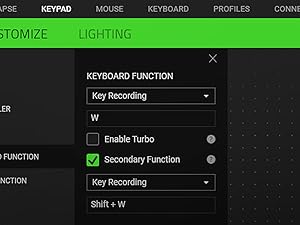
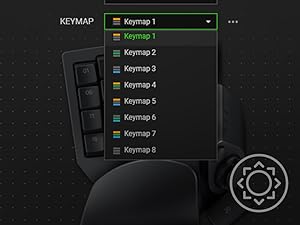
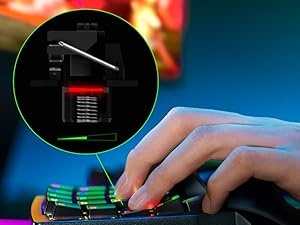
The Razer Tartarus Pro is a cutting-edge gaming keypad featuring ultra-fast 0.1mm optical key resets, adjustable actuation for personalized responsiveness, and 32 programmable keys including an 8-way thumbpad. Its ergonomic design with wrist rest enhances comfort during long sessions, while Razer Chroma RGB lighting offers full customization synced with popular games and devices. Perfect for gamers seeking precision, speed, and immersive control.



| ASIN | B07YQKS4B5 |
| Additional Features | Backlit, Ergonomic, Programmable Keys, Volume Roller, Wrist Rest |
| Antenna Location | Gaming |
| Best Sellers Rank | #252 in Video Games ( See Top 100 in Video Games ) #9 in PC Gamepads & Standard Controllers |
| Brand | Razer |
| Built-In Media | Keyboard |
| Button Quantity | 32 |
| Color | Classic Black |
| Compatible Devices | Gaming Console |
| Connectivity Technology | USB |
| Customer Reviews | 4.3 out of 5 stars 16,818 Reviews |
| Enclosure Material | Plastic |
| Generation | 2 |
| Global Trade Identification Number | 00811659035318 |
| Hand Orientation | Ambidextrous |
| Item Dimensions L x W x H | 5.95"L x 7.96"W x 2.5"H |
| Item Weight | 0.8 Pounds |
| Keyboard Backlighting Color Support | RGB |
| Keyboard Description | Gaming |
| Keyboard Layout | QWERTY |
| Manufacturer | Razer |
| Model Name | Tartarus Pro |
| Model Number | RZ07-03110100-R3U1 |
| Number of Keys | 32 |
| Number of Sections | 32 |
| Power Source | Corded Electric |
| Recommended Uses For Product | Gaming |
| Special Feature | Backlit, Ergonomic, Programmable Keys, Volume Roller, Wrist Rest |
| Style Name | Tartarus Pro - Optical Switches |
| Switch Type | Razer Analog Optical Switch |
| Theme | gaming |
| UPC | 811659035318 |
| Warranty Description | 2 year manufacturer |
D**D
Wish I had purchased this years ago
Pros: -Ergonomics -Added game functionality within easy reach -Great RGB -Quality, tactile keys Cons: -Noisy keys (sone might like this, personal preference) Amazing device. I have been a keyboard and mouse gamer since the days of Doom and Sim City Classic. I was skeptical for years about these and asked myself, “how would this be different than using the keyboard?” It is… so much better. I have always been the guy that has to remap everything to the arrow keys on a keyboard and the surrounding area. As a result, I also had to either have my wrist at an angle or the keyboard at an angle to reach them. I tried many times over the years to use WASD but the alignment of those keys wasn’t right. My brain needed them to be perfectly aligned like the arrow keys…. And this keypad. Maybe that is why there was almost zero learning curve when I started using this keypad. The keys are all perfectly aligned just like my brain already expected having used the arrow keys for so many years. And now, there’s all these additional keys within easy reach! The only minor learning curve was therefore my thumb. For years it had sat idle while I game. Now I have trained it to operate the buttons on this controller and it has been a game changer. I think the best part though is the ergonomics. Everything feels more comfortable when I game now. I use a CouchMaster that rests on my gaming chair and now when I game my arms are in comfortable positions with the mouse on the right of my keyboard and this keypad on the left. Still handy to have the keyboard accessible for when you need it during gaming but now used rarely for gaming and more for work. The wrist rest is perfect. There’s only two positions for adjustment of it but it works great for me. I went with the Mecha Membrane keys and I really like the feel of them. I will say they are louder than I would usually go for, but I almost always game with headphones so it hasn’t bothered me. I have seen in reviews that people pull out the metal clip to make them more quiet but I like the clips as they aid in the “snap back” feel when you release the key. I didn’t go with the upgraded keys because I didn’t think I would use the additional features that were advertised. Specifically, I don’t think my brain would utilize the concept of having different functions or commands based on how hard you press a key. The RGB is great. I always create game profiles so games have unique lighting that matches the theme or feel of the game. It uses the Synapse software which all Razer users will know is a bit of a love-hate relationship. Super powerful software that lets you control not just the lighting but remap keys. Some games I have specific remaps in this software if the game itself doesn’t let me remap a button I want to. For example, I have the far upper left key remapped to ESC because it’s used in some games but they sometimes won’t let you remap it in the game. All that said, Synapse can be frustrating and unintuitive at times. It has a steep learning curve. I am lucky to have pushed past that curve, but for newcomers to Razer just understand that and be ready to hit YouTube. I would highly recommend this product, especially for keyboard and mouse gamers that are already used to using the arrow keys.
C**R
Works GREAT with small hands! Records double modifiers! +6m, +1year, +2.5 year updates
I have small hands, 6.5 inches from palm to middle finger tip and ring sizes 4.5-6. I'm able to use this but I did need to shift my hand position to the right so I could use the thumb buttons. I swaped the directional keys to correspond and added some textured gaming keycap stickers to help me learn the new keybinds. I am able to use all of the buttons easily except the top row which requires a little stretch to reach but that's fine with me, I just make those the seldom used keybinds. I needed more pinky modifier buttons as well as thumb accessible modifier buttons (the D-pad is perfect for that). I use this for gaming along with a G600 mouse, it works wonderfully and solved the problem I was having with needing more modifiers and being able to hit binds faster/more reliably. You can record double modifiers with this such as Alt+Shift, I needed that feature specifically. It looks amazing matching my mercury huntsman mini and I love having a separate keypad for gaming rather than using my keyboard. It allows me to have crazy re-mapped keybinds without losing the ability to type normally. I use W A,S D,Q, and E; all the rest of the keys are re-mapped to numpad or modifiers. The space bar key (20) is a bit low and the distance makes it unreliable for me to use quickly so its in the seldom used keybind category. I re-mapped the circular button above the D-pad to map, the D-pad is space bar and 3 modifiers. The little D-pad thumbstick attachment is really great, too! <> - 6 month update- I absolutely love this thing. I've adjusted to using it all the time for gaming and it is so incredibly comfortable. The wrist rest is my favorite part in regards to comfort and the hand positioning in general is relaxing, the shorter keycaps help with this. I found some better gripy texture tape for my most used keys. The joy stick for the D-pad has become pivitol for my gameplay. I love this thing so much that I got a second one for couch gaming. Synapse 3 doesn't support 2 of the same device running at once so I had to get a USB splitter. I purchased both devices "Used like new" and they have been wonderful. Both arrived in perfect condition with no blemishes or malfunction. - 6 mo th update on the second I purchased in "Like New" Condition. One of the keys broke out of nowhere while I was using it. The device had not been damaged while in my care. Razer does not sell replacement keys for this item and refuses to provide them. Keys are not covered in the warranty, so if they break you are out of luck. However, I was able to find these keys on Amazon that replace the low profile Tartarus keys perfectly -amd they are very affordable: X-keys Keycap Cherry MX Compatible -2.5 year update: STILL AWESOME lol. No issues whatsoever. I have 3 now, send help. I made the #20 thumb usable by making a booster seat for it. Took off they key and traced it on firm 1/4 inch thick foam, cut out the exact shape (took a little notch out to keave room for the D-pad thumb stick to clear it), then doubleside taping it to the key- works like a charm now. I use the Tartarus for every game ( FPS, MMO, Competitive) and will never go back to using a keyboard for gaming.
J**T
Great design, learning curve but no onboard memory
Off the jump be warned, this has no onboard memory… not a lot of people mention that so you need to run razer software for any custom key configuration to work. This interferes with signalRGB and other software and is the heart of my 4 star review, otherwise…. It’s near perfect for its usecase. Want a half keyboard with great design, programmable keys and macros with a serviceable joystick option? This is your choice. I bought the membrane key V2 first and quickly returned it. While I have a mechanical keyboard and love it, these buttons were way too loud. I spent more for the pro model and am pleased with the feel… and sound of the keys. Not to mention I can configure the deep press for a SHIFT-WASD run now too. Perfect. Aforementioned the biggest issue was having to troubleshoot tuning razer software with my LED software, it was a pain but plenty of people complaining about it to do a search and get your resolution as there’s a few of them depending on your setup, you’ll have to do some leg work. The joystick option is cool, I gamed on pc back in the 90’s and went console in college around 2000 never really looking back until the pandemic. Getting back to a KB/M was a difficult transition and having an optional thumb stick (be it not perfect) has helped me on some fps games. I wouldn’t say I’m great, and I’m still better a game controller but I’m pushing through the learning curve which is a little steep. The good news is I find myself subconsciously using 12,13,14,08 buttons (WASD) making it appear to be muscle memory taking over and those who use keyboard will probably adapt to this in no time. The colors on the keys are bright and match my Logitech g915 kb, goes great with my custom built pc using ASUS tuf aio, fans and case. One more positive is the overall design, the buttons and curves are different than a typical layout but I found it much easier to use and shift my hand around for other keys. The wrist rest is adjustable in two different settings, and despite having a normal sized I found both settings a little wonky to get used to. I’m not sure how that will work out in the long run becoming more or less comfortable. All and all it’s a premium price for a specific adapter and if you’re looking at this then you have the need for it (or at least considering it). There are certainly cheaper options from other brands if you’re looking just for a half KB, I wanted the thumb stick and even if it’s not perfect I’ve been forcing myself to get used to it. In that sense the uniqueness is what I paid for, and I have a few more weeks to decide it it’s worth double in price.
N**B
I like this thing. A lot.
I am loving this thing. I have always been a controller guy until I bought Doom Eternal, and it was obvious from the very first level that this game was made with mouse and keyboard in mind and I decided it was time to make the switch and I'm really glad I did. I stopped playing the game and waited for this to arrive, along with the Corsair Harpoon gaming mouse. It took A LONG time to start feeling comfortable with the new set up but once it started to click it made all the difference in the game. The learning curve for me was huge, maybe the biggest one I've had to go through in decades for gaming, but it was worth it. This keypad is great. I bought this used from a seller here, something I don't normally do but the price was more than half off the new price and I knew it was a gamble that I might not take to it and go back to controller, which would have made this a waste of money. I feel like I got lucky, the used product of this looks brand new and is in great shape, and since it worked out and I ended up loving the keypad it was money well spent. I specifically went with the Tartarus because I really liked the idea of having the thumb stick, and I feel like that was a good move. In Doom Eternal, now I can control the Slayer in a way I'm already familiar with while freeing up the rest of the keyboard and my fingers to the different melee attacks and switching equipment. That way I don't have to move my fingers all over the keyboard as I normally would have had to, fumbling around hoping I hit the right keys. The learning curve was huge for sure and for awhile, I probably put in enough time in the first three levels over and over again trying to get accustomed to the new control style as it would take someone else to actually beat the entire campaign, but once it all clicked, I can't imagine playing a game like this any other way and I already knew from the first level that a controller was a huge disadvantage. In regards to the quality of the actual device- it's solid. The keys all have a great feel and click to them, and the thumb stick has the exact same feel. It feels like pushing a key on the board with the mechanical click and all in every direction, it's great feedback to know you're pushing it in the right direction and for learning how to use it. It's also very comfortable to use, and the wrist rest beneath the keyboard reduces any normal strain I would feel by hovering my hand over a typical keyboard. And lastly if you care, the rgb lighting on this is good and bright and every color in the rainbow is represented just fine. I don't care that much about this, but I know some freaks do so there you go. To summarize, this purchase was worth every penny. The keyboard is solid, it feels solid, it is quality. The thumb stick works great and I really struggle to find anything to complain about here. I can see this falling short on games with tons of keybinds, and Doom Eternal is really pushing it in that regard, but it still worked out great with just enough keys to accommodate all the things you need to do. Purchasing this along with a gaming mouse has changed the way I play a game like this and for the better. Highly recommended, especially if you can get one at the used price I did if it shows up at your door in the condition mine did. On a quick side note I do want to point out that Windows 10 by default had this keypad configured to shut down randomly to preserve power in the device settings. You're going to want to figure out how to go into the USB options and make sure to uncheck the box letting Windows do that because if you don't this will disconnect randomly out of nowhere for like fifteen seconds here and there, and obviously that is not ideal unless you like losing due to some technical crap.
T**K
Amazing Gameboard! Not that there are many options...
Like many older games who purchased this device, I used to have a Logitech G13 Gameboard that I miss dearly. I used the heck out of it since 2012, and ten years later it finally broke. Logitech not only discontinued it, but they didn't replace it as of this writing. Want to find a new one in box? Get ready to shell out: https://www.amazon.com/Logitech-G13-Programmable-Gameboard-Display/dp/B001NEK2GE So I read the reviews, and since there were not a lot of options, pulled the trigger on this one. I only have some minor gripes. Razer Chroma Software The Razer software that you have to install can be a little touchy. When I first installed it, it had some annoying notifications, but luckily these can be silenced. Since then I have had no more popups. The only issue now is one out of a hundred times, it just doesn't start up with my MSI Gaming laptop. So I am already in game and this Razer game board is glowing a billion colors...but the program didn't start up so the game board is in default mode. As you might imagine, this thing is meant to be customized...most will not want to use it with the default keys. Razer Tartarus So yeah, worth the money and works as advertised. It has withstood some bumps and bruises as is common in gaming, and is none the worse for the wear. The construction is really solid, and I appreciated that you can change the position of the palm pad for bigger hands (this is a MUST). My main issue here is that I kind of which the pad could be made for even bigger hands. I have normal man hands (I have difficulty playing with the Nintendo Switch in handheld mode...my hands are killing me after 15-20 mins) So, surely there are many gamers with bigger hands than I. I imagine those people would be a bit uncomfortable with this thing. Razer, are you listening? If you pick one of these up, you will not be disappointed. If you are coming from the Logitech G13, the Razer has fewer buttons, is physically smaller, and seems to be made for smaller hands. But you don't have a lot of choices in the world of game boards. Happy Shopping!
A**N
Good replacement for my worn out Razer Nostromo.
I've been using a Razer Nostromo for all my gaming for a LONNNNG time, like probably close to 10 years at least. It has finally started to really show some wear and tear, like the LEDs don't work anymore and the paint is wearing off of some of the keys. It has really served me well, so I have built up a lot of muscle memory from using it for so long. I was concerned about trying to learn a new keypad, but I have also been wishing I had more buttons for some of the games I have been playing recently. I tried a Logitech G-13 a couple years ago, and didn't like how it felt. The space bar button on the Logitech also stopped working after about 3 hours of gaming, so I sent it back. I decided to give this Razer Tartarus a try, because it looks very similar to the Nostromo, plus it has an extra row of keys above the standard WASD. I am happy to report that it was a very smooth transition to the Tartarus. I moved the handrest back to the farthest point, and it felt very similar to how my hand always rested on the Nostromo. I could definitely tell that I was using a new keypad, but it was close enough that after a couple hours of gaming I forgot I was using a new keypad. The membrane keys feel good, but they do have a soft "click" to them if that bothers you. Not as loud as a mechanical, but louder than the Nostromo. I don't really hear it while gaming beacuse I am wearing headphones. The top row is a nice addition to my setup. I can't quite reach some of the top row without moving my hand position, but I think that is pretty standard for any keyboard. The LED features are fine, but I don't typically do a lot with RGB other than set a static color. I finally could upgrade to Razer Synapse 3.0, because the Nostromo only worked with 2.0. It seems pretty functional and it wasn't too difficult to set up my keys how I like them. There are a lot of options for the lighting, but I don't really plan to use it much. Overall I have been really happy with the switch. I hope it can give me close to the same number of years of service as the original. If it dies prematurely I will update my review, but so far so good. If you're also looking for an upgrade from a worn out Nostromo, I would definitely recommend the Tartarus as a good option.
A**A
I wouldn't use this if you gave it to me for free.
Friends were raving about this. Bought it for wow to hopefully alleviate hand cramps I get when playing melee classes with high apm. The keys were strange and couldn't tell when I had "pressed" the key. The wrist guard made my hand sit too high off desk which actually made the fatigue worse. I could run several keys before I cramped up with regular keyboard but I would start cramping within a few minutes using this. Removing the wrist rest helped but then it was just uncomfortable. The thumb stick was atrocious. You have to move the stick in a direction not intuitive to the direction you are moving which made it awkward. To move forward you move the thumbstick up to the left. You can rebind this but the other option which is sort of down and to the right is also an awkward direction to use to move forward. The thumb stick also made it hard to fit my hand comfortably so had to remove it and just use D-pad but that was not super easy to use. My movement was not precise even after using it for awhile which got me killed a few times. I tried using the keypad for movement and then using the D-pad for abilities but the way it works made it again awkward and my key presses were not precise with it and I would hit the wrong bind often. The scroll wheel was bad. It is positioned in a strange position and I would rather have just had a key there. I use shift and ctrl modifiers for my mouse and so assigned them to keys on the keypad located in a similar position. For my hand size this meant my hand was mostly locked to this position so I couldn't reach most keys easily. Not having space for jump I had to find another button. The one under thumb is the logical choice but if using the thumbstick/dpad to move then you cant easily move and jump. I could move it to my mouse but I already use all my buttons there and jumping with my mouse just feels unintuitive as I am controlling all movement with my left hand so splitting the task into right and left hands just weird but I did try it. Using the button under the thumbstick to jump meant I could no use the dpad to move or for abilities if I was jumping with that. I tried it for nearly a month but I could just not build the muscle memory for it. It was not ergonomic which is why I purchased it in the first place. Suffice it to say all my friends who recommended it just decided I was strange because I didn't love it. In a reddit post I read a comment in which someone said, "how many pro wow players do you see using a Tartarus?" When I watch them I almost never see them using a Tartarus. There are a few streamers that do but this poster was correct, its not really a thing you see. If it was so much better the pros would use it. Even pros sponsored by Razer don't use them. The quality also seems lacking like it might break in a year.
D**R
Okay product, but Amazon is not an authorized Razer reseller, beware.
I usually quite like Razer products and in the beginning the Tartarus V2 worked well. However after several weeks of regular use the thumb stick forward button got stuck in the depressed position. When I contacted Razer about the issue as I was outside the Amazon return time but within the limited warranty from Razer it was determined (by Razer support) that Amazon was not an authorized seller of this product. As this was the case warranty repair was declined. I did note that in my opinion at least the switches that are used for the thumb stick need to be of a higher quality/durability than the ones currently being used. It seems these switches go out often. So take this as a word of warning, if you plan to use the thumb stick a lot, you may want to purchase from an authorized reseller of Razer products. I've given a 3 star as a combined "this device needs a minor upgrade" and as a warning that Amazon is not a good place to order Razer products from as they are not an authorized reseller.
Trustpilot
Hace 4 días
Hace 3 semanas