We remain fully operational. Our teams are working around the clock to ensure your deliveries continue safely.

Descargar la aplicación


Servicios al cliente
Sobre nosotros
Copyright © 2025 Desertcart Holdings Limited
Descargar la aplicación




Buy anything from 5,000+ international stores. One checkout price. No surprise fees. Join 2M+ shoppers on Desertcart.
Desertcart purchases this item on your behalf and handles shipping, customs, and support to Nicaragua.
🚀 Elevate Your Printing Game!
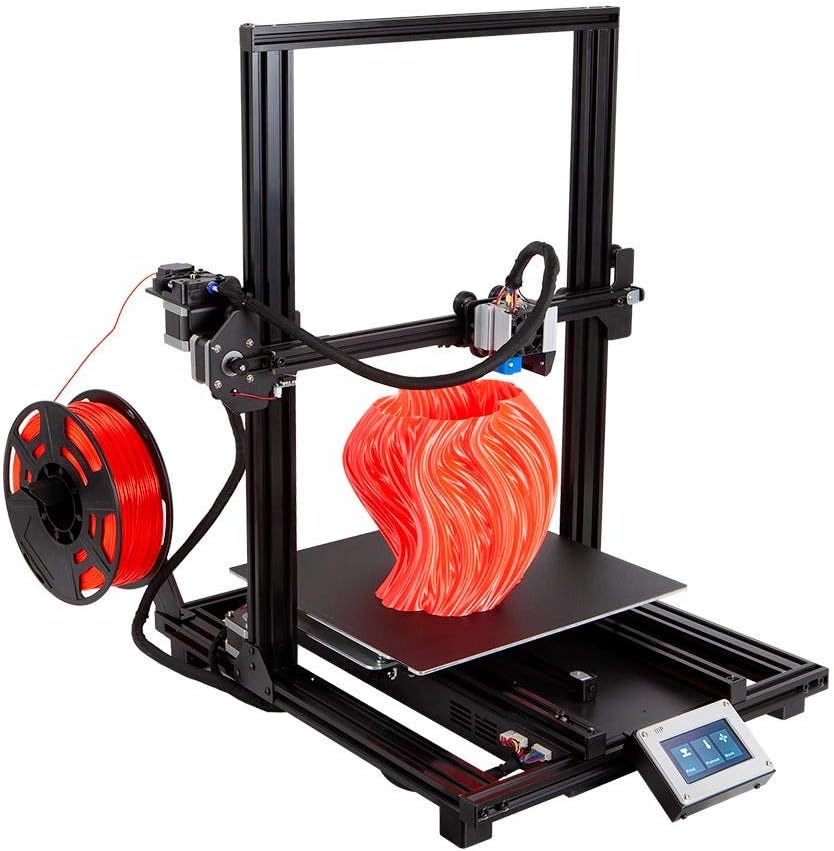
The Monoprice MP10 3D Printer features a spacious 300 x 300 mm magnetic heated build plate, a resume printing function, assisted leveling, and a user-friendly touch screen, making it an ideal choice for both beginners and seasoned makers.


| ASIN | B07MK5W8M7 |
| Date First Available | December 21, 2018 |
| Item Weight | 2.2 pounds |
| Item model number | 134437 |
| Manufacturer | Monoprice |
| Product Dimensions | 24.5 x 24.5 x 19.7 inches |
L**E
Budget option offers premium features.
I like a bunch of the features this printer has and I feel I got a good value. In particular, auto bed leveling, a heated bed and the simple setup make this printer a great starter. This is my first personal 3d printer and I've learned a lot from using it. I recommend you buy spray adhesive for the bed and preheat your bed before prints. These are due to the large print bed having bad adhesion and warping issues around the base of prints, but from what I hear that's common among 3d printers of this caliber.
B**A
Buy 2, Build 1, Return Both
I had concerns based on the reviews but we order a lot of cables and other accessories from Monoprice with no issues, plus it was one of the only printers in stock and I wanted to start printing masks right away so I decided to pull the trigger despite the reviews. It went together fairly smoothly but the directions were practically useless and there had been some changes to the printer since the instructions were last printed so it wasn't even 100% accurate. Once it was put together I put in the sample filament, "leveled" it and auto leveled it again, and started printing the 3d cat file that comes with the SD card. It had some layer adhesion issues but those could be dialed in. Unfortunately about 3 or so hours into the first test print we heard a loud click (maybe a pop?) and the power supply and subsequently the printer was dead, so ended MP10 #1. Contacted Amazon and requested a replacement. Several days later MP10 #2 arrived and was quickly out together since now I had experience on my side. It immediately started having issues with bed adhesion, bed level, and then after a couple test runs of the masks I was trying to print it started crashing the print head into the bed when homing. It never printed as well as MP10 #1 so I contacted MP Support (who were utterly useless and said to request ANOTHER replacement since they had some bad batches recently). I ended part swapping and built one printer from the parts from both and it was running decently well enough and produced about 18 usable masks in a week. Then it started having layer shift and collision issues even though I was just printing the same model over and over again. The z limit switch also fell apart (literally, just one time when it homed after a job). Contacted MP Support again and was told they didn't have spare parts of those switches right now and to exchange the entire printer. I was able to glue the switch back together (and realized that was the issue with #2 to begin with) and it ran for a couple more days but still was never 'right'. I finally decided to throw in the towel after about 2 weeks of MP printer headaches and put both back together with their original parts and returned both. I picked up a Creality Ender 3 Pro and while it's smaller and a little more manual it was printing flawlessly for me straight out of the gate and has been running for almost a week with little to no issues besides having to manually level the bed every few days.
T**R
Good for price
Hard to get parts and some components not made well (bed level senser)
S**N
Outstanding!!!
I have had this printer for a little over a month now and I'm a complete nubile to the 3d printing world but this printer made getting my feet wet a breeze! Right out of the box it printed perfectly I did not have to figure much out at all to get printing and everything I have printed has came out amazing. The level of detail and the speed it can produce it in is more then I could have dreamed. I would recommend this to anyone and the price range is great. Thank you so much.
K**N
It can make high quality prints, but the software and manual are sloppy
This printer can do decent prints without too much work, but every non-critical feature was done sloppily by Monoprice. That's why I'm giving the printer 3 stars. The installation directions that come with the printer are terrible. I had to search online and watch someone else's video on how to assemble it. I can understand if Monoprice already has a bunch of these printers packaged and doesn't want to swap out the manuals, but they should at least post their own installation videos on their website. The WiFi directions were such a hassle, I didn't even try. You have to install an app on your phone, then connect your phone to the printer over USB, and possibly even rename your WiFi access point. What's the point of having a high quality touch screen if the GUI barely does anything? The GUI on the touch screen is oddly layed out and confusing. For example, on the tune screen, the "home" button homes the printer, and the "back" button goes back to the main menu. On the print screen, the "home" button goes to the main menu and there is no "back" button. The printer comes with a test pattern of a cat, but yet the printer only comes with enough filament to print 1/3 of that test pattern. The filament detector is really flaky. About once an hour it reports that the printer is out of filament and pauses print. I've tried it both with white and red filament, both have that problem. I ended up unplugging the filament detector, and fortunately that stops it from reporting it's out of filament. The auto leveling only adjusts for the flatness of the print bed. However, you have to set a "Global Z offset" to configure overall how close the print head to should be to print bed. Getting the Z global offset correct *THE* most important part of stopping the printer from knocking off your prints, but again the manual is terrible about explaining how to set it. I did 5 bad prints until I found out this was the problem. You should keep setting the Z global offset lower until the strands on the first later of your print have a flatten oval shape (instead of cylindrical). Initially -0.40 work working for me. I think the bed settled over time, because now -0.63 is correct for my printer. As others have pointed out, the microSD card comes with an outdated copy of Cura on it. That copy of Cura has an mp10 profile on it. You can also get Monoprice's version of Cura from the Monprice website. If you download that same version (or a newer version) from Cura directly, it does not have an mp10 profile. So obviously Monoprice modified Cura. Cura is an AGPL program, but yet nowhere on the Monoprice website or microSD card does it give the source code to their modified version. Fortunately Monoprice seems to have only modified it by adding their printer profile. I copied over the settings to a standard Linux copy of Cura, and they work. A main part of the printer profile in Cura is the start G-code setting. However, the start G-code in the MP10 profile from Monoprice's version of Cura only half works. It contains these two commands: G0 X-1 Z0;(Move outside the printable area) G1 X-1;(Move a little closer to the print area) Those commands don't do anything on the MP10. The MP10 skips over any commands with a negative X axis. Even if it did accept negative numbers, that second move command would be a no-op anyway, because the printer would already be at X=-1. I think Monoprice sloppily copied that start G-code from some other printer that does support a negative X axis. The end result is that before each print, the printer squirts out some plastic near the end of the print bed, then drags it along toward where it's going to print. Half the time that string of plastic falls of and doesn't interfere with the print. The other half the time it gets into the print area and messes up the first layer of your print. This is what the start G-code should be: G21;(metric values) G90;(absolute positioning) M82;(set extruder to absolute mode) M107;(start with the fan off) G28;(Home the printer) M420 S1;(Restore auto leveling) G92 E0;(Reset the extruder to 0) G0 Z5 E5 F500;(Move up and prime the nozzle) G0 X3 Z0;(Move to the edge of the printable area) G1 Y60 E8 F500;(Draw a priming/wiping line to the rear) G1 X4;(Move a little closer to the print area) G1 Y10 E16 F500;(draw more priming/wiping) G1 E15 F250;(Small retract) G92 E0;(Zero the extruder) The Monoprice MP select Mini also has a lot of bugs, but that printer is cheap enough and popular enough that there is a large community of people that describe how to upgrade and fix it. There is next to no information on how to upgrade MP10.
R**S
3D is for me!
Printing awesome stuff now
M**Y
Very simple fact, it's garbage, don't buy it. Against all the negative warnings in the reviews I decided to give it a go because an expert in New York got it working, after replacing some key parts with upgrades. The 300x300x400mm build space size is very attractive, and with maybe $40 of upgrades seemed doable. Unfortunately the guy that did all the great YouTube reviews and advice for this model should have said don't buy it. It's definitely not for beginners, and a waste of time for experts. Where mine failed miserably is the build bed plate was warped so bad it could never print anything flawlessly, even small items were a struggle. The deflection in the build plate ranged from 0.48mm at the least to a maximum of 1.30mm. There are also mechanical isses that caused the cat demo model to print with signs of shifting in the head area. And there is definitely an issue with the extruder, it doesn't feed consistently. That's why the New York guy said replace it with a metal one. Some issues are just shameful. The Monoprice supplied filament to print the test cat was garbage, it was broken into many pieces and unusable, obviously dried out. That made me wonder how long was it in storage and maybe it was a return. The issues are endless, the worst possibly being lack of technical documentation. This is a printer for experienced users, we still need technical information to do a good job. This one issue infurtiates me. Who are these people that stick their brand on a generic product and don't provide detailed specs. I sent mine back and bought a ANYCUBIC CHIRON with Print Size 400x400x450mm. It's about $100 more but you get a huge improvement in quality, and several extras including 1kg of filament. I also will never buy from Monoprice again. I should have known better when I saw they are only a reseller, and that the MP10 was previously distributed under another name. They come across across as being experts in 3D printing, then why sell a piece of junk like this.
V**O
Me gusto mucho esta impresora, buen capacidad de volumen de impresión y no he tenido problemas con ella.
A**S
As said in other reviews, this printer is not for the beginners. I bought a Monoprice Select Mini as my first 3D printer and it works fantastic. So of corse I wanted to print bigger things and I decided to buy to get another Monoprice printer. What a disappointment. It came without the SDCard and the box looks like it was already opened as if it was a used printer. I haven't been able to print anything as of yet. Impossible to calibrate the bed leveling and the filament won't stick at all. There is only one youtube review with good infos (Dr Vax) and that's it ... I get why there is only 83 reviews. I guess those are the only people who bought this printer. Anyways, I gues I'll try to return it and change it for another one. Very disappointed. My advice, put an extra 100$ and get a more user friendly printer.
A**E
Es una basura no sirve, tienes que comprar piezas extras y aun asi esta carisima, es una basura no cumple con lo dicho.
Trustpilot
Hace 2 semanas
Hace 2 días